 By
By 

Quick Verdict
Pokémon GO search strings make it easier to find valuable Pokémon, identify PvP candidates, prepare transfers, and clean storage. The safest approach is to use short filters, tag important Pokémon, and review every result before transferring.
Who It's For
This guide is for Pokémon GO players who want to organize large collections, find useful Pokémon faster, and avoid accidentally deleting rare or competitive catches.
Key Takeaways:
- Core Operators: Use
&for AND,,for OR,!to exclude, and-for ranges. - Best Uses: Filter hundos, PvP candidates, recent catches, evolutions, moves, and trade Pokémon.
- Storage Tip: Tag valuable Pokémon first, then use
!#to review untagged catches safely.

Managing Pokémon Storage becomes increasingly difficult once you start keeping raid attackers, PvP candidates, Shiny Pokémon, event costumes, trade stock, Dynamax Pokémon, and old catches. Sorting by CP or recent catches can help, but it rarely narrows the collection enough.
Pokémon GO search strings let you filter your inventory by IV appraisal, moves, age, distance, evolution status, Buddy Level, Mega Level, catch type, tags, and many other conditions. You can also combine several filters to build searches for tasks such as Community Day cleanup, long-distance trade preparation, or finding Pokémon with exclusive moves.
This guide explains how Pokémon GO search strings work, provides copy-and-paste examples, and shows how to avoid accidentally transferring Pokémon that may still be valuable.
Best Pokémon GO Search Strings at a Glance
The following strings cover some of the most common inventory-management tasks.
| Goal | Pokémon GO search string |
|---|---|
| Perfect IV Pokémon | 4* |
| True 0% IV Pokémon | 0attack&0defense&0hp |
| Pokémon caught in the last 24 hours | age0 |
| Pokémon caught at least 100 km away | distance100- |
| Pokémon ready to evolve | evolve |
| Pokémon with a new Pokédex evolution | evolvenew |
| Pokémon with exclusive or special moves | @special |
| Best Buddy Pokémon | buddy5 |
| Pokémon eligible to Mega Evolve | megaevolve |
| Dynamax Pokémon | dynamax |
| Gigantamax Pokémon | gigantamax |
| Pokémon with any personal tag | # |
| Pokémon without a personal tag | !# |
These strings can be used individually or combined. However, the longer a search becomes, the more important it is to inspect the results before powering up, evolving, trading, or transferring anything.
How to Use Pokémon GO Search Strings
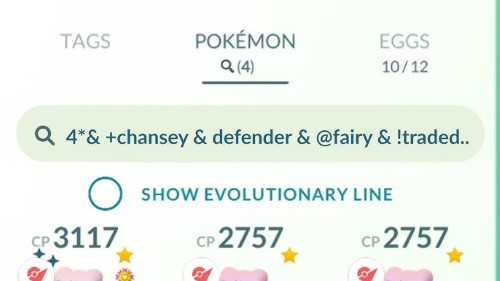
Open Pokémon GO, tap the Main Menu, select Pokémon, and tap the magnifying-glass icon above your inventory. Enter a term directly into the search field.
Suggested search terms can be enabled under Settings > General > Show Suggested Search Terms. The game will then display possible commands after you enter at least two characters, which is helpful when checking whether a recently added filter is supported in your current app language.
Use & or | to Combine Conditions
An ampersand joins conditions that must all be true.
shiny&legendary
This displays Pokémon that are both Shiny and Legendary.
Another example is:
grass&evolve
This returns Grass-type Pokémon that can currently evolve. The game also accepts the vertical bar | as an alternative way to combine required conditions.
Use Commas for OR Searches
A comma displays Pokémon matching one condition or another.
shiny,legendary,mythical
The results can include a Shiny Pokémon, a Legendary Pokémon, or a Mythical Pokémon. Colons and semicolons can also function as alternative separators.
Use ! to Exclude Pokémon
Place an exclamation mark before a condition to remove matching Pokémon from the results.
!shiny
This displays Pokémon that are not Shiny.
You can add several exclusions when preparing a transfer review:
!shiny&!legendary&!mythical
Use for Minimums, Maximums, and Ranges
The placement of the hyphen changes the meaning of a numerical search.
| Search | Result |
|---|---|
cp1500 |
Exactly 1,500 CP |
cp-1500 |
1,500 CP or lower |
cp1500- |
1,500 CP or higher |
cp1400-1500 |
Between 1,400 and 1,500 CP |
The same format can be used with HP and distance searches.
Pokémon GO IV Search Strings
Pokémon GO divides overall appraisal results into five searchable groups:
0*
1*
2*
3*
4*
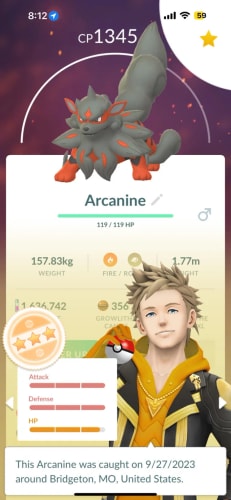
A 4* Pokémon has the maximum appraisal and perfect 15/15/15 IVs. The other star filters cover broader IV ranges, so a 3* search can include many different stat combinations.
How to Find Hundo Pokémon
Use:
4*
This is the simplest exact IV search available in the game. It displays all perfect-IV Pokémon, commonly called hundos.
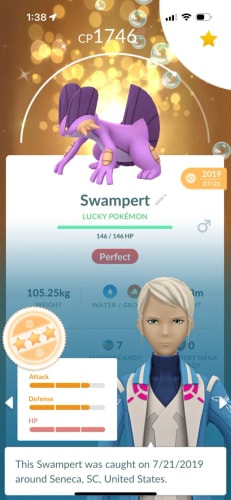
To find perfect Pokémon from a specific period, combine it with an age or year filter:
4*&age0-30
4*&year2025
How to Find Nundo Pokémon
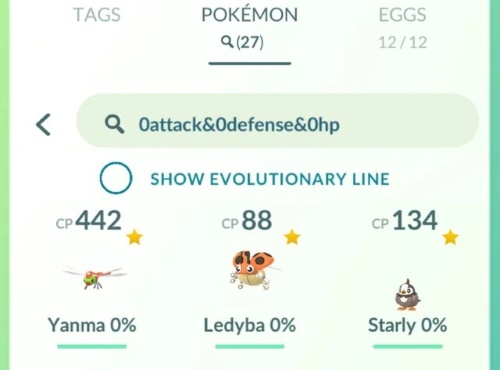
A true nundo has zero Attack, zero Defense, and zero HP IVs.
Use:
0attack&0defense&0hp
You can optionally add 0*, although the three zero-stat conditions already identify the required result:
0*&0attack&0defense&0hp
How Individual IV Filters Work
The game supports attack, defense, and hp filters from zero through four:
The zero and four filters identify the lowest and highest ends of a stat. The middle filters represent appraisal bands rather than one exact IV value. As a result, 3attack does not mean only 14 Attack, and 3hp does not mean only 14 HP.
Can You Search for 98% IV Pokémon?
There is no simple, completely accurate 98% Pokémon GO search string. A 98% Pokémon can have one of three spreads:
- 15/15/14
- 15/14/15
- 14/15/15
The problem is that the in-game stat filters cannot isolate 14 from every other value in the same appraisal band. A search using two maximum-stat filters and one high-stat filter will also return false positives.
For example:
3*&4attack&4defense&3hp
This can find potential 15/15/14 Pokémon, but it can also display Pokémon with a lower HP IV. Use it only to narrow the appraisal queue, then inspect each result manually.
Advanced IV search string generators can build much longer CP-and-HP combinations for a particular species, IV spread, and level range. These are more precise than appraisal bands, but additional appraisal may still be required.
Pokémon GO PvP Search Strings
Strong Great League and Ultra League IVs often look different from ideal raid or Master League IVs. Because Attack contributes heavily to CP, many Pokémon can gain more levels below a league CP cap when their Attack IV is lower and their Defense and HP IVs are higher.
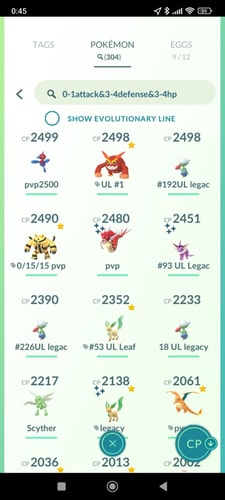
A useful broad PvP candidate search is:
0-1attack&3-4defense&3-4hp
This is best treated as a screening tool for conventional Great League and Ultra League spreads. It does not prove that every result has high-ranked PvP IVs, and it can miss species that prefer less conventional stat combinations.
Great League PvP Candidate Search
For Pokémon already near or below the Great League CP limit, try:
0-1attack&3-4defense&3-4hp&cp-1500
The CP condition only evaluates the Pokémon’s current form. A low-CP base-stage Pokémon may evolve above the limit, while another result may require additional power-ups.
Always check the evolved form and final CP before investing Stardust or Candy.
Ultra League PvP Candidate Search
A similar first-pass filter is:
0-1attack&3-4defense&3-4hp&cp-2500
Again, this does not calculate the Pokémon’s PvP rank. It only reduces the number of Pokémon that need to be appraised and checked.
Master League IV Search
Master League Pokémon generally benefit from high overall IVs, especially maximum Attack for damage breakpoints and Charge Move Priority situations.
Start with two separate searches:
4*
3*&4attack
The second search surfaces three-star Pokémon with maximum Attack, including potentially valuable 15/15/14, 15/14/15, and similar candidates.
Why PvP Search Strings Return False Positives
A generated PvP string works from possible CP, HP, level, evolution, and IV combinations. Multiple IV spreads can sometimes produce the same searchable values, so the game may return Pokémon outside the requested rank range.
PvP search generators are designed to keep the desired candidates in the results, even when that means including additional Pokémon that must be rejected during appraisal. Trash strings work in the opposite direction: they avoid selecting valuable candidates, but may leave some low-ranked Pokémon unselected.
A reliable PvP workflow is:
-
Run a broad or species-specific search string.
-
Appraise the returned Pokémon.
-
Check the exact PvP rank before evolving or transferring.
Pokémon GO Search Strings for Transfer
A transfer search string should create a review queue—not make the final decision for you. No universal trash string can account for every collection goal.
One Trainer may keep every XXL Pokémon for Showcases, while another may protect old catches, location backgrounds, zero-IV Pokémon, trade stock, exclusive moves, or every Dynamax Pokémon. The safest transfer string is therefore one customized around your own priorities.
A Conservative Transfer Review String
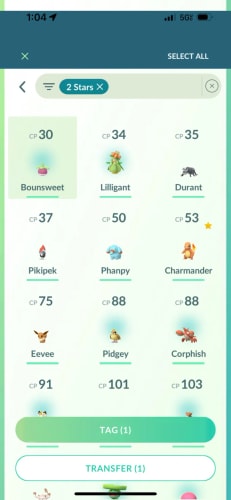
The following example finds Pokémon caught during the last eight days while excluding many commonly protected categories:
age0-7&!3*&!4*&!favorite&!shiny&!legendary&!mythical&!ultrabeast&!shadow&!costume&!lucky&!background&!dynamax&!gigantamax
This is still only a review list. It may include useful PvP Pokémon, rare regional catches, good trade candidates, Pokémon with exclusive moves, or species you personally want to keep.
Before transferring, consider adding any relevant exclusions:
&!xxl&!xxs
&!@special
&!#
The last condition limits the results to Pokémon without personal tags.
Use a Tag-First Transfer Workflow
A safer long-term system is to tag important Pokémon before running a cleanup search. Suggested tags include #PvP, #Raid, #Trade, #Evolve, and #Review.
After reviewing a Pokémon, apply the appropriate tag. You can then use:
!#
This displays untagged Pokémon that still need attention.
Favorites provide another protection layer because a favorited Pokémon cannot be transferred normally. Tags are better for organizing categories, while favorites should be reserved for Pokémon you consider especially difficult to replace.
Community Day Cleanup Search
After a Community Day or Spotlight Hour, begin by limiting the search to recent catches:
age0
Then check valuable groups separately:
age0&4*
age0&shiny
age0&0-1attack&3-4defense&3-4hp
Tag the Pokémon worth keeping, then review the remaining age0&!# results. This staged approach is safer and easier to troubleshoot than pasting one extremely long transfer string.
Pokémon GO Search Strings for Evolution and Candy
Pokémon GO has separate search terms for standard evolutions, new Pokédex entries, trade evolutions, item evolutions, and evolution tasks.
| Goal | Search string |
|---|---|
| Can evolve now | evolve |
| Has an unregistered evolution | evolvenew |
| Can evolve now into a new entry | evolve&evolvenew |
| Uses an evolution item | item |
| Has an evolution-related task | evolvequest |
| Eligible for a trade-related evolution discount | tradeevolve |
| Eligible to Mega Evolve or undergo Primal Reversion | megaevolve |
The evolve filter considers whether the necessary Candy and items are currently available. By contrast, evolvenew can also show Pokémon whose new evolution still requires additional Candy, items, or conditions.
Pokémon GO 12-Candy Evolution Search String
Six Pokémon families currently require only 12 Candy for their first evolution: Caterpie, Weedle, Pidgey, Wurmple, Whismur, and Pidove.
Their Pokédex-number search string is:
10,13,16,265,293,519
To focus on specimens that can currently evolve, use:
10,13,16,265,293,519&evolve
Check the result count before starting a large evolution session, especially after app updates that may affect how combined OR and AND conditions are interpreted.
Pokémon GO Distance, Age, and Year Search Strings
Age and distance filters are especially useful for event cleanup, trade preparation, and reviewing catches from a specific trip.
Search Pokémon by Age
age0
This displays Pokémon caught within the last 24 hours.
age1
This displays Pokémon caught between 24 and 48 hours ago.
You can also create a range:
age0-7
This is useful for reviewing catches from the last several days.
Search Pokémon by Catch Year
Use year followed by a four-digit year:
year2016
year2025
This can help locate older Pokémon, event catches, or potential trade stock.
Pokémon GO Distance Search Strings
The distance filter compares the Pokémon’s recorded catch or hatch location with your current location.
distance100-
This displays Pokémon obtained at least 100 km away.
distance100-1000
This displays Pokémon obtained between 100 and 1,000 km away.
distance-10
This displays Pokémon obtained within 10 km of your current position.
A distance search does not show how far you walked, and it does not directly calculate the final distance between two Pokémon selected for a trade. It measures each stored Pokémon against your current location.
Other useful acquisition filters include:
traded
hatched
locationbackground
Pokémon GO Buddy and Tag Search Strings
Buddy Level filters range from buddy0 to buddy5.
| Search | Buddy status |
|---|---|
buddy0 |
No Buddy history |
buddy1 |
Previously selected but below Good Buddy |
buddy2 |
Good Buddy |
buddy3 |
Great Buddy |
buddy4 |
Ultra Buddy |
buddy5 |
Best Buddy |
For example:
buddy5&4*
This finds perfect-IV Best Buddies.
Search Pokémon by Tag
Enter # followed by the tag name:
Using only # shows Pokémon with at least one tag, while !# is useful for locating Pokémon that have not yet been categorized.
Friend List management is separate from Pokémon Storage. Buddy filters search Pokémon and their Buddy history; they do not search Trainers on your Friend List. Friendship levels, Gifts, trades, and Trainer profiles are managed from the Friends tab.
Pokémon GO Move Search Strings
Place @ before a move name to find Pokémon that currently know that move.
@shadow ball
To search by move type, use:
@ghost
This displays Pokémon with at least one Ghost-type attack.
You can search individual move slots by adding a number:
| Search | Move slot |
|---|---|
@1ghost |
Ghost-type Fast Attack |
@2ghost |
Ghost-type first Charged Attack |
@3ghost |
Ghost-type second Charged Attack |
Use:
@special
This finds Pokémon with moves that cannot currently be learned through ordinary TMs. Examples may include event-exclusive moves, previously available moves, or Return on a Purified Pokémon.
The weather filter is:
@weather
It displays Pokémon with at least one attack currently boosted by the in-game weather.
Search Strings for Raid Attackers
A move search can quickly narrow your potential counters:
@electric
@grass&cp2500-
However, a move type and high CP do not guarantee that a Pokémon is a top raid attacker. Species base stats, Shadow or Mega bonuses, actual movesets, Pokémon level, and the raid boss’s defensive typing all affect performance.
Static “best raid attacker” search strings also become outdated when new Pokémon or moves are released. Use them as temporary shortcuts rather than permanent definitions of what deserves to be kept.
Newer Pokémon GO Search Strings
The inventory search system now covers several newer mechanics and collection types.
| Mechanic | Search string |
|---|---|
| Dynamax Pokémon | dynamax |
| Gigantamax Pokémon | gigantamax |
| Fusion-capable or fused Pokémon | fusion |
| Pokémon undergoing Hyper Training | hypertraining |
| Pokémon with a special background | background |
| Pokémon with a location background | locationbackground |
| Base Mega Level | mega1 |
| High through Max Mega Level | mega2-3 |
You can also search:
megaevolve
This displays Pokémon currently eligible to Mega Evolve or undergo Primal Reversion, taking available energy into account.
Because Pokémon GO continues to add mechanics, use the in-game suggested-term feature to check whether a newer filter is available in your current version and language.
Can You Search Pokémon by Level?
Pokémon GO does not provide a general documented search command such as level35 or level50. The search system supports CP, HP, appraisal, Buddy Level, Mega Level, age, distance, and many status filters, but not a universal exact Pokémon-level filter.
CP alone cannot reveal level because species, form, and IVs also affect CP. Two Pokémon with the same CP may be different levels, while two Pokémon at the same level may have very different CP values.
To estimate level more accurately, combine the Pokémon’s CP, HP, IV appraisal, and power-up information with an IV or CP calculator. PoKeep also provides dedicated Pokémon GO IV, CP, and Evolution calculators through its tool section.
How to Use Pokémon GO Search Strings With PoKeep

Pokémon GO search strings organize Pokémon already inside your inventory. PoKeep Location Changer supports a different part of the workflow: exploring locations, following routes, and returning to productive areas.


PoKeep supports one-click GPS location changes, a 360-degree joystick, adjustable movement, two-spot routes, multi-spot routes, and jump teleport. It also includes saved locations, route history, GPX route importing, and a cooldown timer.
These features can complement search strings through a simple workflow:
-
Use PoKeep to explore or revisit a selected Pokémon GO area.
-
Use Pokémon GO search strings to isolate the catches from that session.
-
Appraise, tag, trade, evolve, or transfer the results.
For example, after completing a multi-point route, enter:
age0
This immediately isolates Pokémon caught during the latest session. You can then check:
age0&4*
age0&shiny
age0&0-1attack&3-4defense&3-4hp
If you collect Pokémon from distant areas, distance100- can help identify possible long-distance trade stock. PoKeep’s saved coordinates and location history can also make productive locations easier to revisit without rebuilding the route each time.
A cooldown timer can help track waiting periods between major location changes, but it should not be treated as a guarantee against warnings or account action. No location-changing method removes all risk, so review the game’s current rules and use location tools responsibly.
Pokémon GO Search String Generators
A Pokémon GO search string generator is most useful when the desired filter is too complicated to build manually. Common examples include species-specific PvP IV strings, exact-IV candidate searches, and customized transfer protection strings.
Before using a generated string, check three things:
-
Which Pokémon or IV combinations it is designed to keep.
-
Whether the output may contain false positives.
-
When the generator’s data was last updated.
PvP IVs, for example, can create search strings for selected rank ranges and evolved forms. Its output intentionally includes possible matches that still need appraisal, while its trash strings are designed to avoid selecting high-ranked candidates.
General cleanup generators can also build strings around PvP, raids, appraisal, Shadows, Lucky Pokémon, and collection preferences. They are convenient starting points, but every generated transfer string should still be reviewed inside the game before mass selection.
Why a Pokémon GO Search String Is Not Working
The Search Uses the Wrong Operator
Remember the basic roles:
&joins required conditions.,creates alternatives.!excludes a condition.
Test each part separately before combining a long string.
The Pokémon Name Contains Punctuation
Names with punctuation or special characters may not appear unless the punctuation is included. For example, searching mr. can display Mr. Mime and Mr. Rime, while entering mr mime may not return the intended result.
The Search Term Is Localized
Move names, types, regions, and some commands can change with the app language. This guide uses English search terms. Use the suggested-term feature or check the official help page in your selected language when an English command returns no results.
An IV Search Returns Too Many Pokémon
Search strings built from CP, HP, and appraisal bands often return false positives. This is expected, especially with PvP and exact-IV candidate strings.
The search narrows the appraisal queue; it does not replace appraisal.
A Transfer String Hides Something You Expected to See
One of the exclusion conditions may be removing it. Delete the exclusions one at a time until the missing Pokémon returns.
This is also why short, staged searches are often safer than a single string containing dozens of conditions.
Pokémon GO Search Strings FAQ
What is the OR operator in Pokémon GO?
Use a comma, colon, or semicolon to search for alternatives. For example, shiny,legendary displays Pokémon matching either category.
How do I search for 100% Pokémon?
Enter:
4*
This displays perfect 15/15/15 Pokémon.
Is there a Pokémon GO 98% search string?
There is no simple exact 98% filter. You can narrow the results using three-star and individual-stat filters, but manual appraisal or an IV search generator is still required.
What is the best Pokémon GO transfer search string?
There is no universally safe transfer string. Start with recent catches, exclude the categories you keep, tag valuable Pokémon, and manually inspect the final results before transferring.
What is the best Pokémon GO PvP search string?
A useful broad Great League and Ultra League candidate filter is:
0-1attack&3-4defense&3-4hp
It does not work perfectly for every species and does not calculate exact PvP rank.
Can Pokémon GO search by exact level?
There is no general documented exact-level command. Use CP and appraisal information with an IV or CP calculator instead.
How do I find Pokémon that can evolve?
Use:
evolve
For Pokémon that can evolve immediately into a new Pokédex entry, use:
evolve&evolvenew
How do I find Pokémon caught far away?
Use a minimum distance search such as:
distance100-
This displays Pokémon obtained at least 100 km from your current location.
Final Thoughts on Pokémon GO Search Strings
The best Pokémon GO search strings are not necessarily the longest. A short filter that solves one clear problem is easier to verify and less likely to hide an important Pokémon.
Use appraisal filters to narrow IV candidates, species-specific tools for serious PvP checking, tags to protect reviewed Pokémon, and age filters for regular storage cleanup. Before mass transferring, always inspect the result count and review categories that matter to your collection.
When location-based exploration creates a larger inventory to manage, PoKeep can support the exploration and route-planning side, while Pokémon GO search strings handle the catches afterward. Together, they create a practical cycle: explore, catch, filter, tag, and decide what deserves to stay.
 Related Articles






 Leave Your Comment