 By
By 

If you have ever opened Pokémon GO only to realize you missed a Spotlight Hour by ten minutes, or if you’ve stared at a "Local Only" Shadow Raid with no one around to help, you know the struggle. The game moves fast. To keep up, you need the right tools.
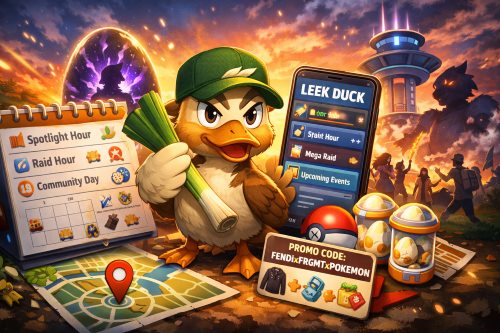
Enter Leek Duck Pokémon GO, one of the most trusted resources in the trainer community. But who—or what—is this duck? And how can you combine its superior intelligence with the right tools to become a master trainer?
What is Leek Duck Pokémon GO?
Before we dive into the tools, let's address the name. "Leek Duck" isn't just a random handle; it’s a nod to the Pokémon Farfetch'd and a clever play on Japanese culture.
There is a Japanese proverb: "Kamo ga negi wo shotte kuru" (A duck comes bearing a leek). It describes a surprising stroke of luck—like a duck flying into your kitchen already carrying the vegetable needed to cook it into a stew. It implies something convenient and fortuitous arriving just when you need it.
That is exactly what the Leek Duck Pokémon GO platform (run by a dedicated trainer from NYC) provides: convenient, timely information, exactly when you need it.
Mastering Leek Duck Pokémon GO Events and Widgets
The biggest pain point for trainers is FOMO (Fear Of Missing Out). The core strength of the platform is the Leek Duck Pokémon GO events calendar. It provides a visual timeline of every current and upcoming event, including Community Days, Spotlight Hours, and Raid Hours.
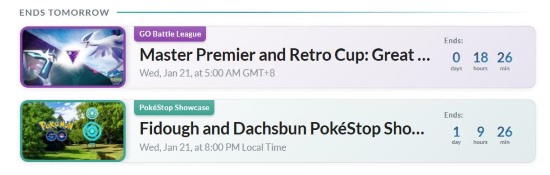
This calendar isn't just a simple list; it is a strategic dashboard that categorizes events so you can prioritize your gameplay:
-
Community Days: The calendar details the featured Pokémon, the exclusive move available upon evolution, and the specific bonuses (like 1/4 Hatch Distance), ensuring you prep your inventory correctly.
-
Spotlight Hours: Occurring every Tuesday, this section clarifies the specific bonus (e.g., 2x Transfer Candy or 2x Evolution XP). This helps you decide if you should catch Pokémon or save your transfers for that specific hour.
-
Raid Hours: It confirms which Legendary Pokémon will take over Gyms on Wednesday evenings, allowing you to organize your raid party in advance.
Crucially, the interface clearly distinguishes between "Local Time" events (which start at a specific time in your time zone) and "Global Time" events (which start simultaneously worldwide). This distinction is vital for avoiding confusion and ensuring you don't log in an hour late.
Getting the Widget
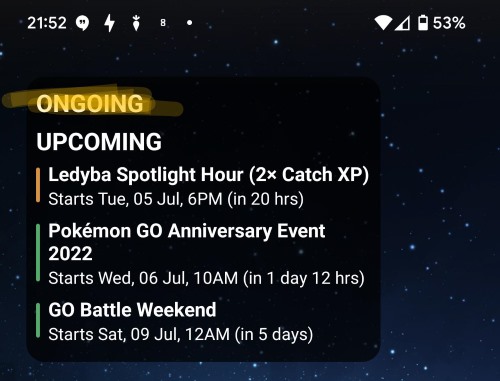
Many users search for a "LeekDuck app", but currently, the best way to stay updated on mobile is via widgets:
For Android
You can download the "GO Events Widget" directly from the Play Store.
For iOS
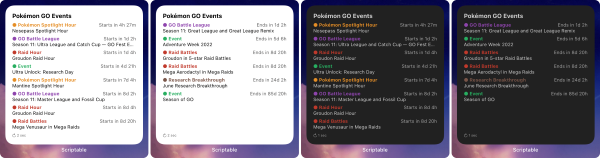
Since there is no native iOS app, the community uses a popular workaround to get the same functionality. Here is the specific method to get the Leek Duck Pokémon GO widget on your iPhone:
Step 1. Download the free app Scriptable from the Apple App Store.

Step 2. Go to GitHub and search for the "PoGOEvents" repository (created by user bigfoott).
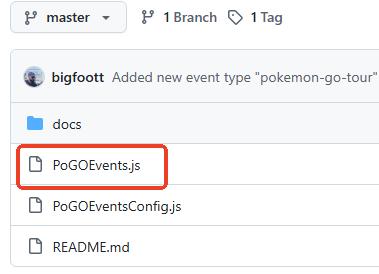
Step 3. Open the PoGOEvents.js file on GitHub and copy the raw code.
Step 4. Open the Scriptable app, tap the "+" to create a new script, and paste the code. Rename it to "LeekDuck".
Step 5. Go to your iPhone home screen, long-press to add a widget, select Scriptable, and then choose the script you just created.
Dominate Battles with Leek Duck Pokémon GO Raids
Coordinating remote raids used to be a nightmare of messaging back and forth. The Leek Duck Pokémon GO raids tool, known as RaidNow, streamlines this process perfectly.
Using the Auto Join Mode
If you are trying to join a popular raid like Mega Sceptile or Cresselia, manual lobbies often fill up instantly. RaidNow solves this with an automated queue.
Step 1. Locate the raid boss you want to fight in the list and tap the blue "Auto join" button.
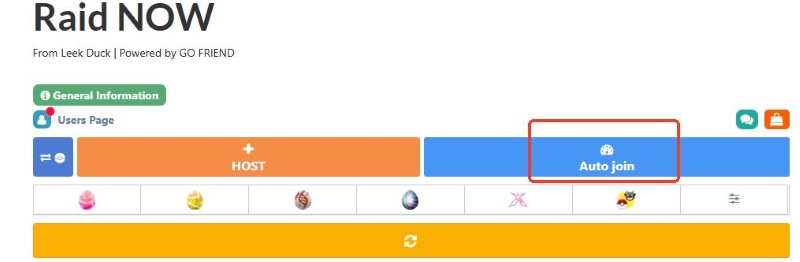
Step 2. Wait in the virtual queue until it is your turn. The tool will automatically reserve your spot.
Step 3. Once placed in a lobby, use the "Copy Code" button to grab the host's Leek Duck Pokémon GO friend code and add them in-game immediately.
Hosting Raids Efficiently
If you are at a gym physically, you can use the orange "HOST" button to invite others. The best feature here is the Search String. Once 5 or 10 players add you, the tool generates a text string. You simply paste this into your Pokémon GO friend search bar, and it instantly filters only the players who just added you for the raid. This allows you to invite 10 players in seconds without scrolling through your whole friend list.
Tracking Leek Duck Pokémon GO Field Research, Eggs, and Codes
Beyond battling, this platform is the ultimate cheat sheet for collectors who need to know exactly where to find specific resources. Instead of guessing, you can use these three critical databases to target your gameplay.
1 Leek Duck Pokémon GO Promo Codes
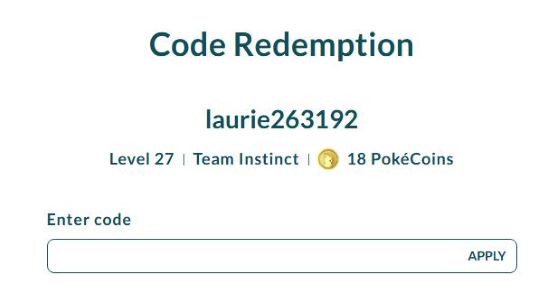
One of the most visited pages is the Promo Codes section. Niantic frequently releases time-limited codes for avatar items or resources, and they vanish quickly.
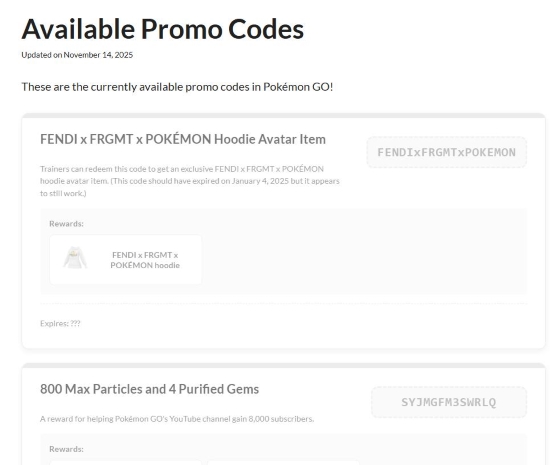
As seen in the current listings, this section doesn't just list the code; it shows you exactly what you get. For instance, recent listings included the exclusive FENDI x FRGMT x POKÉMON Hoodie (Code: FENDIxFRGMTxPOKEMON) and bundles for Max Particles and Purified Gems (Code: SYJMGFM3SWRLQ).
Step 1. Copy the code directly from the Leek Duck card (e.g., tap the text to copy).
Step 2. Visit the Niantic Web Store redemption page (linked directly on the site).
Step 3. Log in, then paste and redeem to instantly receive your items in-game.
2 Leek Duck Pokémon GO Field Research
Field Research tasks can be confusing because the game only tells you the requirement (e.g., "Catch 7 Pokémon"), not the reward. This tool solves that mystery.
The Field Research list connects every task to its specific encounter. For example, by checking the list, you can see that the "Catch 7 Pokémon" task currently rewards you with Magikarp, Stufful, or Wimpod. It also highlights "Spinda Patterns" (currently patterns 6 and 7), which are essential for collectors since they change seasonally.
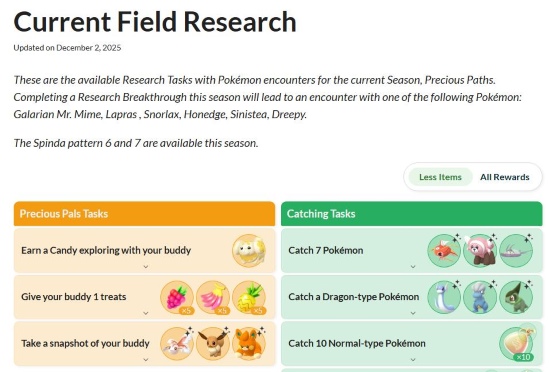
You can also view the "Research Breakthrough" pool to see which rare Pokémon (like Galarian Mr. Mime or Lapras) you might encounter after seven days of stamps.
3 Leek Duck Pokémon GO Eggs
Incubators are premium items, so you shouldn't waste them on eggs that contain Pokémon you already have. The Current Egg Hatches page provides total transparency for the current season (e.g., "Precious Paths").
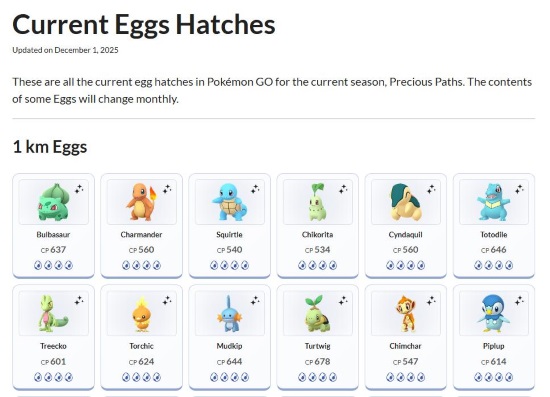
It breaks down the pool by distance. For instance, you can see that 1 km Eggs are currently featuring classic starters like Bulbasaur, Charmander, and Squirtle, complete with their CP ranges (e.g., Bulbasaur CP 637). This allows you to prioritize which eggs to hatch first based on the shiny forms or candy you actually need.
Overcoming Limits with PoKeep Location Changer
Here lies the frustration for many dedicated players. Leek Duck Pokémon GO resources are fantastic at telling you what is happening, but they highlight a painful reality: Access.
You might browse the site and see Shadow Raids marked "Local Only," meaning you cannot use Remote Raid Passes. Or perhaps you see a Wild Area Event thousands of miles away. This is where you need a different kind of tool to bridge the gap.
The Solution: PoKeep Location Changer
If Leek Duck is the "Brain" telling you where to go, PoKeep Location Changer is the "Legs" that get you there. PoKeep is a tool for PC and Mac that allows you to change your GPS location on your iOS or Android device without jailbreaking or rooting.


How to Teleport to Leek Duck Events
By using PoKeep alongside Leek Duck, you can bypass geographical restrictions.
Step 1. Download and install PoKeep on your computer, then connect your device via USB or WiFi.
Step 2. Open the Leek Duck Pokémon GO events page to find the coordinates of a specific event (e.g., a Safari Zone or a city with a specific Shadow Raid).
Step 3. In PoKeep, select "Teleport Mode" and enter the location or coordinates.

Step 4. Click "Move" to instantly shift your phone's GPS to that location.
Final Thoughts
Being a Pokémon master isn't just about throwing excellent curveballs; it's about having the right knowledge and the right access.
By using Leek Duck to stay informed on the latest raids and research, and pairing that intel with PoKeep to overcome geographical barriers, you ensure that you never miss out on the action again.
The duck has brought the leek. Now it’s time for you to cook the stew.
 Related Articles





 Leave Your Comment