 By
By 

Dating apps often lock location features behind a paywall, frustrating users who just want to plan ahead for a trip or move. If you are wondering how to change your location on Hinge, you are in luck because the app handles this quite differently than its competitors.
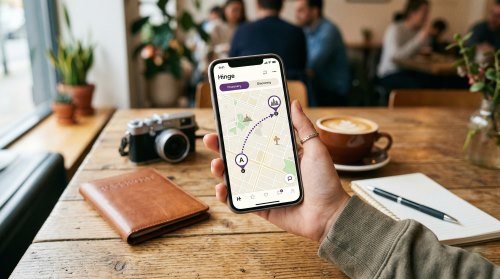
You can easily adjust your whereabouts for free without needing a premium subscription. This guide will walk you through change locaotion on Hinge via the native settings, address common privacy concerns, and show you how to manage your location across all your apps at once.
How Hinge Location Tracking Works
A common question popping up on forums is whether the app tracks your every move. Users frequently ask: does Hinge change your location automatically? The short answer is no, it relies almost entirely on the information you manually provide. If you travel across the country for a weekend vacation, your profile will remain stubbornly in your home city unless you decide to update it yourself.
There is a slight exception for iOS users who have explicitly enabled precise background tracking in their device settings. Even then, the app usually requires you to open the map and hit the compass icon to snap to your new physical spot. You are ultimately in control of where you appear to potential matches.
How to Change Location on Hinge Natively
Adjusting your Hinge coordinates within the app is a straightforward process that won't cost you a dime. You actually have two different areas to update: where your profile says you live, and where you are looking for other people.
Changing Your Hinge Profile Vitals
This setting dictates the city or neighborhood displayed directly on your profile for others to see.
Step 1. Open the Hinge app and tap your Photo Icon situated in the bottom navigation bar.
Step 2. Tap the Pencil Icon located right next to your profile picture to open the editing menu.
Step 3. Scroll down to the "My Vitals" section and tap on "Location."
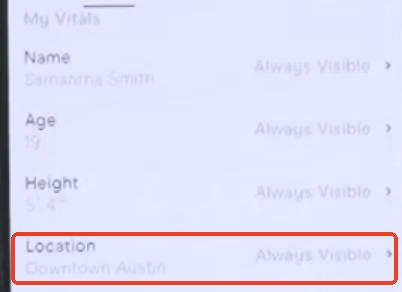
Step 4. Use the map interface to pinch, zoom, and drop a pin on your new city, or tap the compass icon to use your phone's current GPS.
Change Hinge Neighborhood Feeds Location
This setting changes the geographical pool of people you see in your feed.
Step 1. Navigate to your Discover feed and tap the sliders icon to open your Preferences.
Step 2. Tap on "My Neighborhood" from the list of options.
Step 3. Select your desired location using the search bar or by moving the map to your target destination.
The Drawbacks of Hinge Native Location Settings
While changing your hinge location manually is great for casual use, it comes with a few annoying limitations. If you are a digital nomad or someone planning a major relocation, you likely use more than just one app to meet people or navigate.
Updating your neighborhood on Hinge does absolutely nothing for your Tinder, Bumble, or Snapchat accounts. Furthermore, relying solely on in-app settings doesn't actually mask your device's real GPS coordinates. If privacy is your main concern, manually typing in a new city leaves your underlying system data exposed to any other app tracking your phone.

Change Your Location System-Wide with Pokeep

When you need to alter your location across your entire device seamlessly, a dedicated GPS spoofer is the most effective route. Pokeep Location Changer is a powerful tool designed to solve the multi-app hassle with a single click. Instead of going into the settings of every individual app, Pokeep alters your phone's GPS coordinates at the system level. It works flawlessly on both iOS and Android without requiring you to jailbreak or root your phone.


Here are a few ways this tool streamlines the process:
- Teleport Mode: Instantly jump your phone's actual GPS to any city globally.
- Universal Support: Automatically updates your location for Hinge, Pokémon GO, WhatsApp, and all other location-based services simultaneously.
This means you can scout a new city across all your dating and social platforms at the exact same time. It is the ultimate convenience for travelers who want complete control over their digital footprint.
What Happens When You Change Your Hinge Location?
Messing with the algorithm can make users nervous, especially when you look at the change location hinge reddit threads. A broad concern is whether modifying your neighborhood will cause you to lose your existing matches. You can breathe easy, because your current matches and conversations will remain completely intact.
Hinge matches never expire, regardless of where you decide to virtually travel.
Another common worry is the dreaded shadowban. Unlike some platforms that penalize users for hopping around the globe too quickly, Hinge allows unlimited location changes without restricting your account. Keep in mind, however, that your new location will be visible on your profile to your matches unless you actively choose to hide it in your Vitals settings.
FAQs about Changing Hinge Location
Is there a limit to how far I can change my location on Hinge?
No, there are no geographical limitations built into the app. You can drop your pin anywhere in the world, whether that means moving it to the next town over or selecting a completely different continent. Hinge's map allows for global exploration.
Why isn't my feed updating after I changed my neighborhood?
Sometimes the app's algorithm needs a moment to catch up with your new settings. If you are still seeing profiles from your old city, the easiest fix is to force-close the Hinge app and reopen it.
Additionally, you can try expanding your distance preferences by a mile or two. This forces the app to refresh your potential match queue based on your new coordinates.
Will changing my Hinge location alter my maximum distance preferences?
No, your Dealbreaker settings and distance parameters remain exactly the same. If you previously set your maximum distance to a 10-mile radius in your home city, Hinge will simply apply that exact same 10-mile radius centered around your newly selected pin. You do not need to readjust your filters every time you travel.
Can I set multiple locations at the same time?
Hinge only allows you to have one active Discovery neighborhood at any given moment. You cannot search two different cities simultaneously. If your time is split between two different areas, you will need to manually toggle your location back and forth to see the available dating pools in each respective city.
Conclusion
Taking control of your dating life often means casting a wider net. Whether you use the app's native features for a quick fix or leverage a system-wide tool like Pokeep for ultimate privacy and convenience, you have plenty of options. Would you like me to find some tips on how to optimize your dating profile for a brand new city?
 Related Articles


 Leave Your Comment