 By
By 

Even with strict screen time and bedtime rules configured, users often find ways to keep apps active or prevent the device from locking entirely. This naturally leads to the question: can Google Family Link be bypassed completely? The technical answer is yes, under specific circumstances.
While the application effectively manages core Android permissions, Chrome browsing, and device location, it is not an impenetrable system.

In most cases, a successful bypass is not a complex "hack," but rather an exploitation of incomplete setups, outdated software, or isolated application environments. Family Link is highly effective when a user operates within a properly supervised Android ecosystem. However, its coverage drops significantly if the user accesses third-party browsers, unmanaged applications, or manufacturer-specific hidden spaces where Google's monitoring cannot reach.
Identifying these technical gaps is crucial for understanding how digital supervision actually functions on modern smartphones.
Bypass Google Family Link via Developer Tools and Sideloading
One of the most critical vulnerabilities involves advanced Android settings intended for software troubleshooting. If Developer Options and USB Debugging are left enabled, a user can connect the device to a computer and execute command-line operations to disable supervision services.
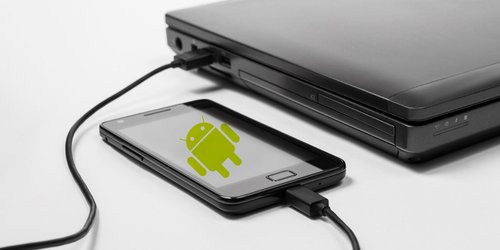
Similarly, bypassing the Google Play Store entirely allows users to evade app download restrictions.
By downloading and sideloading APK (Android Package Kit) files directly from the web, users can install clone applications, hidden browsers, or unmonitored games. Because these applications are installed outside of Google's official ecosystem, they often fly under the radar of Family Link's standard app timers.
Use Browser and YouTube Loopholes to Bypass Google Family Link
A common misconception is that a single screen time limit universally restricts all media consumption. In reality, complex applications often require independent supervision parameters.
YouTube, for instance, operates with its own internal set of supervised settings and content filters that are distinct from the primary OS limits. Furthermore, while Family Link excels at restricting websites and disabling Incognito mode within Google Chrome, those controls instantly lose their effectiveness if a user successfully installs a different browser like Firefox or Opera.
Exploiting Date, Time, and Isolated Environments
As mentioned earlier, manipulating the system clock is a primary method for evading scheduled downtime. If the OS permission to manually edit the date and time is left unlocked, scheduled limits become highly unreliable.
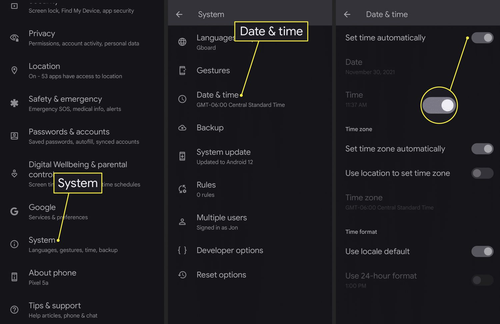
Beyond time manipulation, many Android manufacturers include native features that inadvertently serve as perfect bypass tools:
- Xiaomi's Second Space: Creates a completely separate, unmonitored user profile on the device.
- OnePlus Parallel Apps: Duplicates applications, allowing the clone to operate outside of restricted timers.
- Samsung Secure Folder: Encrypts and hides applications from the main system registry.
Finally, some users resort to a brute-force factory reset to wipe the device entirely. While this removes the supervision software, it also triggers factory reset protection locks and results in severe data loss, making it a highly destructive workaround.
Managing Device Locks and Regaining Access
There are legitimate scenarios where a device lock needs to be bypassed quickly, such as needing access for homework or emergencies when the administrator's device is unavailable. Instead of relying on system loopholes, the software provides official override mechanisms.
The most reliable method for regaining access is utilizing the Parent Access Code.
This is particularly useful because the access code is generated locally and works even when the locked device is completely offline or struggling with network synchronization issues.
Step 1. Open the Family Link app on the administrator's device or log into the web dashboard.
Step 2. Locate the specific supervised profile to view the temporary Parent Access Code.
Step 3. Tap "Parent Access" on the restricted device's lock screen and enter the unique PIN.
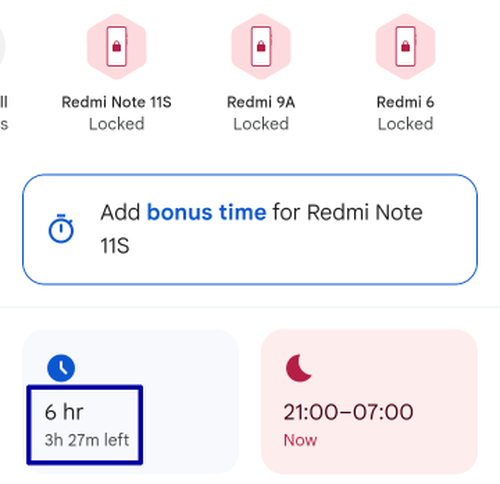
If a permanent unlock isn't desired, administrators can also use the app to grant "Bonus Time". This injects temporary access for the day without permanently altering the established daily limits or school time schedules.
Systematic Removal of Family Link Supervision
For users looking to disable the software permanently, attempting to forcibly break the app often leads to frozen accounts or locked devices. The clean, system-level method for removing restrictions depends entirely on the user's age and account status.
When a managed account reaches the required age for digital consent (which varies by country, but is typically 13), the system automatically offers the option to graduate to a standard account.
If supervision needs to be removed before that threshold, it must be executed systematically from the administrative side to avoid triggering security lockouts.
Step 1. Open the Family Link application and select the managed profile.
Step 2. Navigate to Account Settings and locate the Account Supervision section.
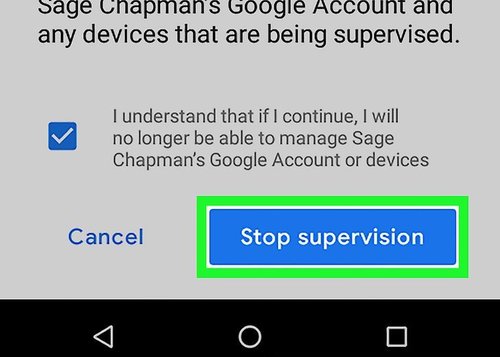
Step 3. Select the option to stop supervision and confirm the choice following the on-screen prompts.
It is important to differentiate between merely removing a Google account from a specific piece of hardware and completely terminating the supervision status of the account itself. Following the proper system prompts ensures that the device regains its standard functionality without triggering Google's anti-theft protocols.
Navigating Location Privacy and GPS Tracking
Family Link allows device administrators to track a smartphone's real-time physical location, which often creates friction regarding digital privacy and trust. While this feature is designed for safety and coordination, continuous GPS monitoring can feel intrusive, leading many users to seek ways to manage their own location footprint. Standard mobile settings offer limited control over this tracking, as simply disconnecting from the internet or powering off the device is highly noticeable and immediately raises red flags.
For users seeking a stable and discreet way to manage their location data, desktop-based simulation tools provide a highly effective technical alternative.

PoKeep Location Changer operates as a powerful GPS control utility that allows you to alter your device's coordinates seamlessly without requiring complex processes like rooting an Android or jailbreaking an iPhone. By tethering the mobile device to a computer, the software overrides the native GPS signals at a system level, ensuring that the new location remains stable across all apps and supervision tools.


This tool offers a versatile suite of movement features designed for realistic location management:
- One-click teleportation to instantly shift GPS coordinates to any global location.
- Advanced route simulation with two-spot or multi-spot movement and adjustable speed settings.
- A 360° GPS joystick and jump teleport mode for precise, real-time directional control.
Having this level of control is incredibly useful for protecting your real-time location privacy on your own terms.
Beyond privacy masking, PoKeep is widely utilized for testing how geo-restricted apps behave in different regions, managing social app visibility, and executing route strategies for location-based games. Ultimately, taking charge of your digital footprint requires robust, reversible tools that grant you the flexibility to modify your GPS coordinates whenever necessary.
Frequently Asked Questions
Can users actually bypass Google Family Link?
Yes, tech-savvy individuals frequently discover workarounds to circumvent specific supervision settings. Common methods involve utilizing secure folders, exploiting embedded in-app browsers, or manipulating system clock settings to evade screen time limits. Because the Android ecosystem is so open, no software restriction is completely immune to technical loopholes.
Can a user disable Google Family Link without a parent's permission?
Officially, removing supervision requires the administrator's account credentials or an access code.
On a technical level, however, users sometimes forcefully sever this connection. This is typically achieved by clearing Google Play Services data or utilizing USB debugging commands via Android Developer Options, though these advanced methods can disrupt other device functions.
How do I legitimately unlock a Family Link-locked phone?
The most reliable method is utilizing the offline Parent Access Code generated by the supervision app.
Step 1. Open the Family Link app on the primary administrator's device.
Step 2. Navigate to the specific supervised profile to view the temporary access code.
Step 3. Enter this unique PIN directly onto the locked screen of the restricted device to instantly regain access.
Can Family Link unlock a phone without an internet connection?
Yes, the system is designed to handle offline scenarios smoothly. The Parent Access Code is generated locally, meaning it will successfully bypass the lock screen even if the restricted device has no active Wi-Fi or cellular data connection at the time.
Why are YouTube restrictions still failing to work?
YouTube operates with an independent set of internal supervision settings that are distinct from the core Android OS limits.
If restrictions are not applying correctly, the device might be signed into an unsupervised secondary Google account. Alternatively, the specific content level parameters and search controls need to be manually adjusted within the YouTube or YouTube Kids app directly.
Does Family Link successfully block every web browser?
No, its web filtering capabilities are primarily integrated with Google Chrome. If a user manages to download a third-party browser or accesses the internet through a built-in browser within an allowed app (like a messaging platform), those web activities generally bypass Family Link's standard monitoring entirely.
Can PoKeep Location Changer bypass Family Link GPS tracking?
While PoKeep Location Changer is not a "hacking" tool designed to break Google's software, it operates as a highly effective system-level GPS modifier.
Because the software overrides the mobile device's native location signals through a stable desktop connection, it successfully masks the phone's actual physical coordinates from all supervision apps. This makes it an ideal solution for users wanting to regain control over their location footprint, protect their privacy, and simulate custom geographic routes without needing to root or jailbreak their devices.
 Related Articles




 Leave Your Comment