 By
By 

You open DraftKings, try to place a bet, and suddenly the app says it cannot verify your location. Or maybe you recently moved and need to update the address on your account. In both cases, it feels like the same problem: you need to change DraftKings location.
But DraftKings “location” can mean two very different things.
One is your account address, which is tied to your profile, payments, verification, tax documents, and withdrawals. The other is your real-time physical location, which DraftKings checks when you try to use regulated products such as Sportsbook or Casino. These two location types work differently, and changing one does not automatically change the other.
Can You Change Your DraftKings Location?
Yes, but only in specific ways.
You can update your DraftKings account address if your personal information has changed. You can also adjust your phone, browser, or desktop location settings if DraftKings cannot detect where you are. However, you should not try to fake your physical location to place bets from a restricted state or region.
DraftKings uses location services such as GPS, Bluetooth, and Wi-Fi information to verify where your device is physically located. On desktop, the GeoComply Player Location Check plugin may also be required when the device does not rely on the DraftKings mobile app or built-in GPS/Bluetooth/Wi-Fi services.
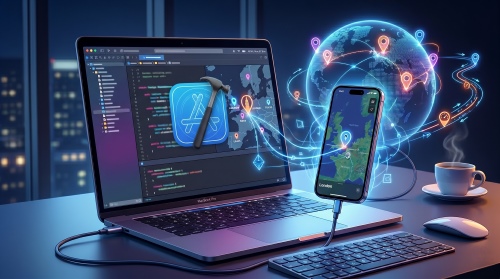
For general GPS-changing needs outside regulated betting apps, tools like PoKeep Location Changer can help you change iPhone or Android GPS location without jailbreak or root, simulate routes, use joystick movement, and manage virtual locations for location-based apps.


But for DraftKings wagering, your physical location must remain accurate. You can try to use PoKeep Location Changer to change DraftKing location to see if it works though.
How to Change Your Address on DraftKings
If you recently moved, your first step is to update your DraftKings address on file. This is different from changing your GPS location.
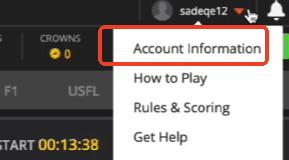
On desktop, DraftKings lists the general path as logging in, clicking your username, opening Account Information, editing your Verified Address under Personal Information, updating the address, and saving it. P.O. boxes are not accepted.
On mobile, the process is similar: log in through the DraftKings app, open your profile area, go to personal information, edit your verified address, and save the updated details. If the address change requires extra verification, you may be asked to provide proof of residency.
A proof of residency document typically needs to show your name, current address, account or invoice details, and a recent issue date. Common examples include utility bills, bank statements, mortgage statements, lease documents, vehicle documents, or official government mail.
When You May Need Proof of Residence
DraftKings may request documentation when your address change affects verification, banking, or withdrawal details. This is especially important if you deposit through online banking, because the address on your DraftKings account may need to match the address connected to your bank account.
Use a document that is easy to read and shows the full address clearly. If the document is cropped, blurry, outdated, or missing your name, the update may take longer.
Can You Use DraftKings in Another State?
You may be able to log in to your DraftKings account while traveling, but what you can do depends on where you are and which DraftKings product you are using.

For Sportsbook, DraftKings allows users to access certain account functions in a jurisdiction that does not permit sports betting. You may still be able to log in, deposit funds, view existing bets, and check promotions. However, you cannot place bets while physically located in a jurisdiction that does not allow sports betting.
This is why changing your home address does not unlock betting access in another state. DraftKings checks your current physical location at the time you try to use regulated features.
If you travel often, the safest habit is simple: open DraftKings only after confirming that your current location and the specific DraftKings product you want to use are permitted there.
Fix DraftKings Location Issues on iPhone
On iPhone, location problems often come from disabled Location Services, blocked app permission, or Precise Location being turned off.

Go to Settings > Privacy & Security > Location Services and make sure Location Services is enabled. Then find DraftKings in the app list and choose an appropriate permission, such as allowing location while using the app. For apps that need exact location, iOS also offers a Precise Location toggle.
Keep Wi-Fi and Bluetooth enabled when possible. Location systems may use GPS, Bluetooth, Wi-Fi hotspots, and cellular towers to estimate where your device is. If you are indoors, near a state border, or using weak Wi-Fi, moving to a better signal area may help.
If DraftKings still cannot verify your location on iPhone, try closing the app completely, reopening it, switching Wi-Fi off and on, and checking whether iOS or the DraftKings app has an available update.
Fix DraftKings Location Issues on Android
On Android, start with app location permission.
Long-press the DraftKings app icon, open App info, go to Permissions, and check Location. Depending on your Android version, you may see options such as allowing location while using the app, asking every time, or denying access. Android also distinguishes approximate location from precise location, and precise location may be necessary for accurate verification.
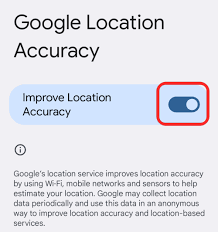
Next, check your broader device location settings. Android’s Location Accuracy can use more sources to improve location detection. If Location Accuracy is off, some apps may not get a precise enough location.
If you use developer settings, mock location apps, VPNs, private DNS tools, proxy apps, or remote access tools, turn them off before opening DraftKings. These tools can interfere with location checks and may prevent verification.
Fix DraftKings Location Issues on Desktop
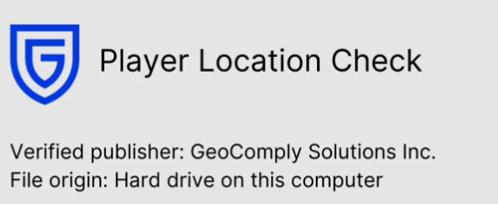
Desktop location checks can be different from mobile checks. If your computer does not use the DraftKings mobile app or built-in GPS/Bluetooth/Wi-Fi location services, the GeoComply Player Location Check plugin may be required. The plugin may download automatically when needed, but it may also need to be manually installed, removed, or restarted during troubleshooting.
A common desktop mistake is assuming Ethernet is enough. DraftKings may still require Wi-Fi to be available because location verification can use nearby Wi-Fi hotspot data. If your PC has no Wi-Fi adapter, or if Wi-Fi is turned off, you may be restricted even if your internet connection works.
Also check browser permissions. If your browser blocks location access, DraftKings may not be able to complete the check. Clear your browser cache, restart the browser, and make sure no VPN, proxy, or remote desktop program is active.
When PoKeep Location Changer Can Help

PoKeep Location Changer is useful when your goal is broader GPS control outside regulated betting use. For example, you may want to test location-based app behavior, protect privacy in social apps, simulate movement in games, or manage virtual routes on iPhone and Android.
PoKeep supports changing GPS location on iPhone and Android without jailbreak or root, one-click location changes, 360° joystick movement, two-spot movement, multi-spot movement, jump teleport mode, custom speed, route simulation, and Wi-Fi/Bluetooth connection options.
For DraftKings specifically, use PoKeep carefully and responsibly. If DraftKings cannot detect your location, solve the issue through legitimate settings: location permission, precise location, Wi-Fi, browser access, GeoComply plugin, and support if needed.
A good way to think about it is this:
PoKeep is a strong option for general GPS-changing needs.
DraftKings requires accurate physical-location verification for regulated betting.
FAQs About Changing DraftKings Location
How do I change my location for DraftKings?
If you mean your account address, update your verified address from your DraftKings account information area. If you mean your real-time betting location, you cannot simply change it manually; DraftKings must verify where you are physically located when you use regulated features.
How do I change my DraftKings address?
Log in to DraftKings, open your account or profile information, find your verified address, edit it, and save the updated address. If extra verification is required, prepare a valid proof of residence document. P.O. boxes are not accepted as valid physical addresses.
Why can’t DraftKings verify my location?
Common reasons include disabled location services, blocked app permission, Precise Location being turned off, weak Wi-Fi, active VPN/proxy tools, browser permission issues, or GeoComply plugin problems on desktop. DraftKings specifically highlights Wi-Fi and location services as common causes of detection issues.
Can I use DraftKings in another state?
You may be able to log in and manage certain account functions, but you cannot place bets unless you are physically located in a jurisdiction where that DraftKings product is permitted.
Can I use a VPN for DraftKings?
No. VPNs, proxies, remote desktop tools, and location-spoofing software can prevent DraftKings from passing required geolocation checks.
Is PoKeep suitable for changing DraftKings location?
PoKeep is suitable for general GPS location changing, virtual movement, social apps, location-based games, privacy use cases, and app testing. It should not be used to bypass DraftKings’ physical-location checks for betting.
Final Thoughts on Changing DraftKings Location
Changing DraftKings location is not one simple action. If your home address is outdated, update your verified address. If DraftKings cannot detect your location, fix permissions, Wi-Fi, precise location, browser access, or GeoComply issues. If you are in a restricted jurisdiction, do not try to force access with VPNs or GPS spoofing.
For everyday GPS-changing needs outside regulated betting apps, PoKeep Location Changer gives iPhone and Android users an easier way to control virtual location, simulate movement, and manage location-based app experiences without jailbreak or root. For DraftKings, the safest approach is to keep your real location accurate and solve only legitimate detection problems.
 Related Articles




 Leave Your Comment