 By
By 

Quick Verdict
Changing location on Instacart Shopper is usually not about switching a manual region setting. In most cases, batches depend on your current GPS location, nearby store demand, and account eligibility, so the best approach is to check your phone’s location settings and move closer to active stores.
Who It's For
This guide is for Instacart Shoppers who moved to a new area, want to shop in another city, or are getting few or no batches and want to understand how location actually works.
Key Takeaways:
- Main Rule: Batch visibility depends on GPS location, nearby stores, demand, and shopper status.
- Best Fixes: Check location permissions, improve signal, move near busy stores, and contact Shopper Support if needed.
- PoKeep Tip: Useful for device-level GPS testing and management, not for bypassing Instacart rules.
You open the Instacart Shopper app, wait for batches, and nothing useful appears. Maybe you moved to a new city, drove near a busier store, joined the waitlist in the wrong area, or noticed that the app is showing the wrong location. That is usually why people search for how to change location on Instacart Shopper.
The tricky part is that “location” can mean several different things inside the Instacart ecosystem. It may refer to your real-time GPS position, the stores near you, your shopper application area, your waitlist market, or even a customer delivery address. Before trying random fixes, it is better to identify which location problem you are actually dealing with.
This guide explains how Instacart Shopper location works, what you can change, what you cannot directly control, and what to do when the app does not show the right area. It also explains where a GPS location changer like PoKeep Location Changer may help with device-level location testing, without confusing it with Instacart’s own account and batch rules.
Can You Change Location on Instacart Shopper?
Yes, but not always in the way users expect.
For active shoppers, Instacart Shopper is mainly location-aware. The app uses your device location to show nearby orders, busy stores, and batches that may be available around you. In many cases, there is no simple “change region” button that instantly moves your shopper account from one market to another.
If you are already approved as a shopper, you may be able to open the app in another supported area and see nearby orders there. However, batch access can still depend on local demand, store coverage, your account standing, your ratings, your Cart Star level, your certifications, and whether your phone has a stable GPS and internet connection.
If you are still on the waitlist or your application is tied to a specific city, the situation is different. You may need to contact Instacart Shopper Support to ask whether your application area can be updated.
First, Know Which Instacart Shopper Location You Want to Change
Before changing anything, decide which of these situations matches your problem.
1. You Want to Change Your Real-Time GPS Location
This means your phone is physically in one place, but the Instacart Shopper app is showing another place or failing to detect where you are. In this case, the issue is usually related to phone location permission, precise location settings, GPS signal, internet connection, or an app glitch.
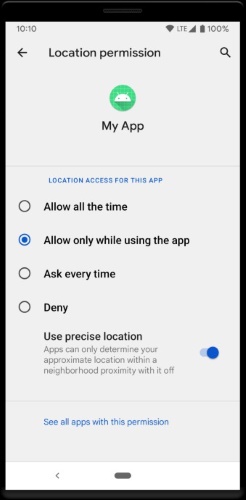
This is the most common fixable problem. You should check your device settings before assuming your Instacart account has a region issue.
2. You Want to Change Your Work Area or Region
This is different from fixing GPS. You may have moved to another city, crossed into a different zone, or want to shop in a busier area.
For active shoppers, the app may show nearby batches based on your current location and store demand. If you are not seeing anything after moving, the issue may be low demand, weak GPS, no active store coverage, or an account eligibility limitation.
3. You Want to Change Your Waitlist or Application Location
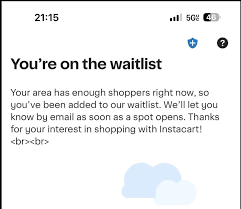
If you applied to become a shopper but are still waitlisted, your selected area may matter. Some users want to switch their application to a different ZIP code or city because their original market is full.
This is not the same as changing GPS. If your application is still pending, the safer path is to contact Shopper Support and ask whether your application market can be updated.
4. You Want to Change a Customer Delivery Address
This is not a Shopper location issue. Customer-side Instacart accounts can change delivery addresses and store selection, but that does not change your shopper work region.
If you are writing or optimizing content around this keyword, this distinction matters. Many search results mix customer address changes with Shopper app location changes, which can leave readers confused.
How Instacart Shopper Location Actually Works
Instacart Shopper location is closely tied to nearby stores and real-time demand. The app can show busy areas, store demand, and available batches based on where you are. Being closer to a busy store may improve your chance of seeing batches faster, but location is only one part of the system.
Batch visibility may also depend on your shopper profile. Ratings, Cart Star status, specialty order eligibility, physical card activation, cooler bag approval, and other account factors can affect what kinds of batches appear. This means two shoppers in the same parking lot may not always see the same orders.
Your device also matters. If your phone has poor GPS signal, weak mobile data, unstable Wi-Fi, or incorrect location permission settings, the Shopper app may not work properly. So when batches disappear after moving areas, start with the basics before assuming your region is locked.
How to Change Instacart Shopper Location After Moving
If you moved to a new city or state, the first thing to check is whether Instacart operates in that area. If the app shows nearby stores and batches, your location may update naturally based on where you are.
Step 1. Open the Instacart Shopper app in your new area and check whether nearby stores or batches appear.
Step 2. Make sure your phone’s location permission is enabled for the Shopper app and that precise location is turned on.
Step 3. If you still see your old area, cannot access batches, or believe your account is tied to the wrong market, contact Instacart Shopper Support through the app.
Do not delete your account and start over just to change location. That can create account problems, especially if your identity, phone number, background check, or tax information is already connected to your existing shopper profile.
How to Shop in Another Area as an Active Instacart Shopper
If you are already approved and want to shop in another area, you usually need to physically go to that area and open the Shopper app. The app is designed around nearby orders, so the batches you see can change when your real location changes.
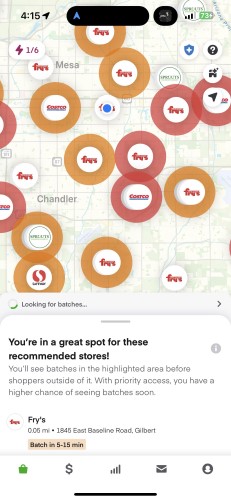
A practical approach is to use the map and store busyness indicators to find areas with stronger demand. Instead of waiting in a low-demand area, move closer to stores that show more activity. This can be more effective than repeatedly refreshing the app from the same location.
Keep in mind that moving closer to a store does not guarantee high-paying batches. Local order volume, shopper competition, customer demand, and account eligibility still matter.
How to Change Store Location on Instacart Shopper
If your goal is to receive batches from a specific store, you usually cannot just pick a store location manually and force the app to send you orders from there. The Shopper app generally uses your current location and nearby store demand to decide what may appear.
The better method is to move near the store you want to shop from, keep the app open, and check whether that store appears as a busy area. If the store is not busy, you may not see batches even if you are nearby.
You can also check whether your account is eligible for certain types of orders. Some batches may require a physical payment card, alcohol delivery eligibility, prescription delivery approval, cooler bag verification, or other shopper requirements.
How to Fix Instacart Shopper Location Not Updating
If the Shopper app shows the wrong area, does not update after moving, or keeps searching for batches with no results, start with your phone settings. Many location problems come from permission or signal issues rather than account restrictions.
Check Location Permission on iPhone
Step 1. Open Settings on your iPhone.
Step 2. Go to Privacy & Security > Location Services.
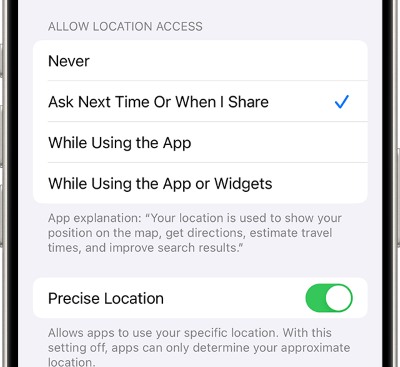
Step 3. Find the Instacart Shopper app and allow location access while using the app. Make sure Precise Location is enabled if the option is available.
After changing the setting, close and reopen the Shopper app. If the app still shows the wrong place, restart your iPhone and check again in an area with stronger GPS and mobile signal.
Check Location Permission on Android
Step 1. Open Settings on your Android phone.
Step 2. Go to Location or Apps > Instacart Shopper > Permissions, depending on your device.
Step 3. Allow location access and turn on precise location if your Android version offers that option.
If you are inside a building, parking garage, or store with weak signal, move outside for a few minutes. GPS accuracy often improves when your phone has a clearer view of the sky and a stable internet connection.
Refresh the Shopper App Safely
If permissions look correct but the app still does not update, try simple app-level fixes. Close the Shopper app completely, reopen it, switch mobile data or Wi-Fi, and restart your phone if needed.
You can also check for app updates. An outdated app may have bugs that affect map view, batch loading, or location detection.
Can You Use a Location Changer for Instacart Shopper?
A location changer can modify your device-level GPS location, but it should not be treated as a guaranteed way to change Instacart Shopper regions, unlock waitlisted markets, or force better batches. Instacart still controls account eligibility, batch access, shopper rules, and service coverage.
That said, a GPS location changer can be useful in certain device-testing and location-management scenarios. For example, if you work with multiple location-based apps, test app behavior, or need temporary control over your phone’s GPS display, a dedicated tool is more stable than random free GPS apps.
The important point is to separate device GPS control from Instacart account control. A tool can change what your phone reports, but it cannot officially change your Instacart approval status, background check area, tax details, waitlist position, or platform rules.
Use PoKeep Location Changer to Manage Device GPS Location
If you need a reliable way to manage phone GPS location on iPhone or Android, PoKeep Location Changer is a practical option. It lets you change GPS location on iOS and Android without jailbreak or root, which makes it easier for everyday users who do not want to modify their phones deeply.


PoKeep is designed for one-click GPS changes, virtual movement, joystick control, and location-based app testing. It can help you check how your device behaves when the GPS position changes, restore your real location after use, and manage virtual location scenarios from a desktop interface.
For Instacart Shopper users, PoKeep should be used carefully and realistically. It may help with device-level GPS management, but it should not be presented as a shortcut to bypass Instacart’s batch system or shopper eligibility rules.
FAQs About Changing Location on Instacart Shopper
Can I change my location on Instacart Shopper?
You can change your real-world location by moving to another area, and the Shopper app may show nearby orders based on that location. If you mean changing your application market, waitlist city, or account region, you may need to contact Instacart Shopper Support.
How do I change my region on Instacart Shopper?
There may not be a simple region-switch button for every shopper. If you are active, open the app in the new area and check nearby batches. If your account still appears tied to the wrong area, use Shopper Support.
Can I choose which store location to shop at?
You can move closer to a store and watch for batches from that area, but you cannot always force the app to show orders from one specific store. Store demand, shopper supply, and your account eligibility all affect what appears.
Why is Instacart Shopper showing the wrong location?
The most common causes are disabled location permission, approximate location settings, weak GPS signal, poor internet connection, outdated app versions, or temporary app issues. Check iPhone or Android location settings first.
Can PoKeep change location on Instacart Shopper?
PoKeep can change your device GPS location on iPhone and Android. However, it cannot guarantee Instacart batches, change your waitlist status, or override Instacart’s shopper account rules. It is best used for device-level GPS management and location testing.
Should I delete my Instacart Shopper account and apply again in another city?
That is usually not the best first step. Your shopper account may be connected to your personal details, background check, phone number, and tax information. Contact Shopper Support before taking any action that could affect your account.
 Related Articles


 Leave Your Comment