 By
By 

Quick Verdict
You can change your Craigslist search location and edit a post’s map or address, but you cannot move an existing post to another Craigslist city. If the posting city is wrong, the best fix is to recreate the post in the correct location.
Who It's For
This guide is for Craigslist users who want to browse another city, fix a wrong map pin, update saved searches, or understand what location settings can actually be changed.
Key Takeaways:
- Search Location: Switch cities or ZIP codes from Craigslist’s location selector.
- Post Location: Edit the map, address, ZIP code, or pin if the post city is correct.
- Posting City: Recreate the post if it was published under the wrong Craigslist site.
Trying to change location on Craigslist can feel confusing because Craigslist uses “location” in several different ways. You may want to browse listings in another city, fix the map pin on your own post, change the city of a published ad, or stop Craigslist from showing the wrong default area.
The correct method depends on which location you mean. You can change your Craigslist search location, and you can edit the map or address shown on a post. But if you published a post under the wrong Craigslist city or site, that city cannot be switched inside the existing post.
Can You Change Location on Craigslist?
Yes, but only in certain ways. Craigslist separates the browsing location, posting site, map/address, saved searches, and account default homepage.
For buyers, renters, job seekers, and anyone browsing listings, changing Craigslist location usually means switching the city or area you search in. That can be done from Craigslist’s location search tools or by visiting a different Craigslist city page.
For sellers or posters, the answer depends on whether you want to change the visible map/address or the main Craigslist city. You can edit the map or address attached to a post, but the original Craigslist site location cannot be changed after the post is created.
Here is the simplest way to understand it:
| What You Want to Change | Can You Change It? | Best Fix |
|---|---|---|
| Search city or browsing area | Yes | Change search location or choose another Craigslist site |
| Map pin or address on a post | Yes | Edit the post location |
| Craigslist city/site of a published post | No | Recreate the post in the correct city |
| Saved search location | Not directly | Create a new saved search |
| Default Craigslist homepage | Yes | Change it in account settings |
| Device GPS location | Yes, outside Craigslist | Use a GPS location changer like PoKeep when relevant |
How to Change Craigslist Search Location
If you only want to browse Craigslist in another city, you do not need to edit any post. Craigslist lets you change the search area from the location selector.
This is useful when you are checking apartments before moving, looking for used cars in nearby cities, comparing local job listings, or searching for items that may be cheaper in another market.
Step 1. Open any Craigslist city page.
Step 2. Click the geographic name shown near the top of the page.
Step 3. Enter a city name or ZIP code, or adjust the map to the area you want to search.
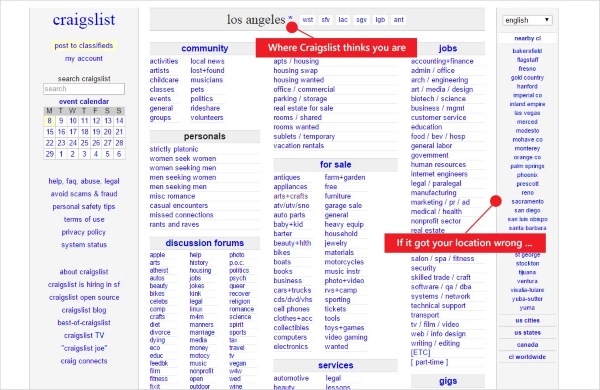
Step 4. Select the suggested location and run your search again.
Some Craigslist areas also include subareas. For example, a large metro area may let you narrow results by nearby regions, neighborhoods, or surrounding areas. This is especially helpful for housing, cars, jobs, and local services where distance matters.
How to Change the Map or Address on a Craigslist Post
If your post is in the correct Craigslist city but the map location is wrong, you may be able to fix it without recreating the post. This applies when the ZIP code, map pin, address, or cross streets need to be adjusted.
Craigslist map placement can be based on a ZIP code area, an address, cross streets, or a draggable pin. A ZIP code usually gives a broader approximate area, while a pin gives a more specific map point.
Step 1. Open the post management link from your Craigslist email, or log in to your Craigslist account.
Step 2. Choose the post you want to update.
Step 3. Select the option to edit location.
Step 4. Change the map, ZIP code, address, cross streets, or pin position.
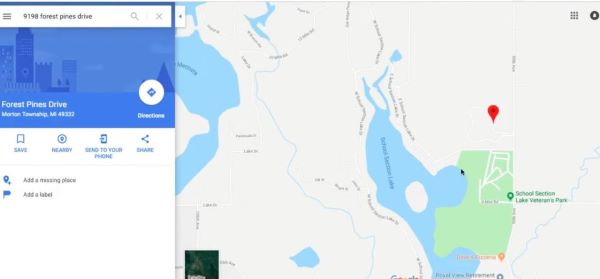
Step 5. Review the post and save your changes.
For privacy, you do not always need to show an exact street address. In many cases, using a ZIP code area or nearby cross streets is enough to help buyers understand the general location without exposing your precise address.
Can You Change the Posting City on Craigslist?
No. If you created a post under the wrong Craigslist city or regional site, the published post cannot simply be moved to another city.
This is the most important point for anyone searching how to change posting location on Craigslist. The “edit location” option does not mean “move this post from one Craigslist city to another.” It only changes the map or address details inside the selected posting area.
For example, if you posted in Atlanta but meant to post in Birmingham, changing the map pin will not turn the Atlanta post into a Birmingham post. You need to create a new post from the correct Craigslist site.
What to Do If You Posted in the Wrong Craigslist City
If the Craigslist city/site is wrong, the cleanest fix is to recreate the post in the correct location. This is annoying, but it prevents your ad from appearing in the wrong local market.
Before deleting anything, save your post title, description, price, photos, and contact details. If the post is paid, check Craigslist billing or support options before removing it, because paid posting rules may differ by category and location.
Step 1. Copy your current post title, body text, price, category details, and contact information.
Step 2. Save your photos locally so you can upload them again.
Step 3. Go to the correct Craigslist city or regional site.
Step 4. Create a new post from the beginning.
Step 5. Confirm the correct city, ZIP code, category, map area, and contact settings before publishing.
Do not rely on reposting as a way to move the ad to another city. Reposting is mainly for renewing or copying a post within the same Craigslist location, not changing the original posting city.
How to Change Craigslist Location on Mobile
Changing Craigslist location on mobile follows the same basic logic as desktop, but the exact layout may vary by browser, device, or app version. The safest approach is to focus on the location you are trying to change rather than expecting one universal button.
If you are browsing, open the location selector or choose a different Craigslist city page. If you are editing a post, open the post management link or your account posting page and update the map/address if that is the problem.
If you are using Craigslist frequently on mobile, check these areas:
- The selected Craigslist city or region
- The filters or search area used in your current search
- Saved searches and alerts from older locations
If Craigslist keeps returning to the wrong city, it may be using an old account setting, saved search, browser data, or location-related hint from your device or network.
How to Change or Save Your Craigslist Default Location
If you have a Craigslist account and the site keeps opening the wrong city, check your account settings. Craigslist account settings include a default Craigslist homepage, which can affect where you land after signing in.
This is different from a single search location. A default homepage controls your starting Craigslist area, while a search location controls the area for a specific search session.
Step 1. Log in to your Craigslist account.
Step 2. Open account settings.
Step 3. Look for the default Craigslist homepage setting.
Step 4. Change it to the Craigslist city or region you use most often.
Step 5. Save the setting and reopen Craigslist to confirm the change.
This is especially useful if you recently moved, travel often, or share a browser with someone who uses a different Craigslist city.
How to Change a Saved Craigslist Search Location
Saved searches are another common reason Craigslist seems stuck in the wrong area. If you saved a search for one city, changing your current browsing location does not necessarily update that saved search.
Craigslist saved searches cannot be edited directly. To change the location of a saved search, create a new search in the correct location and save it again. Then remove the old saved search or alert if you no longer need it.
This matters for alerts too. If your email alerts are coming from the wrong Craigslist city, the alert may be connected to an older saved search.
Best Fix for Saved Search Problems
Create a fresh search from the correct Craigslist city, apply the filters you want, and save that new search. After that, delete the outdated saved search so you do not keep receiving irrelevant results.
This is cleaner than trying to modify old alerts one by one, especially when you are changing cities or expanding your search to a new area.
Why Craigslist Shows the Wrong Location
Sometimes Craigslist may show a location that does not match where you actually are. This can happen for several reasons, and not all of them are controlled directly inside Craigslist.
Your browser, account settings, cookies, VPN, proxy, or IP geolocation can all affect how websites estimate location. IP-based location is not always exact, and it can sometimes point to a nearby city, another state, or even the wrong country depending on the network.
Try these fixes first:
Step 1. Manually choose the correct Craigslist city from Craigslist’s location selector or city list.
Step 2. Check whether a VPN, proxy, remote server, or work network is changing your apparent location.
Step 3. Review browser location permissions and site data.
Step 4. Check your Craigslist account default homepage.
Step 5. Recreate saved searches that still point to the wrong city.
If the wrong location only appears in one browser, clearing Craigslist-related cookies or trying another browser can help identify whether the issue is browser-based.
Can You Post on Craigslist in Multiple Cities?
Craigslist is built around local communities, so posting the same ad across multiple cities is not a normal location-changing method. If your item, job, housing offer, or service is truly relevant to another area, create the post from the correct Craigslist site and follow Craigslist’s local posting rules.
For most users, the better approach is to choose the most accurate city from the start. If your target audience is between two areas, select the Craigslist site that best matches where the item, job, property, or service is actually located.
This is especially important for local pickup items, rentals, services, and jobs. A misleading city can reduce trust and may cause users to skip your post.
When PoKeep Helps with Craigslist Location Scenarios
Most Craigslist location issues should be solved inside Craigslist first. If you need to change a search city, use Craigslist’s location tools. If your map pin is wrong, edit the post map or address. If the post city is wrong, recreate the post in the correct Craigslist site.

PoKeep Location Changer becomes useful when your broader problem is device GPS control, privacy, or location-based browsing outside the normal Craigslist settings. It can help you change GPS location on iPhone or Android without jailbreak or root, making it easier to test how location-based apps and websites behave from another area.
(GSP download)
For example, PoKeep may be helpful if you want to:
- Simulate your device GPS location for privacy or testing
- Check how location-based services respond in another city
- Manage GPS location on iOS or Android without changing your real travel plans
PoKeep should not be treated as a shortcut for moving an already-published Craigslist post to another city. It changes device GPS location, not Craigslist’s fixed posting-site rule. Used correctly, it is best positioned as a location-control tool for device-level GPS needs, while Craigslist’s own tools should handle Craigslist search, post map, and account-location settings.
FAQs About Changing Location on Craigslist
How do I change my region on Craigslist?
To change your browsing region, use the geographic location selector at the top of a Craigslist page or open the Craigslist site for another city. If you are logged in and Craigslist keeps opening the wrong city, check your account’s default homepage setting.
How do I change posting location on Craigslist?
You can edit the map or address attached to a post, but you cannot change the Craigslist city/site of an existing post. If the post was created under the wrong Craigslist city, recreate it from the correct site.
Can I change the location of a Craigslist ad after posting?
You can change the map or address location. You cannot move the ad to another Craigslist city or regional site after it has been created.
How do I change search location on Craigslist?
Open a Craigslist site, click the geographic name near the top, then enter a city or ZIP code or adjust the map. Select the correct location and search again.
Why does Craigslist show the wrong location?
The wrong location may come from your selected Craigslist site, account default homepage, saved search, browser data, VPN/proxy, or IP-based location estimate. Manually selecting the correct Craigslist city is usually the first fix.
Can I use PoKeep to change location on Craigslist?
PoKeep can change your device GPS location on iPhone or Android, which may help with location-based browsing, testing, and privacy. It cannot move an existing Craigslist post from one Craigslist city/site to another.
Can I post the same Craigslist ad in multiple cities?
Craigslist is designed around local posting areas, so users should choose the most accurate city for the post. If you need to reach another area, create a post from the correct Craigslist site and follow Craigslist’s posting rules.
How do I change Craigslist location on mobile?
Use the same logic as desktop: change the selected Craigslist city for browsing, edit the post map/address if needed, recreate the post if the city/site is wrong, and rebuild saved searches that point to an old location. Exact app layouts may vary by version.
 Related Articles




 Leave Your Comment