 By
By 

Moving to a new city, traveling for a few weeks, or opening the Uber Driver app only to see the wrong location can all lead to the same question: how do you change Uber Eats driver location? The answer depends on what you want to change. For Uber Eats drivers, “location” can mean your approved delivery city, your live GPS position, your saved home address, your country, or even a customer’s delivery address.
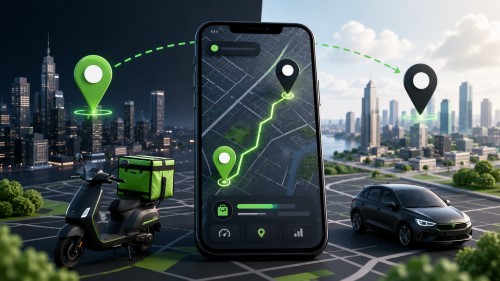
The most important thing to know is this: changing your Uber Eats driver location is usually not just a map setting. If you want to deliver in a different city, Uber may need to review your account, documents, and local eligibility before you can go online in that market. Temporary city changes are also limited, so drivers should understand the process before requesting a switch.
This guide explains how to change Uber Eats driver location the right way, what to check before switching cities, how to fix wrong GPS location issues, and where a GPS location changer like PoKeep can help.
What Does “Change Uber Eats Driver Location” Actually Mean?
Before changing anything, it helps to separate the different types of Uber Eats location settings. Many drivers search for how to change location on Uber Eats Driver app, but they may be trying to solve completely different problems.
Your approved delivery city is the city or market where your Uber Eats driver account is allowed to receive delivery requests. Changing this usually requires Uber review. Your live GPS location is the real-time phone location used by the Uber Driver app while you are online or navigating. Your saved Home address or destination is a navigation preference, not a work-city change. A customer delivery address is different again and applies to an active Uber Eats order.
So, when asking “Can I change my Uber Eats driver location?”, the practical answer is yes—but only through the correct method for your situation.
Changing Your Approved Uber Eats Delivery City
If you moved or plan to deliver in a different city long-term, you need to switch your approved delivery city. Uber asks drivers to check the requirements for the new city before requesting the change. The process involves visiting the Uber delivery requirements page, selecting the new city, reviewing local requirements, and contacting Uber if you meet them.
This is the main method for drivers who want to know how to change Uber Eats driver location permanently.
Changing Your Live GPS Location
Your live GPS location is controlled by your phone’s location services, not by an Uber Eats city-change form. If the Uber Driver app shows the wrong location, the issue may come from disabled precise location, weak GPS signal, outdated app data, phone permissions, or network problems.
For iPhone users, Uber’s help guidance includes turning on Precise Location under the Uber app’s location settings.
Changing a Customer Delivery Address
If you are not a driver and simply want to change the drop-off address for an Uber Eats order, that is a customer-side issue. Uber Eats allows customers to request an address change from the order tracking screen, but after pickup, the delivery person can decide whether to deliver to the new address and may receive additional payment for extra distance.
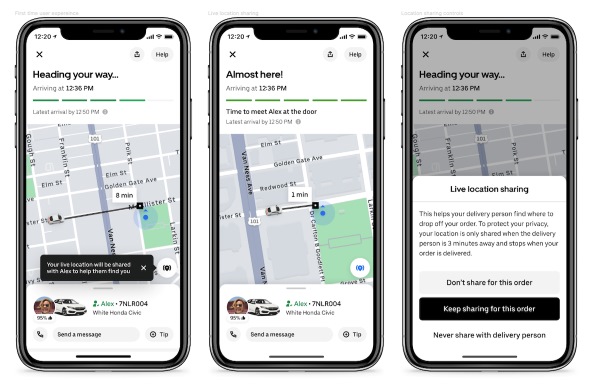
This is why searches like change Uber Eats delivery location can be confusing. A driver changing work location and a customer changing a delivery address are not the same thing.
Changing Country or Region
Changing country is more complicated than changing city. For drivers, moving to a new country may require a new account because insurance and regulatory requirements can differ by country.
If your goal is how to change country on Uber Driver or how to change country in Uber Eats, treat it as a separate onboarding issue rather than a simple profile edit.
Can You Change Your Uber Eats Driver Location?
Yes, Uber Eats drivers can request a city change, but it is not always instant. Your ability to deliver depends on local requirements, account status, documents, vehicle type, and Uber’s review process.
Uber also does not treat temporary city changes as a casual travel feature. One Uber help page says temporary city changes are not supported because changes can take up to 14 days to process. Another Uber help page says the update process can take up to 5 days and warns that driving in a market other than the one assigned to your account could result in deactivation.
That means you should not request a city switch just because you are visiting another city for a weekend. For short trips, the review time and account restrictions may create more trouble than benefit.
When Uber Allows City Changes
A city change makes the most sense when you are moving, relocating for a longer period, or planning to deliver regularly in a new market. Before switching, check whether Uber operates in the new city and whether Uber Eats delivery is available for your delivery method. Uber’s city list is updated as availability expands.
You should also review the local delivery requirements. Uber Eats may require screening, documents, a valid driver’s license for car or scooter delivery, insurance for car delivery, and other details depending on your area and delivery method.
Why Temporary City Changes Can Be Difficult
A temporary Uber Eats driver location change sounds convenient, especially if you are traveling and want to make money in another city. In practice, it can interrupt your ability to go online, trigger document review, and affect promotions or rewards.
Some Uber guidance states that switching cities can take several days and that your account may not be online during review. And after changing cities, the account may be offline for about 3 days while documents are reviewed, and incentives in the new city may take more than 2 weeks to appear.
For drivers who want to know “Can I do Uber Eats in a different city?”, the best answer is: check the new city first, understand the review window, and avoid switching unless you actually need to work there.
What Happens During Document Review
Uber may need to confirm that your documents match the new city’s rules. This can include identity documents, license details, insurance, vehicle information, background screening, and region-specific compliance checks.
If documents are missing or not accepted by the deadline, you may not be able to go online. This is why drivers should prepare documents before requesting the location change rather than waiting until the account is already under review.
How to Change Uber Eats Driver Location Officially
The official process is straightforward, but you should do it carefully. A rushed city-change request can temporarily block your earning ability if your documents need review or the new city has different requirements.
Step 1. Check Whether Uber Eats Is Available in the New City
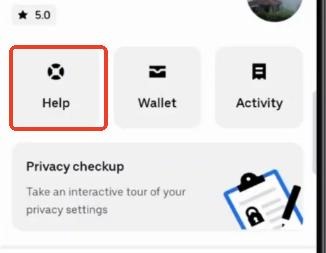
Start by confirming that Uber operates in the city where you want to deliver. Uber’s city pages can help you check availability, and the driver help center also points drivers to Uber’s cities page before switching.
Availability alone is not enough. A city may support Uber rides, Uber Eats, or both, and delivery options can vary by vehicle type. Open the Uber delivery requirements page and check the new city specifically before making a decision.
Step 2. Review Local Uber Eats Delivery Requirements
Go to Uber’s delivery page and scroll to the city selector. Select the city where you want to deliver, then review the delivery requirements for that city. Uber’s delivery city-change guidance uses this process before asking drivers to contact support for the switch.
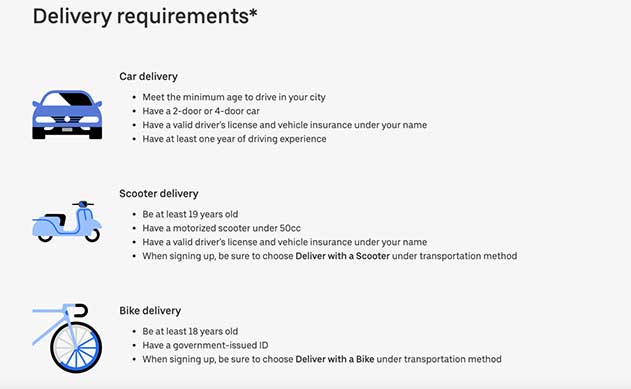
Pay attention to age, delivery method, license, insurance, vehicle type, and screening requirements. If you are switching from bike delivery to car delivery, or from one state to another, the requirements may not be identical.
Step 3. Contact Uber Support to Request the City Change
After confirming that you meet the new city’s requirements, contact Uber through the city-change help flow. Uber needs to review your account and make the necessary changes before you can reliably deliver in the new market.
Use a clear message. Include your current city, the new city, your delivery method, and whether you are moving permanently. Avoid submitting a city-change request if you only want to test demand for a day or two.
Step 4. Wait for Review Before Going Online
Do not assume the switch is complete until Uber confirms it. City changes can involve review time, and your account may not be able to receive delivery requests while documents are pending.
After approval, open the Uber Driver app and check whether your account reflects the new market. If something looks wrong, contact Uber support before accepting trips or deliveries in the wrong city.
How to Fix Wrong Location on the Uber Driver App
Not every location problem requires a city change. If the Uber Driver app shows you in the wrong spot, fails to locate you, or keeps jumping around the map, start with GPS troubleshooting.
This is the right section for drivers searching how to change location on Uber Driver app because the issue may be your phone’s location signal, not your approved Uber Eats city.
Turn On Precise Location
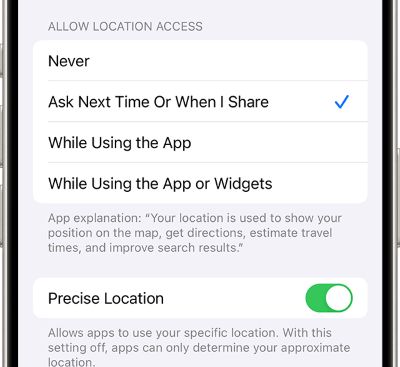
On iOS, go to Settings > Privacy & Security > Location Services > Uber, then turn on Precise Location. Uber’s help content specifically lists this as a fix when the app cannot determine location.
On Android, check the Uber Driver app permissions and make sure location access is allowed. Also check whether your device is using precise/high-accuracy location instead of approximate location.
Restart the App and Device
Close the Uber Driver app fully, reopen it, and check your location again. If the issue continues, restart your phone to refresh GPS, network, and app services.
This simple step can fix temporary map drift, stale app data, and location errors caused by weak signal or a frozen app session.
Update the Uber Driver App
An outdated app can cause location errors, login issues, or map behavior that does not match the current Uber system. Open the App Store or Google Play, update the Uber Driver app, then test again.
Also update your phone’s operating system if location services are behaving strangely across multiple apps.
Check Network, Wi-Fi, and GPS Signal
GPS accuracy can drop indoors, underground, near tall buildings, inside parking garages, or when your mobile signal is weak. Move to an open area, turn Wi-Fi on, and wait a minute for the phone to refresh your location.
If your location remains incorrect across all map apps, the issue is probably device-level. If it only happens in Uber Driver, contact Uber support and describe the exact error.
Can You Use a GPS Location Changer for Uber Eats Driver Location?
A GPS location changer can modify the location shown by supported apps, but it should not be used to bypass Uber Eats city approval, fake your active driver position, receive delivery requests in an unauthorized market, or manipulate platform activity. Uber identifies GPS manipulation and fake location apps as fraudulent activity that can put account access at risk.
That distinction is important. The official way to change Uber Eats driver location for work is still Uber’s city-change process. A location changer is better suited for general GPS control, app testing, location privacy, map-based scenarios, and supported non-work uses.
There are still legitimate reasons to control your phone’s GPS outside active Uber Eats work. You may want to test how a location-based app behaves in another area, protect personal location privacy, preview map-based app settings, or use location simulation for apps that allow it.

This is where PoKeep Location Changer can fit naturally. It gives users a direct way to change GPS location on iPhone or Android without jailbreak or root, and it supports one-click location changes and joystick-style movement for supported location-based apps.


How PoKeep Helps Change GPS Location for Supported Apps
PoKeep Location Changer is designed for users who need flexible GPS control on iPhone and Android. It supports changing location to anywhere, 360° GPS joystick movement, route simulation, and no-jailbreak/no-root setup. It also offers a free trial and can restore the real location by restarting the device, making the change temporary and reversible.
For this topic, the best use case is not “cheating Uber Eats.” The better use case is controlled GPS management outside active Uber delivery, especially when you want a simple way to adjust device location for supported apps, privacy, or testing.
How to Change GPS Location with PoKeep for General Location Use
Use this method only for suitable personal, testing, or supported app scenarios. For Uber Eats delivery work, follow Uber’s official city-change process instead.
Step 1. Download and Install PoKeep
Download PoKeep on your Windows or Mac computer, then install and launch the program. PoKeep supports iPhone and Android location changing without jailbreak or root.
This setup is useful if you want desktop-level control instead of risky modified mobile apps.
Step 2. Connect Your iPhone or Android Device

Connect your device to the computer by USB, Wi-Fi, or other supported connection method shown in the software. Follow the on-screen setup instructions so PoKeep can detect your phone.
Once connected, keep the device unlocked and confirm any prompts needed for location control.
Step 3. Choose a Location and Start Modifying GPS

Select the destination on the map, choose the mode you want, and start modifying the GPS location. PoKeep’s location modes include direct location changing and movement simulation for supported apps, including joystick-style movement.
When finished, restart your device to restore your real GPS location. PoKeep describes its location changes as temporary and reversible.
FAQs About Uber Eats Driver Location Change
Can I change my Uber Eats driver location?
Yes, but if you mean your approved delivery city, you need to check the new city’s requirements and request a city change through Uber. It is not the same as changing your phone’s GPS location.
How do I change my work location on Uber Eats?
Check the delivery requirements for the new city, make sure you qualify, then contact Uber support through the city-change help flow. Wait for approval before trying to deliver in the new market.
Can I do Uber Eats in a different city?
You may be able to deliver in another city after Uber approves your city change. Temporary city changes are limited, and driving or delivering in a market outside your assigned area can create account risk.
Can I drive Uber Eats in another state while on vacation?
It depends on Uber availability, local requirements, your account status, and whether Uber approves the switch. Because temporary changes can take several days and may interrupt your ability to go online, it may not be practical for a short vacation.
How do I change location on the Uber Driver app?
If you mean your live GPS location, check your phone’s location permissions, precise location settings, network signal, app version, and device GPS. If you mean your approved work city, you need to request a city change.
How do I set Home location in the Uber Driver app?
The Driver app destination feature allows drivers to save a Home address and edit it later. This is a navigation preference, not a change to your approved Uber Eats delivery city.
How do I change country on Uber Driver or Uber Eats?
Changing country can require a new driver account because insurance and local regulatory requirements may differ. Check the requirements for the destination country and contact Uber support before assuming your current account can simply be moved.
Can a GPS location changer help with Uber Eats driver location?
A GPS location changer can help with general location control, testing, privacy, and supported non-work app scenarios. It should not be used to bypass Uber Eats city approval or fake active delivery activity. For approved delivery work, use Uber’s official city-change process.
Final Thoughts
The best way to change Uber Eats driver location depends on what you actually need. If you are moving to a new city, use Uber’s official city-change process. If the Uber Driver app shows the wrong map position, troubleshoot GPS permissions and phone settings first. If you are a customer trying to change a delivery address, use the Uber Eats order help flow.
For broader GPS control outside active Uber Eats work, PoKeep Location Changer can be a useful option for iPhone and Android users who want one-click location changes, joystick movement, and temporary GPS modification without jailbreak or root. Just keep the boundary clear: PoKeep is helpful for supported personal and testing scenarios, while Uber Eats delivery city changes should always go through Uber’s official review process.
 Related Articles



 Leave Your Comment