 By
By 

Quick Verdict
Geofinder is a phone location tracking service that works through location requests rather than direct GPS access. It can be useful for finding a device's location, but results depend on the recipient opening the tracking link and granting location permission.
Who It's For
This guide is for users considering Geofinder, comparing phone tracking tools, or looking for safer alternatives for lost phones, family location sharing, or GPS control.
Key Takeaways:
- How It Works: Sends a location request link to the target device.
- Main Limitation: Accurate tracking usually requires user interaction and permission.
- Alternative Option: PoKeep is better for changing your own GPS location on iPhone and Android.
Losing a phone, checking whether a family member arrived safely, or trying to locate a device without installing extra apps can make a phone number tracker sound very convenient. That is why many users search for Geofinder, Geofinder mobi, Geofinder phone number tracker, or does Geofinder really work.
Geofinder is usually promoted as a location tracking tool that helps users find a phone by entering a mobile number. Instead of requiring software installation on the target phone, it typically works through a link-based location request. Once the recipient opens the link and shares location access, the requester can view the location result through an online dashboard.
This guide explains what Geofinder is, how the Geofinder app or web service works, whether Geofinder is legit, what to know about its free trial and subscription model, and when a GPS location changer like PoKeep may be a better fit for controlling your own device location.
What Is Geofinder?
Geofinder is a phone location tracking service commonly associated with names like GEOfinder, Geofinder.mobi, and Geofinder phone number tracker. Its main selling point is simple: enter a phone number, send a location request, and view the phone’s location after the recipient interacts with the tracking link.
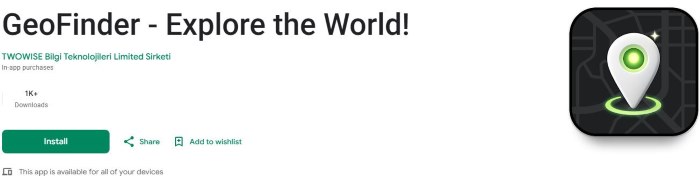
Unlike traditional family locator apps, Geofinder does not always require installing an app on the other person’s device. This is why it appeals to users who want a fast web-based way to request a location. It is often positioned for lost phone recovery, family safety, child location checks, and general mobile number location lookup.
However, the important detail is that Geofinder is not a magic GPS tool that can silently reveal any phone’s exact location from a number alone. Its practical performance depends on whether the message is delivered, whether the link is opened, whether location permission is granted, and whether the device has internet access.
How Does Geofinder Work?
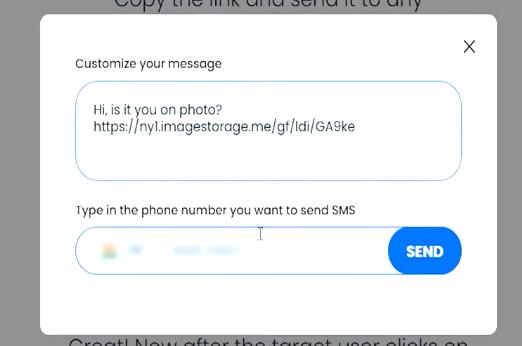
Geofinder-style tracking usually works through a location tracking link. The user enters a phone number, the system generates a message, and that message is sent to the selected number. When the recipient opens the link, the device may be asked to share location through the browser or phone environment.
This makes Geofinder different from built-in services like Apple Find My or Google Find Hub. Those official tools are tied to your own Apple or Google account. Geofinder is more like a third-party location request service that depends on link interaction.
The basic process usually looks like this:
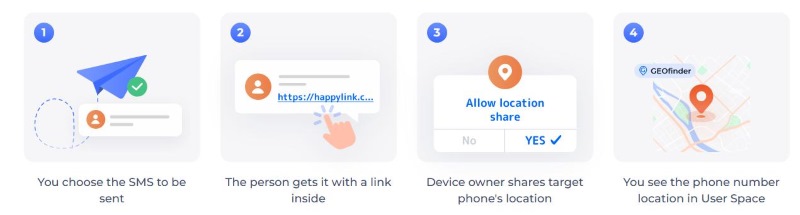
Step 1. Enter the phone number you want to locate.
Step 2. Geofinder generates or sends a tracking link by SMS or message.
Step 3. The recipient opens the link and allows location access.
Step 4. The location result appears in the Geofinder dashboard.
This workflow is the key to understanding whether Geofinder can work for your situation. If the recipient does not click the link, blocks the message, denies location permission, or uses a device without internet access, Geofinder may not return a useful GPS result.
Can Geofinder Track a Phone by Number Only?
Many users expect the phone number itself to reveal the phone’s GPS position. in most normal consumer tools, that is not how precise GPS tracking works.
A phone number can help deliver a message to the device, but it does not automatically unlock real-time GPS coordinates. Precise location usually requires GPS, Wi-Fi, mobile network signals, bowser location permission, or account-level device recovery tools. For a web-based Geofinder link, the most important trigger is usually the recipient opening the link and allowing location access.
So the realistic answer is:
Geofinder may use a phone number to send a location request, but accurate tracking usually depends on link interaction and location permission.
This does not make the tool useless. It simply means users should not expect hidden, instant, guaranteed GPS tracking from a phone number alone.
Geofinder Free Trial and Subscription: What to Check First
Some Geofinder services advertise a low-cost trial instead of a fully free version. This can be useful if you only need to test the service once, but it also means you should read the renewal terms carefully before entering payment details.
Look for these details before starting a Geofinder free trial:
- Trial duration and first payment amount
- Monthly or weekly renewal price after the trial
- Cancellation steps and refund conditions
If the trial renews automatically, set a reminder before the renewal date. Also check whether cancellation happens through a website dashboard, app store subscription settings, or customer support. This small step can prevent unexpected charges later.
Geofinder App vs Geofinder Web Service
There are two common ways users encounter Geofinder: through a web-based phone tracker or through a mobile app listing. The web version is usually built around entering a number and sending a tracking link. The app version may include GPS tracking, family location sharing, lost phone features, or subscription-based tracking tools.
The difference matters because users may confuse one Geofinder product with another. A web tracker may not behave like a family locator app, and an app may require permissions, subscriptions, or account setup. Before paying, check whether you are using the official service you intended to use.
For most users, the safest evaluation method is simple: read the product page, check the subscription terms, test only what you need, and avoid downloading random APK or mod versions from unknown sites.
Geofinder for Lost Phone Recovery
Geofinder may be marketed as a lost phone finder, but it is not always the best first choice for your own device. If your iPhone or Android phone is already connected to your Apple or Google account, official recovery tools are usually more direct.

For iPhone users, Apple Find My can help locate a device, play a sound, mark it as lost, or erase it remotely when Find My was enabled before the device went missing. For Android users, Google Find Hub can help locate, lock, ring, or erase a lost Android device when the required account and device settings are active.
Geofinder may still be useful in some lost-phone scenarios, especially if someone finds the phone and opens the message link. But for account-based recovery, official device tools are usually more reliable and better integrated.
Best Geofinder Alternatives by Location Need
Not every location problem needs a phone number tracker. The better solution depends on what you are trying to achieve.
| Your Goal | Better Option |
|---|---|
| Find your own lost iPhone | Apple Find My |
| Find your own lost Android phone | Google Find Hub |
| Share family location | Built-in family sharing or consent-based location sharing apps |
| Request someone’s current location | Link-based location sharing or messaging apps |
| Change your own GPS location | PoKeep Location Changer |
| Test location-based apps | GPS simulator or location changer |
| Use location-based games from home | GPS joystick and route simulation tools |
This distinction is important. Geofinder is mainly about requesting or checking a phone’s location. PoKeep is for users who want to control the GPS location on their own device.
When PoKeep Is a Better Choice Than Geofinder
If your goal is to locate another phone, PoKeep is not the right tool. But if your real need is to change, hide, or simulate your own GPS location, PoKeep Location Changer is much more relevant than Geofinder.


PoKeep lets users change GPS location on iPhone and Android without jailbreak or root. It is designed for location-based games, social apps, dating apps, map apps, privacy scenarios, and geo-restricted content. Instead of asking where another phone is, PoKeep helps you decide where your own device appears to be.

This makes PoKeep useful for situations like:
- Changing location in dating apps to explore another city
- Using joystick movement in location-based games
- Simulating routes for app testing or virtual movement
- Managing privacy when apps rely heavily on GPS data
For Pokémon GO, Monster Hunter Now, and other LBS games, PoKeep’s joystick and route modes can create more flexible movement. For dating and social apps, it can help you switch your displayed city without physically traveling.
Geofinder vs PoKeep: Which One Should You Use?
Geofinder and PoKeep solve different location problems. Choosing the right one depends on whether you want to find a phone or control your own GPS.
| Feature / Need | Geofinder | PoKeep |
|---|---|---|
| Locate a phone by sending a link | Yes | |
| Track through phone number request | Yes | |
| Depends on recipient clicking a link | Usually yes | |
| Change your own GPS location | No | Yes |
| Joystick movement | No | Yes |
| Route simulation | No | Yes |
| Useful for LBS games | Limited | Yes |
| Useful for dating/social location changes | Limited | Yes |
| No jailbreak/root GPS control | Not the focus | Yes |
If you are trying to request someone’s location, Geofinder may be closer to what you need. If you want to change your own iPhone or Android location, PoKeep is the more suitable option.
Final Verdict: Is Geofinder Worth Trying?
Geofinder can be useful if you understand what it actually does. It is best viewed as a link-based phone location request tool, not a guaranteed hidden GPS tracker. It may return useful results when the phone is online, the message is opened, and location access is allowed.
Before using Geofinder, check the subscription terms, trial renewal price, cancellation process, and privacy details. Avoid unofficial APK or mod versions, especially for tools that handle location data. If you are trying to find your own lost device, start with Apple Find My or Google Find Hub first.
If your goal is different — changing your own GPS location for apps, games, privacy, dating, social platforms, or virtual movement — PoKeep Location Changer is a better match. It gives you direct control over your own device location with 1-click GPS change, joystick movement, route simulation, and support for both iPhone and Android.
 Related Articles






 Leave Your Comment