 By
By 

Quick Verdict
Zombies, Run! is a story-based fitness app that makes walking, jogging, running, and treadmill workouts more immersive. Beginners should start with Season 1 Mission 1, keep zombie chases off at first, and use 5K Training if they want a structured running plan.
Who It's For
This guide is for new Zombies, Run! players who want to understand missions, zombie chases, supplies, base building, treadmill use, and the best way to start without getting overwhelmed.
Key Takeaways:
- Best Start: Begin with Season 1 Mission 1 and follow the story in order.
- Beginner Setup: Turn off zombie chases first, use short missions, and walk or jog comfortably.
- Training Tip: Use Zombies, Run! 5K Training if you want to build up to running a 5K.
- GPS Tip: Use real movement for workouts; PoKeep is better for GPS testing, route simulation, and other location-based apps.
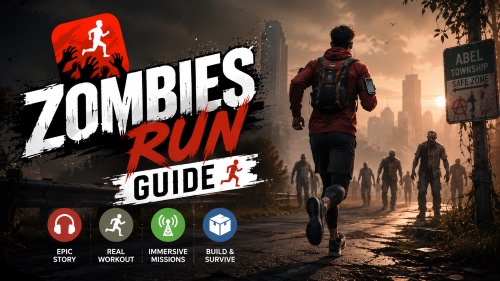
Starting Zombies, Run! can feel confusing at first. You open the app, see missions, supplies, base building, zombie chases, training modes, and story seasons — but what are you actually supposed to do on your first run?
The good news is that Zombies, Run! is much easier than it looks. At its core, it is a story-based fitness app that turns walking, jogging, running, and treadmill workouts into an audio adventure. You listen to missions, collect supplies automatically, build Abel Township over time, and occasionally speed up when zombies get too close.
This Zombies Run Guide explains how to start, what each major feature does, and how beginners can enjoy the app without overthinking every setting.
What Is Zombies, Run!?
Zombies, Run! is an immersive running and walking app where you become Runner 5, a survivor helping Abel Township after a zombie outbreak. During each workout, you hear story clips through your headphones while moving in the real world. Between story segments, the app can play your own music, making the workout feel more like a mission than a normal fitness session.
You do not need to be a serious runner to use it. Zombies, Run! works for walking, jogging, running, treadmill sessions, wheelchair workouts, and general fitness routines. The main appeal is motivation: instead of staring at distance numbers, you are pulled through a story where your movement matters.
For many beginners, that story element is exactly what makes the app easier to stick with. A regular run may feel boring after ten minutes, but a mission about escaping zombies, collecting medicine, or helping Abel Township gives your workout a reason to continue.
Is Zombies, Run! Still Active?
Yes, Zombies, Run! is still active. The app has gone through ownership and development changes, but it returned with new story content in 2026. That means a new player can still start today without feeling like they are joining a dead app.
This matters because Zombies, Run! has been around for many years, and some older discussions online may make the app seem uncertain or outdated. A current Zombies Run Guide should treat it as an active story-fitness platform with a large mission library, ongoing community interest, and enough content for both casual walkers and long-term runners.
For beginners, the best mindset is simple: do not worry about catching up. Start from the beginning, enjoy the story at your own pace, and let the app become part of your normal walking or running habit.
How to Play Zombies, Run! for the First Time
The best first session is not about perfect settings. It is about getting through one mission comfortably and understanding the rhythm of the app.
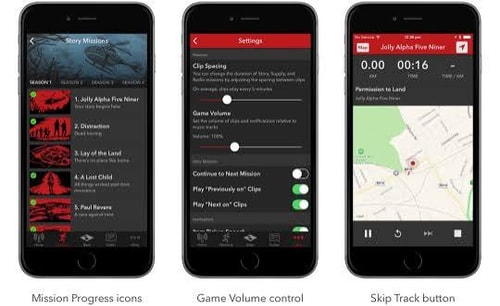
Step 1 Download Zombies, Run! and create your account
Install the app on your phone, sign in, and give it the permissions it needs for audio, movement tracking, and notifications. You can adjust more advanced settings later, so keep the setup simple at first.
Step 2 Start with Season 1 Mission 1
For the main story, Season 1 Mission 1 is the cleanest starting point. It introduces the world, your role as Runner 5, and the basic story format. Even if other missions are available, chronological order is the easiest route for new players.
Step 3 Choose a comfortable workout type
You can walk, jog, run outdoors, or use a treadmill. Beginners should not feel pressured to run fast. A steady walk or light jog is enough to experience the story and learn how missions work.
Step 4 Keep zombie chases off for your first mission
Zombie chases are exciting, but they can also be stressful for a first session. Turn them off at the beginning, complete one or two missions, then enable chases when you understand the app better.
Step 5 Put on headphones and start moving
Once the mission starts, the app will play audio clips and guide the experience. Supplies are collected automatically, so you do not need to tap the screen while moving. Just listen, move, and let the story unfold.
How Zombies Run Missions Work
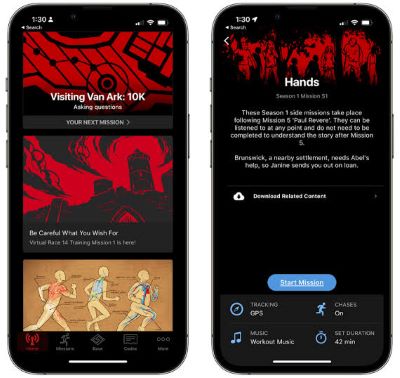
A Zombies, Run! mission is a workout built around audio storytelling. You hear characters speaking to you, giving instructions, reacting to danger, and moving the plot forward. Between those clips, your own music can play, so the mission does not feel like one long podcast.
The app tracks your movement through GPS, step counting, or treadmill-friendly modes depending on your setup. You can usually adjust mission length or choose a workout style that fits your schedule. This makes the app flexible enough for short walks, lunch-break jogs, weekend long runs, or indoor sessions.
During a mission, you automatically collect supplies such as medicine, batteries, food, or other survival items. These supplies can later be used in base building. You do not need to stop, look at the map, or manually pick them up.
The main goal is to finish the workout and progress through the story. Zombies, Run! is not a game where you need perfect scores every time. It works best when you treat each mission as a reason to move.
How Zombie Chases Work in Zombies, Run!
Zombie chases are optional speed challenges that can happen during missions. When chases are turned on, the app may warn you that zombies are closing in. Your job is to speed up for a short period and create enough distance to escape.
Think of zombie chases as interval training. Instead of randomly sprinting, the story gives you a reason to push harder. This can make workouts more exciting, especially after you already feel comfortable walking or jogging with the app.
Getting caught does not end your mission. You may lose some supplies, but you can keep going and still complete the workout. That is an important point for beginners because many new runners assume a failed chase means they failed the entire mission.
For your first few sessions, chases are best treated as an optional challenge. Turn them off while learning the app, then try them later when you want more intensity.
Best Zombie Chase Settings for Beginners
Zombie chases can be fun, but they are not ideal for every workout. New runners, treadmill users, and anyone recovering from soreness should be careful with sudden speed increases. The app is more enjoyable when the challenge matches your current fitness level.
A beginner-friendly setup looks like this:
- Turn off chases for your first one or two missions.
- Enable chases only on days when you feel ready for short bursts.
- Use walking or light jogging missions on recovery days.
Once you are comfortable, chases can become one of the best parts of Zombies, Run!. They add urgency, make interval training feel natural, and turn a normal route into a survival scenario.
Supplies and Base Building Explained
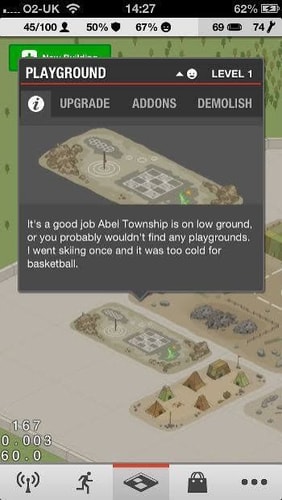
Supplies are items you collect automatically during missions. After your workout, you can use them to improve Abel Township, the main survivor settlement in the story. This base-building system adds a light strategy layer to the app.
Base building can include creating or upgrading buildings, improving the settlement, and making Abel Township feel more alive as you continue the story. It gives your runs a sense of progress beyond distance and calories.
However, beginners should not overthink it. Base building is not the main reason to use Zombies, Run!, and you do not need an optimized township to enjoy the story. Treat it as a fun bonus that rewards consistency.
A good rule is simple: finish missions first, spend supplies later. The more you move, the more resources you collect, and the more your base grows over time.
What Mission Order Should You Follow?
The best mission order for most players is chronological. Start with Season 1 Mission 1 and continue through the main story in order. This keeps character introductions, plot twists, and major events easier to follow.
Zombies, Run! also includes side content, training plans, races, and extra modes. Those can be enjoyable, but they may feel confusing if you jump into them too early. For a first-time player, the main storyline gives the clearest path.
Zombies, Run! 5K Training has a special place in the timeline. It is designed for beginners and fits early in the story, making it a good choice for people who want a structured running plan before continuing deeper into regular missions.
Radio-style content and side missions are better after you understand the world. They can add atmosphere, but the main missions should come first if your goal is a smooth story experience.
Zombies, Run! 5K Training: Should Beginners Start Here?
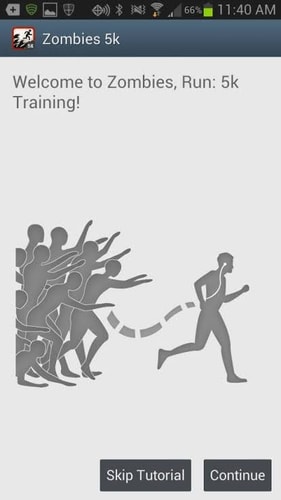
Zombies, Run! 5K Training is a beginner running program built around the same story universe. It is designed to help people gradually work toward running a 5K. Instead of expecting you to run continuously from day one, it mixes walking, jogging, drills, and structured workouts.
This is the better starting point if you are completely new to running. The main Zombies, Run! app is flexible enough for walking, but 5K Training gives you a clearer progression. It tells you when to walk, when to jog, and how to build endurance step by step.
For casual walkers, the main app is still fine. For someone who specifically wants to become a runner, 5K Training is the more supportive path.
A practical route is to play Season 1 Mission 1 first, then move into Zombies, Run! 5K Training if you want structure. After that, return to the main story with more confidence.
Best Zombies Run Settings for Beginners
The best settings depend on your fitness level, but a simple beginner setup works for most people. Keep the experience easy enough that you actually return for another mission.
Start with shorter mission lengths where possible. A 25–35 minute session is usually easier to commit to than a long run. You can increase mission time later once the app becomes part of your routine.
Use step tracking or treadmill mode for indoor workouts. Use GPS tracking outdoors when you want accurate route and pace information. Keep music volume balanced so story clips remain clear.
For the first week, the best setup is usually: chases off, comfortable pace, short mission, chronological story order. That gives you the full Zombies, Run! experience without making the app feel punishing.
Can You Use Zombies, Run! on a Treadmill?
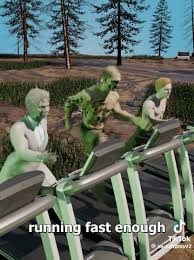
Yes, Zombies, Run! can work on a treadmill. This is useful during bad weather, late-night workouts, gym sessions, or situations where outdoor running is not convenient.
Treadmill sessions work best when you focus on the audio story rather than GPS movement. Since you are not physically changing location outdoors, some GPS-based elements may feel less immersive, but the mission structure, music, and story motivation still work well.
Zombie chases can also be used carefully on a treadmill, but beginners should be cautious. Sudden speed changes on a treadmill are not as natural as outdoor acceleration. A safer approach is to keep chases off at first, then increase treadmill speed manually only when you are comfortable.
For treadmill users, Zombies, Run! works best as an audio adventure layered over your indoor workout. You still get the story, the mission feeling, and the motivation to keep moving.
Can You Use Zombies, Run! While Walking?
Yes, walking is one of the easiest ways to enjoy Zombies, Run!. You do not need to run to understand the story, collect supplies, or progress through missions. Walking can be especially useful for beginners, recovery days, commuting routes, or people returning to exercise after a long break.
A walking-based setup is simple: choose a mission, turn off chases, and move at a comfortable pace. Over time, you can add short jogging intervals if you feel ready. The app does not need to become intense immediately.
Walking also makes the story easier to absorb. Since you are not fighting for breath, you can focus more on characters, plot details, and mission atmosphere.
For many people, Zombies, Run! is not just a running app. It is a way to make regular movement feel less repetitive.
Free vs Paid: Is Zombies, Run! Worth Subscribing To?
Zombies, Run! can be downloaded for free, and free access is enough to test whether the story style motivates you. That is the best way to start. Try a few missions, see how the audio pacing feels, and decide whether the app makes you want to move more often.
A paid membership unlocks more content and gives long-term users access to a much larger mission library. This is most useful if you enjoy the story, want to progress through multiple seasons, or plan to use the app as a regular workout companion.
Beginners do not need to subscribe immediately. The smarter approach is to test the app first, confirm that the format works for your routine, and then consider upgrading when you know you want more missions.
Pricing and membership details can change by platform, region, or membership type, so check the in-app membership page before buying.
Zombies Run Tips to Get More Out of Every Mission
The best Zombies, Run! experience comes from consistency, not perfection. You do not need to run fast, collect everything, or build the perfect base. The app works because it turns movement into a habit.
Use the story as your main motivation. When a mission ends on a cliffhanger, let that pull you into the next walk or run. This is where Zombies, Run! is stronger than a normal fitness tracker: it gives you a reason to come back.
Do not make every workout intense. Some sessions can be walking-only, some can include chases, and some can be relaxed story listening. That variety makes it easier to stay consistent.
Also, keep your route simple at first. A familiar park, quiet street, treadmill, or walking trail is better than a complicated route where you constantly need to check your phone.
GPS and Route Control Tips for Location-Based App Users
Zombies, Run! is best experienced through real movement. The app’s fitness value comes from walking, jogging, or running while the story plays. A location changer should not replace the core workout experience.
That said, many people who enjoy Zombies, Run! also use other location-based apps and games, such as Pokémon GO, Monster Hunter Now, social apps, tracking apps, or map-based tools. In those cases, managing GPS behavior can be useful for route testing, privacy control, location troubleshooting, or exploring how different apps respond to simulated movement.

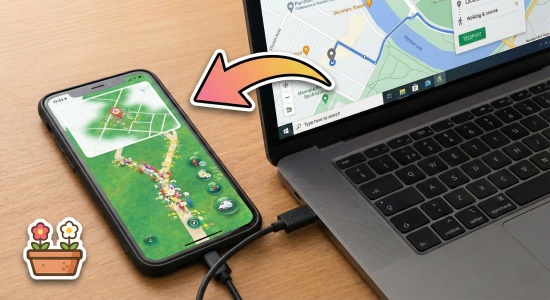
PoKeep Location Changer is a practical option for users who need more control over iPhone or Android GPS location. It supports 1-click location changing, joystick movement, two-spot movement, multi-spot routes, and virtual movement modes without requiring jailbreak or root. For location-based game users, its custom speed and route simulation tools can make GPS movement feel more controlled and realistic.


For a Zombies Run Guide, the most natural use case is not “skip the workout.” It is broader GPS control for people who use multiple location-based apps and want a flexible way to test routes, manage virtual locations, or protect personal location privacy.
Zombies Run Guide FAQ
What are the rules of a zombie run?
The basic rule is simple: start a mission, move while listening to the story, and keep going until the workout ends. Supplies are collected automatically. When zombie chases are enabled, you need to speed up during chase warnings to escape.
Is Zombies, Run! good for beginners?
Yes, Zombies, Run! is good for beginners because it supports walking, jogging, running, and treadmill workouts. New users should start with chases turned off and choose shorter missions. Complete beginners who want a structured running plan may prefer Zombies, Run! 5K Training.
How do you play Zombies, Run!?
Choose a mission, select your tracking and workout settings, put on headphones, and start moving. The app plays story clips and music while you walk or run. After the mission, you can review your workout and use collected supplies for base building.
Should I start with Zombies, Run! or Zombies, Run! 5K Training?
Start with the main app if you already walk or jog comfortably and mainly want story motivation. Start with Zombies, Run! 5K Training if your goal is to build up to running a 5K from a beginner level.
Can I play Zombies, Run! without running?
Yes. Walking works well, especially for beginners or recovery days. You can still enjoy the story, complete missions, and collect supplies without running.
Do zombie chases make you fail the mission?
No. Getting caught during a chase does not end the mission. You may lose some supplies, but the workout continues. This makes chases a challenge, not a strict failure condition.
Is Zombies, Run! free?
The app can be tried for free, and paid membership unlocks more content. Since pricing and membership details can vary, check the current in-app membership page before subscribing.
Final Thoughts on This Zombies Run Guide
Zombies, Run! works because it gives movement a story. Instead of forcing yourself through another boring workout, you become Runner 5, hear urgent radio messages, collect supplies, help Abel Township, and gradually unlock a larger world.
The best way to start is simple: play Season 1 Mission 1, turn off chases, walk or jog at a comfortable pace, and ignore base-building pressure at first. After a few missions, you can add zombie chases, try 5K Training, explore treadmill sessions, and build your routine around the type of movement you actually enjoy.
For location-based app users who also need better GPS control, PoKeep can be a helpful companion for route simulation, virtual movement, and location privacy. But for Zombies, Run! itself, the real reward still comes from moving your body and letting the story pull you forward.
 Related Articles


 Leave Your Comment