 By
By 

Quick Verdict
You can freely customize your Pokémon GO avatar’s appearance, clothes, and poses. The current avatar system also offers more flexible body and gender-related customization than older versions.
Who It’s For
This guide is for Trainers who want to change their avatar, find new clothes or poses, understand the newer customization system, or control how their avatar appears and moves.
Key Takeaways
- Change anytime: Edit your avatar through Trainer Profile → Style → Appearance without losing progress.
- More customization: Adjust body features, hair, colors, clothing, accessories, and poses.
- Movement is separate: Your map avatar follows your device location, while appearance settings only change how your Trainer looks.
Your Pokémon GO avatar is more than the character you choose when starting the game. It represents you on the map, appears on your Trainer profile, and can be seen by other Trainers when you interact through features such as friends, battles, and trades.
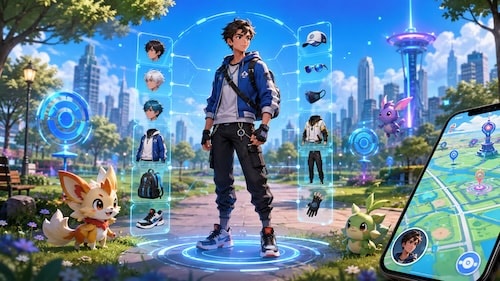
Pokémon GO now offers far more avatar customization than it did in its early years. You can adjust body features, hairstyles, colors, clothing, accessories, and poses without creating a new account. The large avatar redesign introduced in 2024 also changed how gender and body customization work, which means many older tutorials are no longer accurate.
What Is a Pokémon GO Avatar?
A Pokémon GO avatar is the Trainer character connected to your account. It serves two closely related purposes.
First, it is your visual Trainer identity. The clothes, hairstyle, body shape, accessories, and pose you choose determine how your Trainer appears on your profile and in certain social and multiplayer areas of Pokémon GO.
Second, your avatar represents your current location on the Pokémon GO map. When your device's GPS position changes, your Trainer moves around the Map View with you.
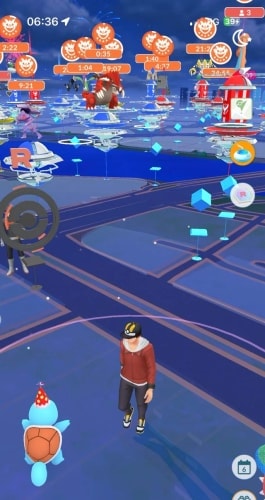
These two functions are worth separating because changing how your avatar looks is completely different from changing where the avatar moves.
How to Change Your Pokémon GO Avatar
You are not permanently stuck with the character appearance you selected when creating your Pokémon GO account.
To edit your current avatar:
Step 1. Open Pokémon GO and tap your Trainer portrait.
Step 2. Select Style.
Step 3. Open Appearance.
Step 4. Select the feature you want to change.
Step 5. Apply your new appearance.
You can return to these settings later and modify your Trainer again.
Change Your Pokémon GO Avatar Appearance
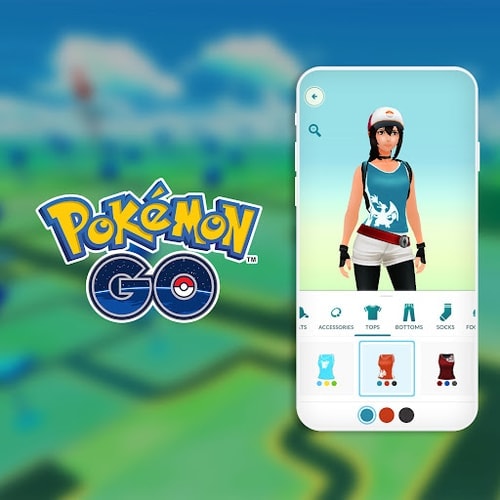
The current avatar editor gives you much more control than the original Pokémon GO character creator.
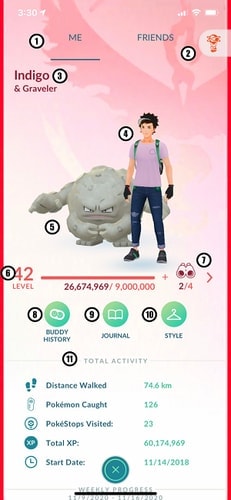
Available options can include characteristics such as:
- Body shape and proportions
- Hairstyle and hair color
- Skin tone and eye color
The Body section also provides more detailed adjustments instead of limiting everyone to a small number of fixed character models.
This makes it possible to substantially change the way your Pokémon GO avatar looks without restarting the game or losing any Pokémon.
Can You Completely Change Your Pokémon GO Avatar Later?
Yes. Changing your avatar does not reset your Trainer progress.
Your Pokémon, Trainer level, Stardust, items, friends, medals, and other account progress remain associated with the same account. You are simply changing the visual representation of your Trainer.
Can You Change Gender in Pokémon GO?
This question has become more complicated because the Pokémon GO avatar system has changed.
Older versions of Pokémon GO relied much more heavily on separate male and female Trainer models. Many older guides therefore tell players to simply switch their Trainer gender.
The current customization system instead focuses on adjustable physical features, body characteristics, hairstyles, colors, clothing, and accessories.
How Pokémon GO Avatar Gender Works Now
Instead of treating your Trainer as one rigid male or female character model, the current editor lets you build the appearance you prefer through individual customization options.
For example, you can change body proportions, hairstyle, chest, shoulders, hips, clothing, and other visual characteristics.
That means someone who originally created a traditionally male-looking Trainer can later create a much more feminine appearance, and vice versa.
There is no need to create another Pokémon GO account simply because you want your Trainer to look different.
Pokémon GO Avatar Customization Options
The modern Pokémon GO avatar editor was significantly expanded through the Rediscover Yourself update.
The customization system now provides considerably more flexibility than the original character creator.
Body and Physical Features
Body customization can include adjustments for areas such as:
- Weight and muscle
- Shoulders
- Chest
- Hips
Rather than choosing only one predefined body, you can adjust several characteristics separately.
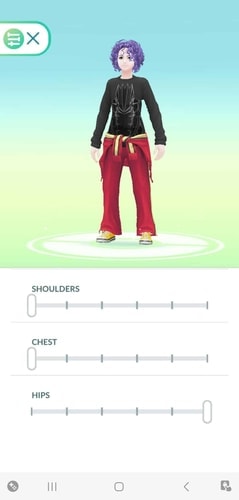
This is particularly useful if the default body presets do not produce the proportions you want.
Hair, Skin Tone, Eyes, and Face
You can also customize smaller appearance details such as hairstyle, skin tone, hair color, and eye color.
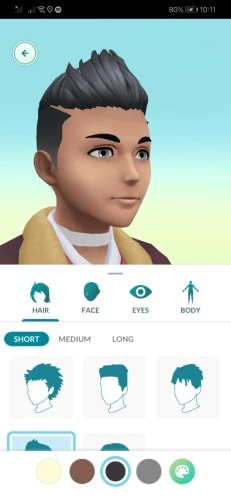
Hairstyles are no longer tied as closely to the old Trainer models, giving players more freedom to combine different hair, body, and clothing choices.
Because Pokémon GO periodically updates its avatar interface, the exact available options can change. If your Style screen differs slightly from older screenshots or tutorials, use the current in-game Appearance menu as the reference.
Pokémon GO Avatars Before and After the 2024 Update
The April 2024 avatar overhaul was one of the largest changes Pokémon GO had made to Trainer customization.
Before the update, Trainers were based around relatively fixed character models. Clothing and accessories had also been designed around those limited proportions.
After the update, players gained substantially more control over body characteristics, hairstyles, colors, and overall appearance.
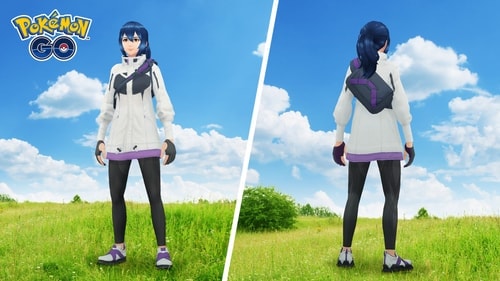
The change made avatar customization more flexible, but it also created problems.
Clothes and accessories originally designed around fixed bodies suddenly had to fit a much larger range of proportions. This contributed to complaints about clothing fit, body proportions, faces, and how some older outfits appeared on the redesigned Trainers.
The system has received additional adjustments since its original rollout, so screenshots from the first days of the update may not represent exactly how Pokémon GO avatars look today.
Pokémon GO Avatar Clothes and Items
Changing clothes is separate from changing your physical appearance.
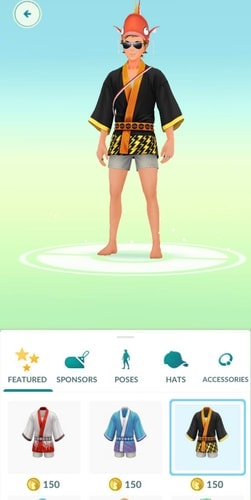
Open your Trainer profile and enter Style to browse available clothing and accessory categories.
Depending on the item, you may be able to equip it immediately or need to unlock or purchase it first.
Free vs. Premium Pokémon GO Avatar Items
Not every Pokémon GO avatar item costs PokéCoins.
Your Style collection can contain a combination of:
- Free or default items
- Premium items purchased with PokéCoins
- Items unlocked through gameplay
Premium cosmetics normally show their PokéCoin requirement before you obtain them.
Cosmetic items do not improve your Pokémon's stats or make your Trainer stronger. Their purpose is personalization.
How to Get More Pokémon GO Avatar Items
The Style Shop is only one source of avatar cosmetics.
Pokémon GO has distributed clothing, accessories, and poses through several types of content, including achievements, limited events, GO Battle League rewards, research, GO Pass rewards, collaborations, and promotional campaigns.
Because of this, two Trainers can have very different Style collections even if they have played for a similar amount of time.
Some cosmetics may also disappear after the event or promotion that originally distributed them, making older items much harder to obtain later.
Save Pokémon GO Outfits with Wardrobe
If you regularly switch between different looks, the Wardrobe feature can save complete outfit combinations.
Instead of manually finding the same hat, shirt, pants, shoes, and accessories again, you can save an outfit and return to it later.
This is especially useful if you maintain different looks for events, Pokémon themes, GO Fest, Team outfits, or different seasons.
One important limitation is that saved Wardrobe combinations may not survive reinstalling Pokémon GO or moving to a new device. If you have carefully built several outfits, it is worth taking screenshots before reinstalling the app.
Pokémon GO Avatar Poses
A pose changes how your Trainer stands or presents themselves rather than changing their physical appearance.
Poses are particularly noticeable on the Trainer profile and can make an otherwise simple outfit look much more distinctive.
How to Get Pokémon GO Avatar Poses
Like clothing, poses can come from different sources.
Depending on the specific pose, it may be available through the Style Shop, GO Battle League progress, events, research, GO Pass rewards, or other limited content.
This means there is no single universal method for unlocking every pose.
If you see another Trainer using a pose you do not have, check whether it is associated with a current event or achievement before assuming it can be purchased directly.
Pokémon GO Poses in 2026
Pokémon GO continues to introduce new poses alongside events and other seasonal content in 2026.
Because availability changes frequently, a static list of every Pokémon GO pose quickly becomes outdated. It is more useful to check the current Style section and event rewards when looking for newly released poses.
Older poses can also become desirable precisely because their original unlock method is no longer available.
Pokémon GO Avatar Codes: Do They Exist?
Yes, but "Pokémon GO avatar codes" usually does not mean a code that copies another player's entire character.
Instead, Pokémon GO occasionally distributes promo codes that unlock avatar cosmetics or research containing cosmetic rewards.
These promotions can be connected to brand collaborations, events, or other special campaigns.
How to Redeem Pokémon GO Avatar Codes
Pokémon GO promo codes are generally redeemed through the official Pokémon GO Web Store offer-redemption system.
After a valid reward is redeemed on the correct Pokémon GO account, the corresponding item or research should become available in-game.
Availability can vary by promotion and region.
Do Pokémon GO Avatar Codes Expire?
Often, yes.
Promotional rewards may have specific redemption periods, regional restrictions, or limited campaigns.
For that reason, old lists of "working Pokémon GO avatar codes" should be treated cautiously. A code that worked months or years ago may no longer be active.
What Are the Rarest Pokémon GO Avatar Items?
There is no official rarity ranking for Pokémon GO avatar items.
Calling one cosmetic the absolute "rarest avatar item" is therefore difficult unless its distribution numbers are known.
It is more useful to look at why an avatar item may be rare.
Limited Event Items
Cosmetics distributed during a short event can become difficult to obtain once that event ends.
A Trainer who missed the original event may have no immediate way to obtain the same item.
Promotional and Collaboration Items
Brand collaborations and promotional campaigns sometimes introduce cosmetics available only through a specific code or promotion.
If the campaign does not return, those items can become relatively uncommon.
Achievement and Competitive Rewards
Some items or poses require reaching particular milestones or participating successfully in certain gameplay systems.
These rewards can be rarer simply because fewer players meet the unlock conditions.
Rarity does not make an avatar item stronger—it only affects how unusual that cosmetic may be among other Trainers.
Pokémon GO Avatar Update and Controversy
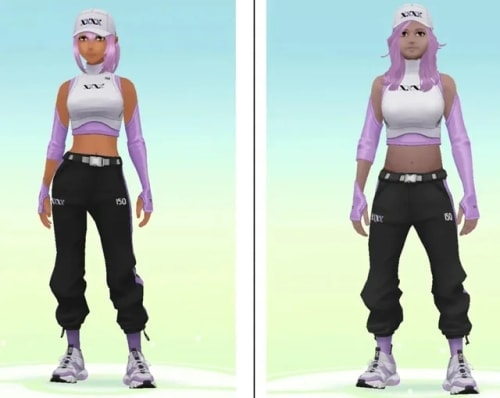
The 2024 avatar update was controversial because it dramatically changed how established Trainers looked.
Players who had used almost the same character for years suddenly saw changes to body proportions, faces, clothing fit, and overall style.
Why Did Players Dislike the New Pokémon GO Avatars?
Common complaints focused on several visual areas:
- Body proportions
- Faces and skin tones
- How existing clothes fit the new bodies
The technical challenge was also significant. Pokémon GO already had years of clothing and accessories created around the older character models.
Giving players far more control over body shape meant those existing assets also needed to work across many more combinations.
Can You Restore the Old Pokémon GO Avatar?
There is no simple setting that switches the entire game back to the original pre-update avatar system.
The practical solution is to use the current Appearance tools to recreate a look you prefer as closely as possible.
Experiment with body customization instead of relying only on presets, since small changes to shoulders, chest, hips, and other characteristics can make clothing look very different.
How to Make Your Pokémon GO Avatar Move
Changing appearance does not control where your avatar walks on the map.
Under normal gameplay, Pokémon GO uses your device's location. As you physically move through the real world, your Trainer moves through the corresponding streets, parks, PokéStops, Gyms, and other areas in Map View.
Adventure Sync can record eligible travel distance when Pokémon GO is not actively open, but it is not a manual control system for moving your avatar around the map.
How to Make a Pokémon GO Avatar Move Without Walking
There is no normal in-game joystick that allows you to manually move your Trainer anywhere on the map.
Players who cannot or do not want to physically walk sometimes consider virtual-location tools that change the GPS position reported by the device.
These tools are fundamentally different from avatar customization. Instead of changing how your Trainer looks, they change the location Pokémon GO receives from the device.
Move a Pokémon GO Avatar with PoKeep Location Changer

PoKeep Location Changer is designed to provide virtual GPS control on iPhone and Android.


For location-based games, PoKeep includes a 360° joystick and customizable movement behavior, allowing the virtual GPS position to move in different directions rather than remaining fixed at one coordinate. It also provides two-point and multi-point route modes for simulated movement between locations.
For example, joystick mode can be used for manual movement, while two-point movement creates a route between a starting point and destination. Multi-point mode allows several waypoints to be arranged into a longer virtual route.
This can be useful when the goal is specifically to control where the Pokémon GO map avatar moves, rather than simply changing its clothes or physical appearance.
Pokémon GO Avatar FAQ
Can I change my original Pokémon GO character?
Yes. Open your Trainer profile, enter Style, and use Appearance to modify your current avatar. You do not need to restart your account.
Can I change from a male-looking to female-looking Pokémon GO avatar?
The modern avatar system no longer relies as heavily on the old male/female Trainer selection. Instead, you can adjust physical features, body proportions, hairstyle, clothing, and other characteristics to create the appearance you prefer.
Do Pokémon GO avatar items affect gameplay?
No. Avatar clothes, accessories, and poses are cosmetic. They do not increase CP, improve catch rates, strengthen Pokémon, or provide battle bonuses.
Why did my saved Pokémon GO outfit disappear?
Saved Wardrobe combinations can be lost after reinstalling Pokémon GO or switching devices. The individual avatar items you actually own should remain tied to your account, but the saved outfit combination itself may need to be rebuilt.
Can old Pokémon GO avatar items come back?
Sometimes cosmetics can return, but there is no guarantee that a limited event, promotion, or reward will be offered again.
Why is my Pokémon GO avatar not moving?
Check that Pokémon GO has the required location permissions and that your GPS position is updating correctly. Weak GPS reception, disabled location services, network problems, or being indoors can prevent the map position from updating normally.
 Related Articles


 Leave Your Comment