 By
By 

Quick Verdict
Changing location on Nextdoor depends on what you want to change: your address, neighborhood feed, post location tag, or phone GPS. If you moved, update your address in Nextdoor settings; if you only need device-level GPS control, PoKeep can help.
Who It's For
This guide is for Nextdoor users who moved, see the wrong neighborhood, want to follow another area, or need to understand whether GPS location changes affect Nextdoor.
Key Takeaways:
- Main Method: Update your address in Nextdoor account settings if you moved.
- Better Alternative: Follow another neighborhood if you only want to view posts from another area.
- GPS Tip: Use PoKeep for phone GPS control, not as a replacement for Nextdoor address verification.
Moving to a new place can make Nextdoor feel confusing. You may still see posts from your old neighborhood, your profile may show the wrong area, or the app may not let you post where you want. For many users, the real question is simple: how to change location on Nextdoor without losing access to local updates.
The answer depends on what “location” means in your situation. On Nextdoor, location can refer to your account address, your neighborhood feed, a location tag in a post, or your phone’s GPS position. These are not the same thing, so the right solution depends on whether you moved, want to browse another area, need to fix a wrong neighborhood, or want to manage device-level GPS location.
What Does “Location” Mean on Nextdoor?
Before changing anything, it helps to understand how Nextdoor uses location. Unlike many social apps, Nextdoor is built around local neighborhoods, so your address plays a major role in what community you can join and what local content you see.
There are four common meanings behind change location on Nextdoor:
- Account address: Your home address connected to your Nextdoor account.
- Neighborhood feed: The neighborhoods and nearby areas you follow or see in your feed.
- Post location tag: A map location attached to a post or comment.
- Device GPS location: The live GPS position detected by your phone.
If you recently moved, you need to change your account address. If you only want to see another area, following another neighborhood may be enough. If you want a post to show a place, use a location tag. If your need is about phone GPS privacy or testing, a GPS location changer may be relevant.
How to Change Your Address on Nextdoor
If you have moved to a new home, the official way to change location on Nextdoor is to update your account address. This is different from changing your phone’s GPS location because Nextdoor uses your address to connect your account with the correct neighborhood.
Step 1. Open Nextdoor and go to your homepage.
Step 2. Select Settings from the bottom of the left-side menu.
Step 3. Click Account settings.
Step 4. Scroll down to Profiles, then click the pencil icon next to your address.
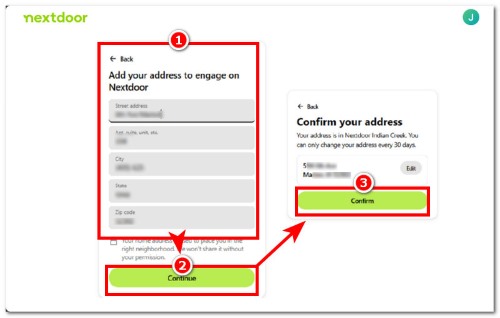
Step 5. Enter your new address and click Continue.
After you submit the new address, Nextdoor may ask you to complete verification before your new neighborhood is fully updated. Make sure the address is entered correctly, especially if you live in an apartment, condo, or multi-unit building.
Nextdoor also limits address changes for account security. If you recently changed your address, you may not be able to change it again immediately. In that case, wait until the address-change lock expires before trying again.
Why You May Not Be Able to Change Location on Nextdoor
Sometimes, users follow the right steps but still cannot change their Nextdoor location. This usually happens because Nextdoor treats location as a verified local identity signal, not just a map preference.
One common reason is the address change limit. Nextdoor generally does not let users keep changing addresses repeatedly in a short period, so your account may be locked from another address change for a period of time. If you recently updated your address, you may need to wait before changing it again.
Another reason is address verification. Nextdoor may ask you to confirm that you actually live at the address you entered. If the address cannot be matched, is formatted incorrectly, or belongs to an apartment or multi-unit building, the system may have trouble validating it.
If the address change option does not appear, update the Nextdoor app, try the website version, check whether you are logged into the correct account, and review your account settings again. When the issue is tied to verification or incorrect neighborhood placement, contacting Nextdoor support may be necessary.
How to See Posts from Another Neighborhood Without Moving
If you only want to read posts from another area, you may not need to change your Nextdoor address. Nextdoor has a separate feature for browsing, following, and unfollowing other neighborhoods. This is useful when you want to check local discussions near a future home, a parent’s neighborhood, a rental property, or another nearby community without changing your verified address.
Step 1. Click your profile picture in the top-right corner.
Step 2. Choose View Profile.
Step 3. Click the neighborhood name shown beneath your name.
Step 4. Search or browse for the neighborhood you want to view.
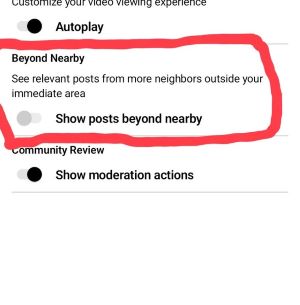
Step 5. Use the Follow option if you want to keep seeing updates from that neighborhood. If you no longer want posts from that area, use the Unfollow option in the same neighborhood area.
How to Tag a Location in a Nextdoor Post
A location tag is different from changing your Nextdoor account location. It simply adds a place to a post or comment, which can be helpful for local recommendations, lost items, events, suspicious activity reports, or neighborhood questions.
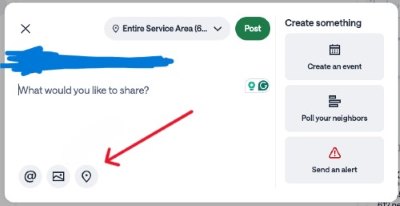
To tag a location, start creating a post and look for the location icon or map option in the post composer. You can usually search for a place or move a map pin before finishing the post.
Use this feature when the post is about a specific place. Do not use it as a substitute for changing your account address after moving.
How to Manage Location Privacy on Nextdoor
Because Nextdoor is a local platform, it is worth reviewing your privacy settings after changing your address or neighborhood visibility. Your profile may show information such as your name, neighborhood, city, or other local identity details depending on your settings and region.
Open your privacy settings and check what others can see on your profile. Also review post visibility before publishing, especially if the post includes a map tag, nearby place, or personal location detail.
Changing your privacy settings does not change your verified address. It only helps you manage what other people can view or infer from your profile and activity.
Can a Location Changer Help with Nextdoor Location?
A GPS location changer can be useful, but it is important to use it for the right purpose. Nextdoor account location is mainly tied to your address and neighborhood verification, so changing your phone GPS should not be treated as a replacement for updating your Nextdoor address.

That said, a tool like PoKeep Location Changer can help when your goal is device-level GPS control. PoKeep lets users change GPS location on iPhone and Android without jailbreak or root, making it useful for privacy testing, location-based app scenarios, and situations where an app reads your live device location.


For example, if you want to test how your phone behaves when GPS is set to another city, or you want more control over GPS-based apps, PoKeep gives you a direct way to set a virtual location. It also supports 1-click location changes and works with many social, tracking, map, and location-based apps.
The key point is simple: use Nextdoor’s official address settings when you actually move, and use PoKeep when your need is about your phone’s GPS location. PoKeep can support location privacy and GPS simulation, but it cannot replace Nextdoor’s address verification system.
Best Method for Each Nextdoor Location Problem
If you are unsure which method to use, match your situation to the right solution.
| Your Goal | Best Solution |
|---|---|
| You moved to a new home | Change your address in Nextdoor account settings |
| You are placed in the wrong neighborhood | Check your address first, then contact Nextdoor if the boundary is wrong |
| You want to see another area | Browse or follow another neighborhood |
| You want to mark a place in a post | Add a location tag to the post |
| You want to change phone GPS | Use a GPS location changer like PoKeep |
| You want more location privacy | Review Nextdoor privacy settings and device GPS permissions |
This approach avoids unnecessary account changes. It also helps you choose the safest and most effective method for your actual need.
FAQs About Changing Location on Nextdoor
How often can you change your location on Nextdoor?
Nextdoor limits how often users can change their address. If you recently moved your account to a new address, you may need to wait before changing it again. This is one reason users may not see the address change option immediately.
How do I change location on Nextdoor app?
Open the Nextdoor app, go to your account or profile settings, and look for the address or Move to a new address option. Enter your new address and complete any verification steps. If the app layout looks different, try using Nextdoor on a desktop browser.
Can I change my Nextdoor location without moving?
If you only want to view another area, try browsing or following other neighborhoods instead of changing your address. If you want to change your phone’s GPS location for device-level purposes, PoKeep can help. If you want to change your verified Nextdoor neighborhood, you need a valid address update.
Can I post on Nextdoor in a different city?
Normal neighbor accounts are usually tied to verified local neighborhoods. You may be able to adjust audience settings or reach nearby neighborhoods, but posting freely in any city is not usually how Nextdoor works. Business, agency, and advertising accounts may have different location options.
Does changing GPS change my Nextdoor neighborhood?
Not usually. Your Nextdoor neighborhood is mainly connected to your account address and verification status. A GPS location changer can affect device-level location, but it should not be treated as a substitute for changing your Nextdoor address.
Final Thoughts on Changing Location on Nextdoor
The best way to change location on Nextdoor depends on what you are trying to fix. If you moved, update your address through Nextdoor settings. If your neighborhood is wrong, check whether the issue is your address or Nextdoor’s neighborhood boundary. If you only want to see another area, follow another neighborhood instead.
For device-level GPS needs, PoKeep Location Changer is a practical option for iPhone and Android users who want more control over their phone location without jailbreak or root. Just keep the distinction clear: Nextdoor address changes belong inside Nextdoor, while GPS changes belong at the device level.
 Related Articles



 Leave Your Comment