 By
By 

Need to change Lyft location? The right method depends on what “location” means in your situation. You may want to fix the pickup pin, update your drop-off address, add a stop, request a Lyft for someone in another city, or change your Lyft driver location.
The good news: most rider-side changes can be handled directly in the Lyft app. The only tricky part is knowing whether you should edit the ride, contact the driver, cancel and rebook, or update your phone’s GPS settings.
Quick Answer: Can You Change Your Lyft Location?
Yes, but only in certain ways. Riders can usually confirm or change the pickup location before requesting a ride, and they can add a stop during a ride from the ride screen. Lyft also allows riders to request a ride for someone else by entering that person’s address and using the “Change rider” option.
A destination or stop change may affect the final ride price. Lyft fare estimates may differ from the final charge when you add a stop, change the destination, or when the trip takes longer or shorter than expected.
For drivers, “change Lyft location” usually means something different. Drivers who want to work in another city or region need to change their driver region in the Lyft Driver app, and that may require document review, inspections, or another background check.
How to Change Lyft Pickup Location Before Requesting a Ride
The easiest time to change your Lyft pickup location is before you confirm the ride. This is useful when the app places the pin on the wrong side of a building, near the wrong entrance, or at a nearby street instead of your exact pickup spot.
Step 1. Open the Lyft app and enter your destination in the “Search destination” field.
Step 2. Choose your preferred ride type and continue to the confirmation screen.
Step 3. Check the pickup location carefully before tapping “Confirm and request.” Lyft lets you confirm or change the pickup location at this stage.
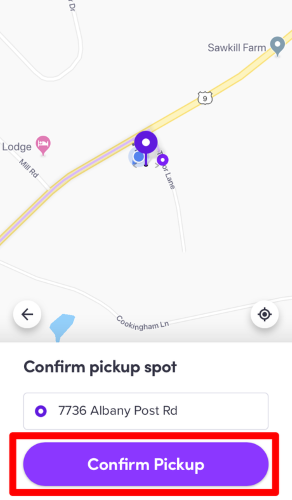
Step 4. Move the pin or type the correct pickup address if the current one is inaccurate.
Step 5. Add pickup notes when needed, especially for gates, apartment complexes, hotels, campuses, or busy venues.
This small check can prevent most pickup problems. A driver may follow the pickup pin rather than your real-world position, so make sure the pin matches where you can safely meet the car.
Tips for Choosing a Better Lyft Pickup Location
Choose a spot where the driver can legally and safely stop. A wide hotel entrance, rideshare zone, marked pickup area, or side street is often better than a crowded main road.
At airports, stadiums, shopping centers, or large venues, the app may guide you to a designated pickup zone instead of letting you choose any exact point. In those cases, follow the app’s pickup instructions and check the terminal, level, zone, or door number before the driver arrives.
If the pickup place is hard to find, use pickup notes. For example, “Meet at the north entrance near the blue sign” is more helpful than “I’m outside.”
Can You Change Lyft Pickup Location After Requesting?
Sometimes you may be able to edit the ride after requesting, but options can vary depending on the ride type, location, and whether the driver is already close. If the app gives you an edit option, use it as soon as possible so the driver receives the updated route or pickup details.
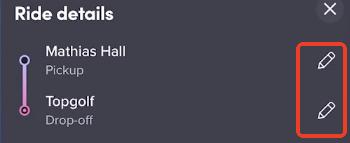
When the app does not allow you to change the pickup location, you still have a few practical choices.
Option 1: Contact your driver. Use the call or message option to explain the exact pickup point. This works best when the new spot is very close to the original pin.
Option 2: Walk to the pickup pin. If the driver is already nearby, walking to the original pin may be faster and less confusing.
Option 3: Cancel and request again. If the pickup location is far away, unsafe, or completely wrong, canceling and rebooking may be cleaner. Be aware that cancellation fees can apply depending on timing and ride conditions.
For scheduled rides, edits are more limited. Lyft says scheduled rides can be edited or canceled up to 1 hour before pickup, and a cancellation fee may apply within 1 hour of pickup. Scheduled airport pickups are stricter: after booking, you cannot add stops or adjust the destination.
How to Change Drop-Off Location on Lyft
If you need to change drop off location on Lyft, make the change inside the app instead of only telling the driver verbally. This helps the app update the route, fare, and driver navigation.
Step 1. Open the active ride screen.
Step 2. Look for the destination or address area at the top of the ride screen.
Step 3. Use the edit option or add-stop option if available.
Step 4. Enter the new drop-off location and confirm the change.
Lyft’s driver guidance confirms that passengers can update the drop-off location or add a stop in the app during the ride, and the driver app alerts the driver when this happens.
You should still mention the change to your driver politely, especially if it adds time, changes direction, or requires a stop. The app update matters, but clear communication keeps the ride smoother.
How to Add a Stop on Lyft
Adding a stop is slightly different from changing the final destination. A stop is best for a short errand, picking someone up, or dropping something off before continuing to the final address.
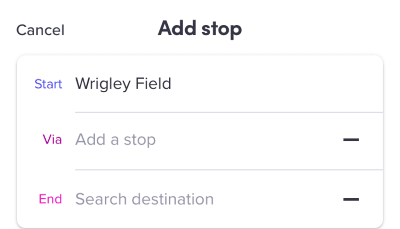
To add a stop during a ride, tap the “+” icon next to the listed addresses at the top of the ride screen. Lyft recommends asking the driver to end the ride and requesting a new one later if you will be away from the car for more than 5 minutes.
Keep stops short and realistic.
A driver may have another ride, a scheduled pickup, or personal plans after your trip. If your stop turns into a long wait, ending the current ride and booking again is usually the fairest option.
Will Lyft Charge More If You Change the Destination?
Yes, your final price can change if you update the route. Lyft’s fare estimate may not include later changes such as added stops, a new destination, traffic delays, route changes, tips, tolls, or local fees.
This does not always mean the ride will cost more. A shorter new destination could reduce the final cost, while a farther destination, extra stop, longer wait, or busier route could increase it.
You may also see a temporary pending transaction when changing your destination. A pending transaction is not the same as a final charge; it is usually a payment authorization that later disappears or adjusts after processing.
How to Request a Lyft for Someone Else in Another Location
You do not need to fake your own location to order a Lyft for another person. Lyft supports rides for other riders.
Step 1. Enter the other person’s pickup or destination address.
Step 2. Tap “Change rider” at the top of the screen.
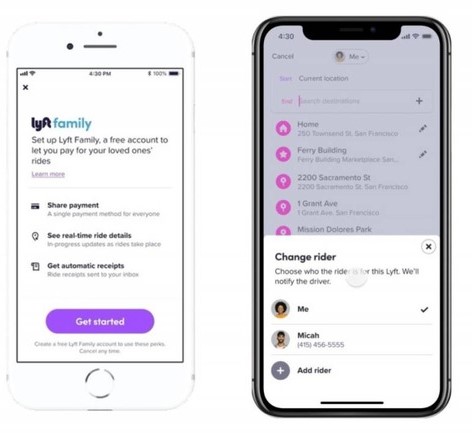
Step 3. Select the rider from your contacts.
Step 4. Confirm the ride and share any pickup details with the rider.
The rider receives the ride details, and you can watch the trip progress in your app. (Lyft 帮助中心)
This is the best method when arranging a ride for a friend, family member, guest, employee, or someone in another city. It keeps the ride linked to the correct passenger instead of trying to make your phone appear somewhere else.
Why Lyft Shows the Wrong Location
If Lyft shows the wrong pickup point, the cause is usually GPS accuracy, phone permissions, weak connectivity, map pin placement, or a large venue with designated pickup zones.
Start with simple fixes first. Close and reopen the app, toggle airplane mode, restart your phone, and make sure the Lyft app is updated. Lyft also notes that poor phone connectivity can cause app issues such as trouble requesting a ride or logging in.
For GPS accuracy, placement matters. Phones may track location poorly when they are in a pocket, center console, or blocked from a clear signal. Lyft’s driver-side GPS guidance also recommends keeping the app and phone software current, closing unused apps, giving GPS a minute or two to settle, and checking location settings if access was denied.
Fixes to Try When Lyft Location Is Wrong
Step 1. Check that location permission is enabled for Lyft in your phone settings.
Step 2. Turn airplane mode on and off to refresh the connection.

Step 3. Restart the Lyft app and your phone.
Step 4. Update the Lyft app and your phone software.
Step 5. Move outdoors or closer to a window if GPS is drifting.
Step 6. Manually adjust the pickup pin before confirming the ride.
If none of these work, use the in-app support flow and include screenshots if possible. That helps support understand whether the issue is GPS, payment, app behavior, or ride availability.
What About Drivers Who Want to Change Lyft Location?
For drivers, change Lyft driver location usually means changing the approved driving region, not just moving the phone’s GPS pin. This is important because city, state, vehicle, document, and inspection requirements can differ.
To change your driver region, open the Lyft Driver app and go to:
Step 1. Main menu.
Step 2. Get Help.

Step 3. Help Center.
Step 4. Account and earnings.
Step 5. Change where you drive.
Step 6. Select new region or contact support.
Changing where you drive may make the account inactive for a few days while Lyft processes the application. You may also need additional documents, a vehicle inspection, document re-approval, or another background check.
This is different from updating a home address or shipping address. It is also different from using a driver location filter.
Lyft Location Filters Are Not the Same as Changing Driver Region
Lyft location filters help drivers control the rides they receive, but they do not officially change where a driver is approved to work. Available filters include Arrive on time, Head to destination, and Stay within area, which can filter rides within a 5–10 mile radius around a map pin.
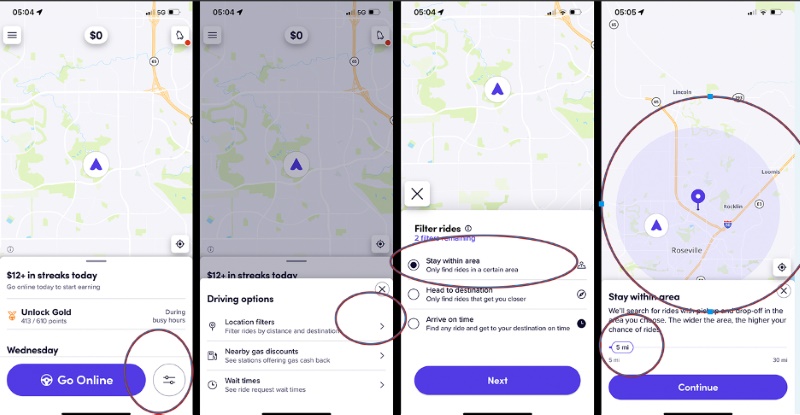
Filters can be helpful when you are trying to drive toward home, stay in a certain area, or arrive somewhere by a certain time. They are not a workaround for city or state approval requirements.
Can Location Changers like PoKeep Help Change Lyft Location?
PoKeep Location Changer can help with device-level GPS control, but it should not be treated as a replacement for Lyft’s official ride settings. If you need to change a real Lyft pickup, drop-off, rider, stop, scheduled ride, or driver region, use the Lyft app or Lyft Driver app first.


Where PoKeep fits better is broader location control. It is designed to change GPS location on iPhone and Android without jailbreak or root, offers one-click location changes, includes a 360° GPS joystick, supports virtual movement, and can be used for location-based apps, privacy protection, and geo-restriction scenarios.

That distinction matters.
For example, PoKeep may be useful if you are testing how a location-based app reacts to different GPS coordinates, protecting your real location in social or tracking apps, or simulating movement in supported apps. It is not the right tool for bypassing Lyft’s pricing, pickup rules, rider matching, airport pickup zones, or driver-region approval.
When PoKeep Makes Sense
PoKeep may be useful when your goal is to manage your phone’s GPS behavior outside of the Lyft ride-booking flow. For instance, you may want to test app location behavior, temporarily mask your real position in privacy-sensitive apps, or simulate a route for apps that rely on GPS movement.
It also offers temporary, reversible changes. The product materials note that restarting the device can restore the real GPS location and that PoKeep does not make permanent device changes.
When PoKeep Is Not the Right Solution
Do not use a GPS location changer to misrepresent a Lyft pickup, trick a driver, avoid a fare change, manipulate ride matching, or bypass driver-region requirements. Those actions can create safety, billing, and account problems.
For Lyft-specific tasks, the cleanest path is still simple: edit the pickup or destination in Lyft, add a stop through the ride screen, request a ride for someone else through “Change rider,” or change driver region through the Lyft Driver app.
Common Problems When You Change Lyft Location
The pickup pin keeps jumping back
This often happens when GPS is weak or the app is snapping the pickup to a safer or approved location. Try typing the address manually, zooming in on the map, or choosing a nearby legal pickup point.
The driver is going to the old location
If you changed the pickup too late, the driver may already be following the original pin. Message or call the driver immediately. If the new pickup is far away, canceling and rebooking may be easier.
The app will not let you change the destination
Some ride types, scheduled airport pickups, or special ride arrangements may restrict changes. If the edit option is unavailable, check whether canceling and booking a new ride is the better option.
The final price is different
This is expected when the route changes. Added stops, new destinations, tolls, demand, traffic, and trip duration can all affect the final charge.
FAQs About How to Change Location on Lyft App
Can you change your Lyft location?
Yes, if you mean changing the pickup before confirming, adding a stop, updating a destination during a ride, or requesting a ride for someone else. If you mean changing a driver’s working region, that must be done through the Lyft Driver app.
Can you change Lyft pickup location after requesting?
Sometimes, but it depends on the ride and app options available at that moment. If you cannot edit it, contact the driver, walk to the original pin, or cancel and rebook if the pickup is too far off.
How do I change drop off location on Lyft?
Open the active ride screen and edit the destination or add a stop if the option is available. The change should be made inside the app so the driver receives updated route information.
Does Lyft charge if you change destination?
Your final fare can change after a destination change or added stop. The new total depends on the updated route, time, distance, tolls, demand, and other applicable fees.
How do I change my Lyft driver location?
Drivers can change their region in the Lyft Driver app through Get Help → Help Center → Account and earnings → Change where you drive. Processing may take a few days and may require additional documents, inspection, or background review.
Can I use PoKeep to change my Lyft pickup location?
Use Lyft’s own pickup and destination tools for real rides. PoKeep is better suited for general GPS control, location privacy, and testing location-based apps, not for changing official Lyft trip details or driver-region eligibility.
Final Thoughts on Changing Lyft Location
Changing Lyft location is simple when you choose the right method. For riders, edit the pickup before confirming, update the destination through the ride screen, add short stops when needed, and use “Change rider” when booking for someone else.
For drivers, changing location is more formal. A driver region change may require Lyft review, documents, inspections, or background checks, while location filters only control the types of ride requests you receive.
PoKeep can be helpful for broader GPS-location control, especially privacy and location-based app scenarios. But for actual Lyft rides, the safest and most reliable answer is to make the change inside Lyft itself.
 Related Articles





 Leave Your Comment