 By
By 

You open the Lyft Driver app in a new city, expect to start earning, and suddenly realize that “changing location” is not as simple as moving your phone on a map. For Lyft drivers, location can mean several different things: your approved driving region, the area where you want to receive ride requests, a rider’s pickup or drop-off point, or your phone’s GPS location.
That is why searches like “change Lyft driver location,” “how to change Lyft driving location,” and “change Lyft driver region” often lead to confusing answers.
This guide explains what each type of Lyft location change means, when to use each method, and why drivers should avoid using GPS spoofing as a shortcut for active Lyft driving. 🚗
What Does “Change Lyft Driver Location” Actually Mean?
Before changing anything, it helps to identify what you are really trying to do. The phrase change Lyft driver location can describe several different problems.
You may want to change the city or state where you are approved to drive. You may only want ride requests that move you toward home, an airport, or a busy area. A rider may want to change the pickup or drop-off address. Or you may be looking for a way to change your phone’s GPS location for general app testing, privacy, or map simulation.
These situations require different solutions.
For active Lyft driving, the most important distinction is this:
Changing your Lyft driver region is not the same as changing your phone’s GPS location.
If you want to drive in a different approved city or state, use Lyft’s official driver-region process. If you only want to guide your next few rides, use Lyft’s location filters. If the rider needs a new destination, the ride details should be updated in the Lyft app.
How to Change Your Lyft Driver Region Officially
If you are moving, relocating temporarily, or trying to drive in a different city, the official method is to change your driver region in the Lyft Driver app.
Step 1. Open the Lyft Driver app.
Step 2. Open the main menu and tap Get Help.

Step 3. Tap Help Center, then choose Account and earnings.
Step 4. Tap Change where you drive.
Step 5. Choose Select new region or Contact support.
Lyft allows drivers to change their driver region through this in-app help flow, but the change may not be instant. Your account may become inactive for a few days while the application is processed, and your current incentives or Lyft Rewards status may be affected.
Why Your Lyft Driver Location Change May Take Time
A new driving region may have different rules from your current one. You may be asked to upload extra documents, complete a car inspection, wait for document re-approval, or go through another background check. City requirements can also differ, including vehicle inspection rules.
This is why changing your Lyft driver location should be treated like an account update, not just a map setting.
What to Check Before Driving Lyft in Another City or State
Driver and vehicle requirements vary by city and state. A region change may involve more than choosing a new location in the app.
Before you try to drive Lyft in another state or city, check these items:
- valid driver’s license, vehicle registration, and insurance;
- vehicle inspection or local permit requirements;
- whether the region requires in-state documents.
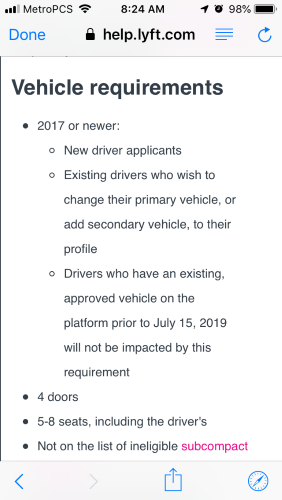
Lyft’s driver requirements include a current valid driver’s license, valid plates with current registration, and current valid insurance with your name and VIN on the policy. Some cities and states may require in-state documents. You can go to Lyft requirements page for more detailed information.
Can You Drive Lyft in Another State While Traveling?
Sometimes, yes — but do not assume your approval automatically transfers everywhere.
If you are traveling for vacation or planning to earn in another state for a short period, check the destination region’s requirements first. Lyft’s requirements vary by city and state, and switching into a new driving region may require extra documents, inspection, re-approval, or another background check.
For a short trip, it is safer to confirm your eligibility before you rely on Lyft earnings in the new area.
Use Lyft Location Filters When You Do Not Need a Full Region Change
Not every “change Lyft driver location” problem requires changing your official region.
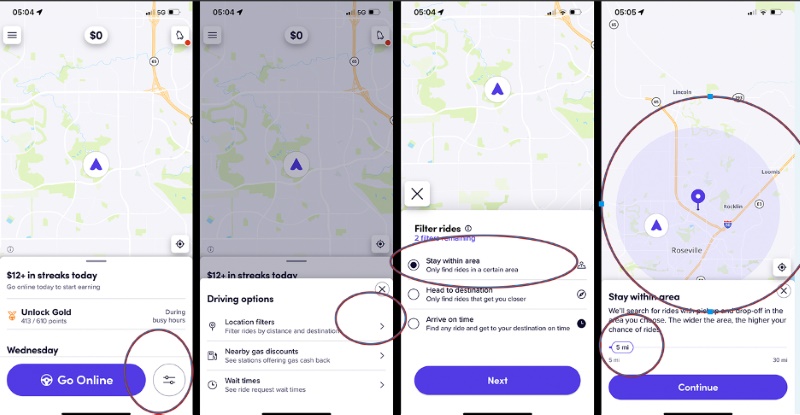
If you are already approved to drive in your area but want more control over where ride requests take you, use Lyft location filters instead. Location filters help drivers control ride requests in three ways: Arrive on time, Head to destination, and Stay within area. The “Head to destination” filter prioritizes rides going toward a selected destination, while “Stay within area” filters rides within a 5–10 mile radius around a map pin.
This is useful when you want to:
- drive toward home at the end of a shift;
- stay near a busy zone;
- arrive near a planned destination by a certain time.
Location filters can be activated from the filter icon on the home screen, but they are limited. They can only be used 2 times per day, and usage resets at midnight local time. Going offline while a filter is active still counts toward the daily limit.
Lyft Driver Region vs. Location Filter
A driver region change updates where you are approved to drive. It may trigger document review, inspection, or account downtime.
A location filter only controls the kinds of ride requests you receive while you are already driving in an approved area.
If you moved to a new state, use the driver-region process. If you simply want rides that take you closer to home, use a filter.
Can a Lyft Driver Change the Rider’s Destination?
This is another common source of confusion. When people search “can Lyft driver edit destination address” or “Lyft driver change drop off location,” they are usually talking about the ride route, not the driver’s work region.
For riders, pickup and destination details are handled in the Lyft app. Before requesting a ride, riders can confirm or change the pickup location. During a ride, riders can add an extra stop by tapping the + icon near the listed addresses.
If the destination changes, the fare can change too. Lyft’s upfront price may change when the route or destination changes, and the final price may differ if the rider changes the destination, adds stops, or the trip takes longer or shorter than estimated.
Does Lyft Charge More If the Destination Changes?
It can.
If the final destination differs from the original ride request, or if the time and distance differ substantially from the quoted fare, the original fare quote may be replaced by a variable fare. Distance may be calculated using GPS data from the rideshare provider’s device.
For riders, this means a new drop-off or extra stop can increase the final charge. For drivers, it means accurate route and GPS data matter for payment and trip records.
How to Order a Lyft for Someone in a Different Location
If your real question is not about changing the driver’s location, but about requesting a ride for another person, Lyft supports that too.
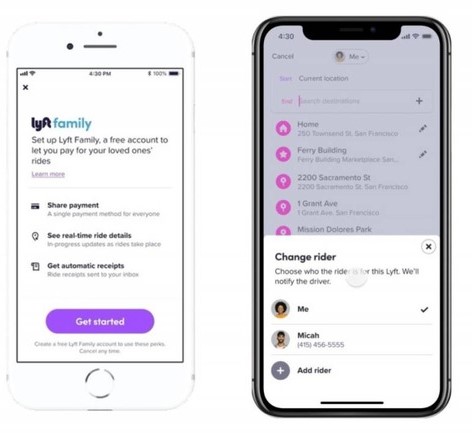
To request a Lyft for someone else, set the rider’s destination, tap Change rider, select a person from your contacts, and send the ride. The rider receives a notification, and if they do not have a Lyft account, they may receive an SMS link to create one.
This is useful when helping a friend, family member, guest, or coworker get picked up somewhere else.
Should You Use GPS Spoofing to Change Lyft Driver Location?
No — not for active Lyft driving.
GPS spoofing is not the right way to change your Lyft driver region, bypass local requirements, or appear available in a city where your account is not approved. Lyft collects precise driver location when the app is open and in use, including while it runs in the background. Driver device information and mobile sensor data may also be collected.
Lyft driver agreements also require drivers to have the proper licenses, approvals, and authority in every jurisdiction where they provide rideshare services. Drivers must not attempt to defraud Lyft or riders, and suspected fraud can lead to withheld fares or other action.
So, if your goal is to change Lyft driver region, use Lyft’s official process. If your goal is to receive rides toward a specific area, use location filters. Do not rely on GPS spoofing to work around Lyft’s driver-location or compliance rules.
Where Location Changers Like PoKeep Fit

PoKeep Location Changer is designed for general GPS location changes on iPhone and Android. It supports changing phone location without jailbreak or root, one-click location changes, joystick-style movement, route simulation, and location privacy or geo-restriction use cases.


That makes PoKeep useful for non-rideshare situations such as:
- testing how an app behaves in another location;
- simulating movement in map-based or location-based apps;
- protecting personal location privacy in supported scenarios;
- exploring GPS-based apps without physically traveling.
For Lyft driving, however, PoKeep should not be used as a replacement for a driver-region change. Lyft’s app, payments, ride matching, compliance checks, and trip records depend on accurate driver location. Use the official Lyft Driver app process when your goal is to change where you drive.
FAQs About Changing Lyft Driver Location
How do I change my Lyft driver location?
If you mean your official driving city or state, open the Lyft Driver app and go to Get Help → Help Center → Account and earnings → Change where you drive → Select new region / Contact support. Your account may need a review before the change is complete.
How long does it take to change Lyft driver region?
There is no single guaranteed time. Your account may be inactive for a few days while the application is processed. Extra documents, inspection, document re-approval, or background check processing can affect timing.
Can I drive Lyft in another state?
You may need to meet that state or city’s driver and vehicle requirements first. Requirements vary by region, and some places require in-state documents.
Can Lyft drivers change destination?
The rider should update the destination, pickup location, or stop details in the Lyft app. Riders can confirm or change pickup location before requesting a ride and add a stop during a ride.
Does changing a Lyft destination change the fare?
Yes, it can. The upfront price may change if the route or destination changes, and the final price may differ if the rider changes destination, adds stops, or the trip duration changes.
Can I order a Lyft for someone in another location?
Yes. Set the rider’s destination, tap Change rider, choose the rider from your contacts, and send the ride. The rider will be notified that a ride was sent to them.
Is GPS spoofing safe for changing Lyft driver location?
It is not recommended for Lyft driving. Lyft uses precise driver location, device information, and trip data for ride matching, route tracking, fare calculation, safety, and compliance. If you need to change where you are approved to drive, use the Lyft Driver app’s official region-change process.
Final Thoughts on How to Change Lyft Driver Location
The best way to change Lyft driver location depends on what you are trying to change.
If you are moving to another city or state, change your driver region in the Lyft Driver app. If you only want rides toward a destination or within a nearby area, use location filters. If a rider needs a new pickup, stop, or drop-off location, update the ride details in the Lyft app.
For general GPS location needs outside Lyft driving, PoKeep Location Changer can help you modify or simulate your phone location. But for Lyft work, stay with the official driver-region and in-app location tools. That is the safest path for account access, fare accuracy, and local driving requirements.
 Related Articles




 Leave Your Comment