 By
By 

You may want to find a Mac spoofer because your Wi-Fi keeps recognizing your device, a network blocks your adapter, or you want more privacy on public hotspots. But here is the first thing to clarify: in most cases, “Mac spoofer” really means MAC address spoofer, not a tool for Apple Mac computers.
A MAC address spoofer changes the MAC address your network adapter presents to a local network. It can be useful for privacy, troubleshooting, network testing, or device registration issues. But it is not the same as a VPN, IP changer, or GPS location spoofer.
What Does “Mac Spoofer” Actually Mean?
A MAC address is a hardware-level network identifier used by devices such as Wi-Fi cards, Ethernet adapters, phones, tablets, and laptops. It helps a local network recognize a device when it connects.
A Mac spoofer or MAC address spoofer changes the address that your device reports to the network. The original hardware address is usually burned into the network interface, but many operating systems, drivers, and tools can make the adapter use a different software-level address instead.
This is why MAC spoofing is often described as changing a device’s local network identity.
It does not physically rewrite the network card.
It does not change your GPS location.
It does not automatically hide your browsing activity from websites.
Why Do People Spoof a MAC Address?
People search for mac address spoofer, spoof mac address, or how to spoof mac address for several reasons. Some are practical and legitimate; others can violate network rules or laws.
Privacy on Public Wi-Fi
Public Wi-Fi networks can use device identifiers to recognize returning devices. MAC randomization helps reduce passive tracking because the network sees a different address instead of the factory MAC address. Android explains this privacy issue clearly: factory MAC addresses are globally unique and static, which can allow devices to be tracked across Wi-Fi networks.
This is why modern systems increasingly include built-in randomization features.
Troubleshooting Network Access
Sometimes a router, hotel Wi-Fi, campus network, or ISP-like setup remembers a specific device address. If you replace a network card or switch devices, the network may treat the new adapter as unknown. A temporary MAC change can help with legitimate troubleshooting when you control the device or have permission from the network owner.
Testing Network Security
Network administrators may test whether MAC filtering, access lists, or device registration systems can be bypassed. This is a defensive use case. It helps admins understand whether their network relies too heavily on a weak identifier.
Avoiding Device Tracking at Home or Work
Some users do not want every network to recognize their real hardware address. Built-in tools like Apple’s Private Wi-Fi Address, Android’s MAC randomization, and Windows Random hardware addresses are designed for this kind of privacy protection.
MAC Spoofing vs IP Spoofing vs GPS Spoofing
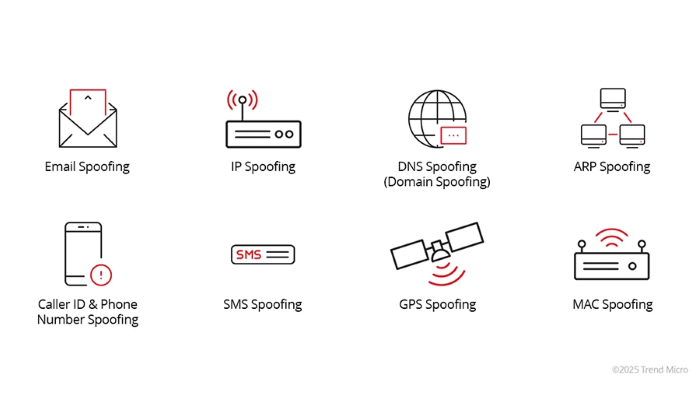
This is where many users get confused. A Mac spoofer is not always the tool they actually need.
| Spoofing Type | What It Changes | Common Use Case | What It Does Not Do |
|---|---|---|---|
| MAC spoofing | Local network adapter identity | Wi-Fi privacy, device registration, testing | Does not change GPS location or public IP |
| IP spoofing / IP changing | Network address seen online or in traffic | VPN-like privacy, routing, testing | Does not change Wi-Fi MAC address |
| GPS spoofing | App-reported physical location | Location games, maps, social apps, dating apps | Does not change network adapter MAC |
MAC spoofing is limited to the local broadcast domain, which means it mainly matters to nearby network equipment such as routers and access points. It is not a full online anonymity tool.
If your goal is to change location inside apps like Pokémon GO, Monster Hunter Now, Life360, Find My, Tinder, Bumble, Snapchat, or map apps, you are looking for GPS spoofing, not MAC spoofing.
Best MAC Spoofer Options by Platform
Different devices handle MAC spoofing differently. Some offer built-in privacy features. Others require a third-party tool. In some cases, the network adapter driver may not support manual MAC changes at all.
Windows MAC Address Spoofers
Windows users usually have two main options: built-in Random hardware addresses or a dedicated MAC address changer.
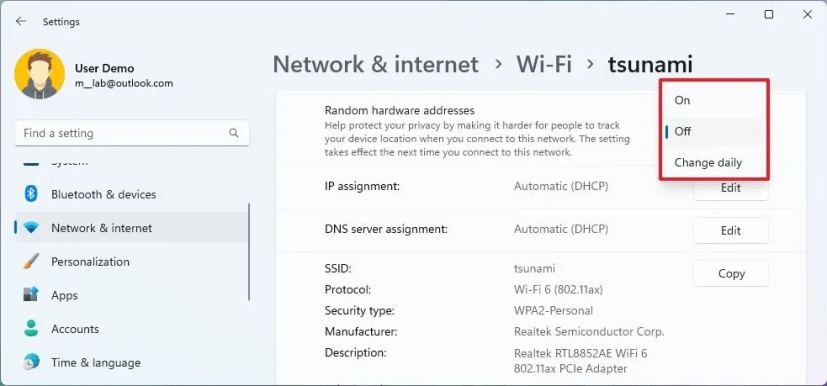
Windows supports random hardware addresses for Wi-Fi when the device hardware and driver support the feature. You can turn it on for all networks or for a specific saved Wi-Fi network from Windows Wi-Fi settings.
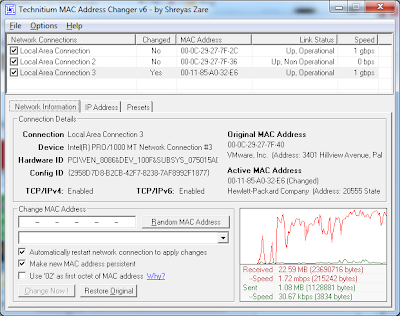
For manual control, Technitium MAC Address Changer is one of the best-known Windows tools. It is designed to change or spoof the MAC address of a network interface card and can show adapter details before applying a new address.
Another Windows option is SMAC Tool, which describes itself as a MAC Address Changer / Spoofer for Windows systems. Its page notes that it changes the software-based MAC address rather than the burned-in hardware address.
A good Windows workflow is to start with the built-in random hardware address setting if privacy is your only goal. Use a third-party MAC spoofer only when you need more specific control and understand the network consequences.
macOS MAC Spoofing Tools
On macOS, users often search for spoof-mac Homebrew, SpoofMAC, or MAC address changer Mac.
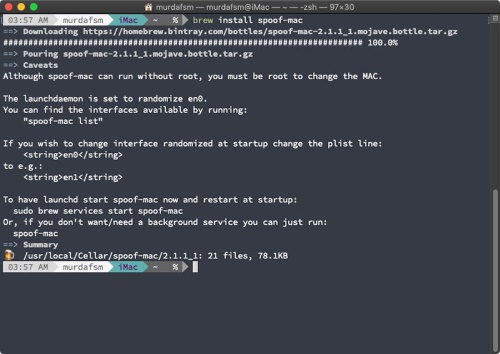
The Homebrew formula spoof-mac installs a tool for spoofing a MAC address in macOS. Its current formula page lists the install command and describes it as a macOS MAC address spoofing utility.
The GitHub project SpoofMAC was built to change MAC addresses on OS X, Windows, and Linux. Its documentation notes that macOS Wi-Fi may need to disconnect before the change applies correctly, and that randomizing or setting an address requires root privileges.
There is also a Node.js port named spoof, which supports macOS, Windows, and Linux and provides commands for listing devices, randomizing a MAC address, setting a specific address, and resetting where possible.
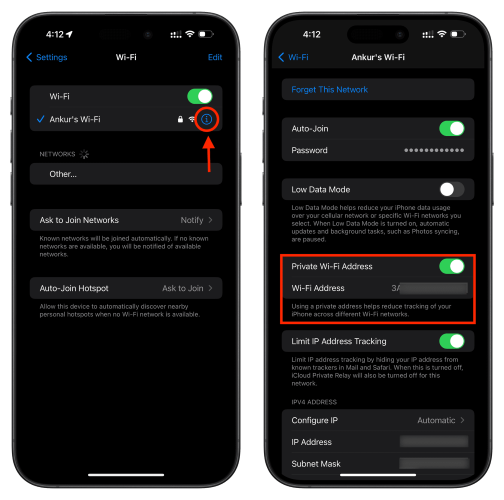
For everyday privacy, macOS users should also check Apple’s built-in Private Wi-Fi Address feature before installing a third-party MAC spoofer. Apple devices can use a different Wi-Fi address for each network and may rotate it periodically.
Linux MAC Address Changer Options
Linux users usually have more flexibility. The common tool is macchanger, also known as GNU MAC Changer. It is used to view and manipulate MAC addresses of network interfaces.
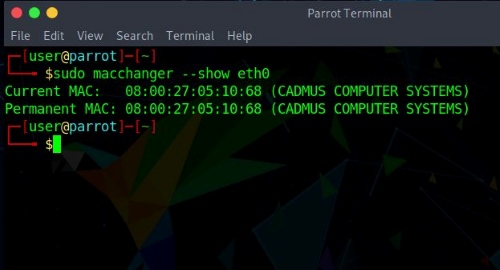
Linux is a good fit for advanced users who need temporary address changes, testing environments, or privacy workflows. However, desktop network managers can sometimes reset adapter settings when reconnecting, so users should verify the active MAC address after reconnecting to Wi-Fi.
Android MAC Address Changer Options
Modern Android already includes MAC randomization for Wi-Fi privacy. Android 10 and higher use randomized MAC addresses by default when connecting to Wi-Fi networks, and users can enable or disable MAC randomization for individual networks in the network details screen.
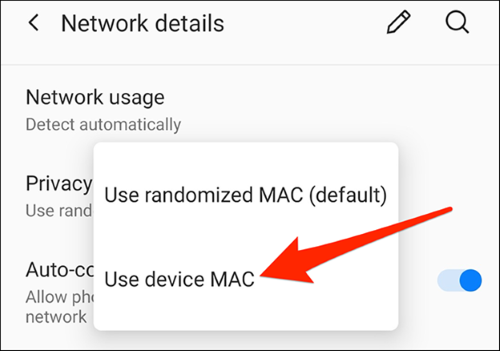
This means many Android users do not need a separate Android MAC address changer. Built-in randomization is usually enough for public Wi-Fi privacy.
Manual MAC changing on Android is more complicated. Third-party apps may depend on Android version, manufacturer restrictions, root access, or hardware support. If an app claims to change a MAC address without root, check recent reviews, compatibility notes, and whether it affects only Wi-Fi scanning or actual network association.
iPhone, iPad, and Mac Private Wi-Fi Address
For iPhone, iPad, Mac, Apple Watch, and Apple Vision Pro, the built-in Private Wi-Fi Address setting is usually the most practical option. Apple devices can identify themselves to each Wi-Fi network using a different address, which improves privacy and reduces cross-network tracking.
This is not the same as a full manual MAC address spoofer. It is better described as automatic MAC randomization or private addressing. For most iPhone users, that is enough. If a school, workplace, or home router requires a stable address, users may need to adjust the setting for that trusted network.
Chromebook MAC Address Changer Options
Chromebook searches often include “MAC address changer for Chromebook,” but verified, current, official guidance is less clear than for Windows, Android, or Apple devices. ChromeOS behavior can vary by version, hardware, and managed-device policy.
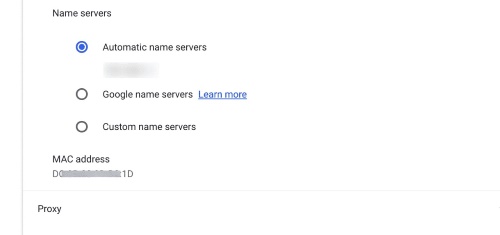
For an article targeting general users, it is safer to avoid promising a universal Chromebook MAC spoofer. You should check ChromeOS Wi-Fi privacy settings, device management restrictions, and official Chromebook support resources for their model.
How to Detect or Prevent MAC Spoofing
MAC spoofing is one reason MAC filtering is weak as a standalone security measure. If a network only checks whether a device has an allowed MAC address, someone who knows an approved address may be able to imitate it.
For home networks, stronger protection starts with WPA2 or WPA3, a strong Wi-Fi password, disabling unknown devices, and keeping router firmware updated. MAC filtering can be used as a small extra layer, but it should not be treated as serious security by itself.
For business or campus networks, stronger prevention usually involves:
- 802.1X authentication instead of simple MAC allowlists.
- Network access control with user/device verification.
- Switch port security and monitoring for duplicate or suspicious MAC behavior.
MAC Address Bypass can help connect devices that do not support 802.1X, such as printers or cameras, but it should be combined with additional security controls because MAC addresses can be spoofed.
Need a GPS Spoofer Instead of a MAC Address Spoofer?
If you searched for Mac spoofer because you want to change your location in a game, dating app, family-tracking app, or social platform, a MAC address changer is the wrong tool.
For that goal, you need a GPS location changer. If you also need to change App Store region, screenshot metadata, or other location settings on the Mac itself, see our 5 Ways to Change Location on Mac guide.

PoKeep Location Changer is designed for users who want to change GPS location on iPhone or Android from a Windows or macOS computer. It supports fake GPS on Android and mock iOS location without jailbreak or root, one-click location change, 360° joystick movement, Pokémon GO and Monster Hunter Now location scenarios, Life360 and Find My location privacy use cases, and geo-restriction-related location changes.


This distinction is important. A MAC spoofer changes how a Wi-Fi network sees your device. PoKeep changes the GPS location that location-based apps see on your phone. If your real goal is app location control, PoKeep is the more relevant solution.
PoKeep also includes movement modes such as joystick control, two-spot movement, multi-spot routes, jump teleport, custom speed, cooldown timer, favorite routes, history records, GPX import, and Wi-Fi/Bluetooth connection options. These are useful for location-based games, app testing, social location sharing, dating apps, and privacy scenarios where GPS location—not MAC address—is the key signal.
FAQs About Mac Spoofers
Is MAC spoofing illegal?
MAC spoofing is not automatically illegal. It may be acceptable when used on your own device for privacy, testing, or troubleshooting. It becomes risky or potentially illegal when used to bypass access controls, impersonate another device, evade bans, or access networks without permission.
Is it possible to spoof a MAC address?
Yes. Many operating systems, drivers, and tools allow software-level MAC address changes. However, success depends on the device, adapter, driver, operating system, and network configuration.
Is spoofing a MAC address safe?
It can be safe when used responsibly. The main risks are losing network access, breaking device-based rules, confusing router management tools, or violating network policies. Always record your original address or know how to restore it before making changes.
Is Windows Random hardware address the same as MAC spoofing?
It is related but not identical. Windows Random hardware addresses are a built-in privacy feature that randomizes the hardware address used for Wi-Fi networks when supported. Manual MAC spoofing usually gives users more direct control over the replacement address.
Can a MAC spoofer hide my location?
Not in the GPS sense. MAC spoofing may reduce local Wi-Fi tracking, but it does not change your phone’s GPS coordinates. For GPS location changes in apps, use a GPS location changer such as PoKeep.
What is the best MAC address spoofer?
It depends on your device. Windows users often consider Technitium MAC Address Changer or built-in Random hardware addresses. macOS users may use Private Wi-Fi Address, spoof-mac, or SpoofMAC. Linux users often use macchanger. Android and iPhone users usually rely on built-in MAC randomization or private Wi-Fi address features first.
Final Thoughts on Using a Mac Spoofer
A Mac spoofer is useful only when you understand what it changes. If your problem is local Wi-Fi identity, public hotspot privacy, or network adapter testing, a MAC address spoofer or built-in MAC randomization setting may help.
But if your goal is to change your location in mobile apps, a MAC address changer will not solve it. In that case, a GPS-focused tool like PoKeep Location Changer is the more practical choice for iPhone and Android location control.
 Related Articles



 Leave Your Comment