 By
By 

Quick Verdict
Catchmon is a Pokémon GO auto catcher that helps catch Pokémon and spin PokéStops through Bluetooth. The best choice depends on your account setup, from Catchmon Go for one account to Catchmon X for multi-account play.
Who It's For
This guide is for Pokémon GO players who want to compare Catchmon models, fix connection issues, and make auto catching more efficient.
Key Takeaways:
- Main Models: Catchmon Go, Dual Catchmon, DuoMon3, and Catchmon X.
- Setup Tip: Pair each account slot correctly and clear old Bluetooth records when needed.
- Location Tip: Use PoKeep to explore better spawn areas and routes while Catchmon handles catching and spinning.
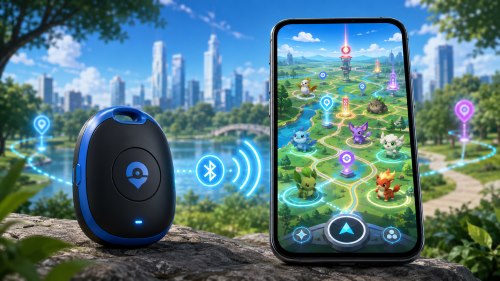
Catching Pokémon while walking, commuting, or grinding during events can get repetitive fast. You may have enough Poké Balls, a busy spawn area, and a phone in your pocket, but constantly checking the screen still takes time and attention.
That is why many Pokémon GO players look for a Catchmon auto catcher. Catchmon devices are designed to help players automatically catch nearby Pokémon and spin PokéStops through a Bluetooth connection, making daily farming easier and less hands-on.
This guide explains what Catchmon is, how different Catchmon models compare, how to connect and troubleshoot it, what it can and cannot do, and how to get better results when using Catchmon for Pokémon GO.
What Is Catchmon in Pokémon GO?
Catchmon is a third-party Pokémon GO auto catcher product line made by MEGACOM. Once connected to Pokémon GO through Bluetooth, it can help catch nearby Pokémon and spin PokéStops automatically, depending on your in-game accessory settings.
The main benefit is convenience. Instead of manually tapping every Pokémon or PokéStop, Catchmon can help you collect Stardust, Candy, XP, and items while you walk, commute, shop, or focus on other tasks.
However, Catchmon is not a magic “catch everything” tool. It still follows Pokémon GO accessory behavior, depends on your item bag, uses available Poké Balls, and may be affected by Bluetooth stability, phone settings, Pokémon GO updates, and device firmware.
Catchmon Models Explained
The word Catchmon can refer to several related devices, which is why many players feel confused when comparing Catchmon Go, Dual Catchmon, DuoMon, DuoMon3, and Catchmon X.
Catchmon Go
Catchmon Go is generally the simpler single-account option. It is best for players who only need one Pokémon GO account connected and want a straightforward auto catcher for daily walks, casual farming, or background item collection.
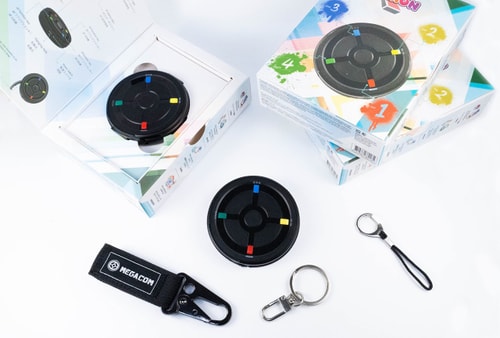
It is usually the easiest model to understand: one device, one account, automatic catching, and automatic PokéStop spinning.
Dual Catchmon
Dual Catchmon is designed for two-account use. This makes it more useful for players who carry two phones, manage two Pokémon GO accounts, or play with a family member.
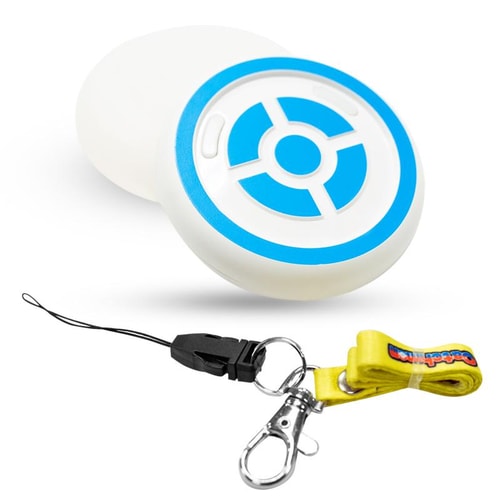
The key point is that each side of the device should be paired separately. If both phones are accidentally connected to the same side, one account may work while the other fails to connect properly.
DuoMon and DuoMon Egg
DuoMon and DuoMon Egg are also dual-account auto catchers. They are often discussed together with Dual Catchmon because they serve a similar purpose: helping two Pokémon GO accounts catch and spin at the same time.
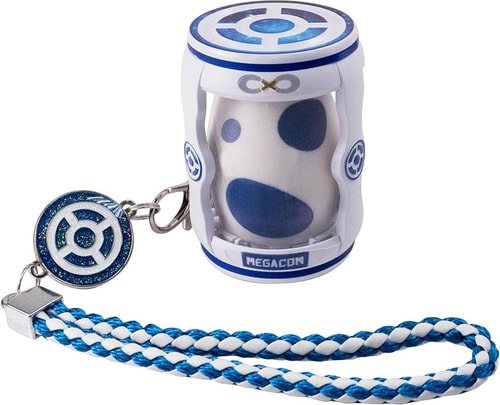
These models are useful for players who want dual-account convenience but prefer a newer form factor or different alert settings.
DuoMon3 and DuoMon3 Pro
DuoMon3 and DuoMon3 Pro are newer-style dual-account auto catchers with more app-related functions. Their key appeal is not just catching and spinning, but also app-based management, firmware updates, and automatic reconnection support.
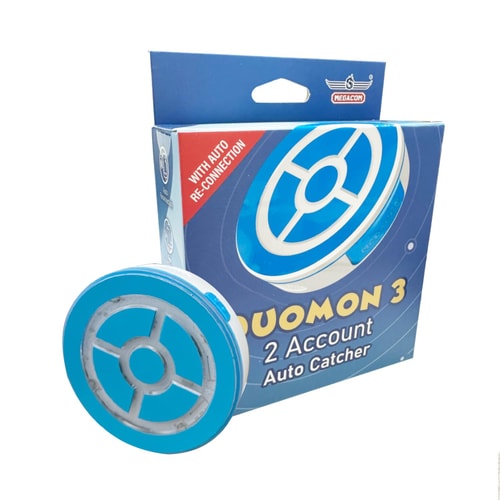
This makes DuoMon3 more attractive for players who want a more modern device experience. At the same time, app permissions, firmware version, phone model, and operating system can affect how smoothly features like auto-reconnect work.
Catchmon X
Catchmon X is the 4-account model. It is mainly built for multi-account players, families, or groups who want up to four Pokémon GO accounts connected at once.
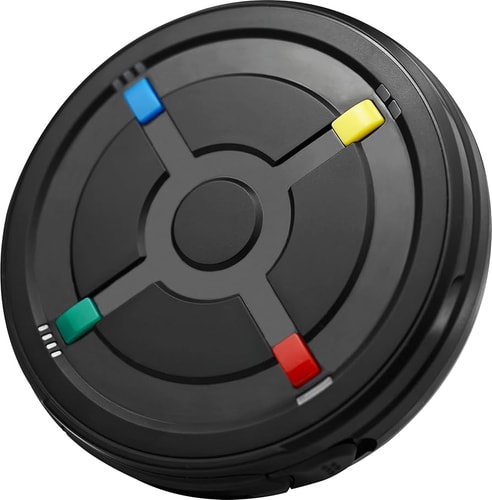
Catchmon X is powerful, but it also has more setup details. Each button corresponds to a separate account position, and sleep mode can make one or more connection slots invisible in Pokémon GO if the user does not know how the button states work.
Catchmon Go vs Dual Catchmon vs Catchmon X
The easiest way to choose a Catchmon device is to start with how many accounts you actually need.
| Catchmon Model | Best For | Main Advantage | Main Consideration |
|---|---|---|---|
| Catchmon Go | Single-account players | Simple and beginner-friendly | Limited to one account |
| Dual Catchmon | Two-account players | Two accounts at once | Pair each side correctly |
| DuoMon / DuoMon Egg | Dual-account players | Newer dual-account options | Settings vary by model |
| DuoMon3 / Pro | Players who want app controls | Firmware updates and auto-reconnect features | May depend on app version and permissions |
| Catchmon X | Multi-account players or families | Supports up to four accounts | Sleep mode and pairing setup need attention |
For most casual players, Catchmon Go is enough. For two phones or two accounts, Dual Catchmon or DuoMon makes more sense. For a family or a serious multi-account setup, Catchmon X is the most relevant option.
How Does Catchmon Work?
Catchmon connects to Pokémon GO as a Bluetooth accessory. After pairing, Pokémon GO detects nearby Pokémon and PokéStops, then sends signals to the device. The device responds automatically based on your Pokémon GO accessory settings and Catchmon’s own mode settings.
In practical use, Catchmon can help with:
- Catching nearby Pokémon automatically
- Spinning nearby PokéStops automatically
- Farming Stardust, Candy, XP, and items during daily movement
The game still needs to be running, even if you are not actively looking at the screen. If Pokémon GO is closed completely, the device cannot continue working as expected.
How to Connect Catchmon to Pokémon GO
The exact interface may change as Pokémon GO updates, but the general connection flow is similar across most Catchmon devices.
Step 1. Turn on Bluetooth on your phone and make sure Pokémon GO is updated.
Step 2. Open Pokémon GO and go to the connected device or accessory device settings.
Step 3. Press the Catchmon button for the account slot you want to connect.
Step 4. Wait for the available Pokémon GO Plus-style device to appear in Pokémon GO.
Step 5. Tap the device name in Pokémon GO to connect.
For Dual Catchmon, DuoMon, and Catchmon X, repeat the process for each account slot. Try to keep the pairing clean: one phone should connect to one specific button or account position.
Common Catchmon Problems and Fixes
Catchmon connection problems are common because Pokémon GO auto catchers depend on several things working together: phone Bluetooth, Pokémon GO settings, accessory memory, device battery, app permissions, and sometimes firmware.
Dual Catchmon Not Connecting
If Dual Catchmon is not connecting, first check whether the device is already remembered by your phone or Pokémon GO. A failed previous connection can block a clean pairing attempt.
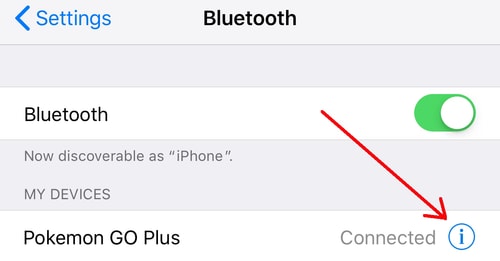
Try this basic flow:
Step 1. Remove the old Pokémon GO Plus-style device from Pokémon GO accessory settings.
Step 2. Forget the related Bluetooth device from your phone’s Bluetooth list.
Step 3. Restart Pokémon GO and reconnect from the in-game accessory settings.
Step 4. Pair 1P with the first phone and 2P with the second phone.
If the device still does not connect, check the battery and confirm that another nearby phone is not trying to connect to the same Catchmon slot.
How to Reset Dual Catchmon
Older Dual Catchmon-style devices may require clearing the connection record before pairing again. The reset method can vary by model and version, so it is best to check the manual for your exact device.
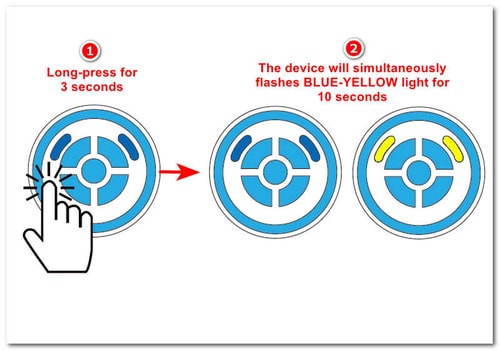
A safe general troubleshooting pattern is to remove the accessory from Pokémon GO, forget it in phone Bluetooth settings, restart the phone or game, then pair again through Pokémon GO rather than directly from the phone’s Bluetooth menu.
Do not assume every Catchmon model uses the same reset method. Catchmon X and newer DuoMon models may handle sleep mode, memory, or reconnection differently.
Catchmon X Not Showing 4 Devices
If Catchmon X is not showing 4 devices in Pokémon GO, the issue may be sleep mode. Catchmon X has separate button states, and a slot in sleep mode may not appear as an available accessory.
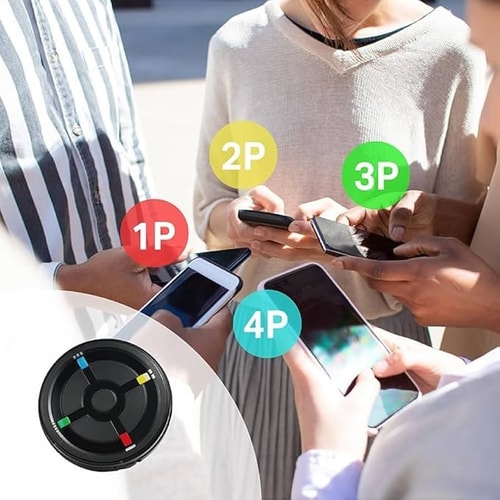
Check each button before pairing. If one button is sleeping, wake it before trying to connect that account slot again.
Another common issue is pairing multiple phones to the same button. For a clean 4-account setup, each account should be matched to its own slot, such as 1P for phone one, 2P for phone two, 3P for phone three, and 4P for phone four.
Catchmon Sound or Vibration Is Annoying
Many Catchmon and DuoMon models include sound, vibration, or LED alerts. These settings differ by model, so the exact light color or button hold time may not be identical across devices.
Look for sound and vibration controls in the device manual. For newer app-supported models, check whether MEGACOM Center offers device settings or firmware-related controls.
If you are using Catchmon in public, turning off sound can make it much easier to use discreetly during commuting or walking.
Catchmon Stops Catching or Spinning
If Catchmon connects but stops working, the device may not be broken. Pokémon GO auto-catching depends on in-game resources and conditions.
Check these first:
- You still have regular Poké Balls.
- Your item bag is not full.
- Pokémon GO is still running in the background.
- Your movement speed is not too high.
- The device has not disconnected from Pokémon GO.
A full item bag can stop PokéStop spinning, and having no regular Poké Balls can stop automatic catching. These two issues are easy to overlook during long sessions.
Is Catchmon Safe or Official?
Catchmon is a third-party Pokémon GO auto catcher. It works through Pokémon GO’s Bluetooth accessory connection flow, but it is not the same as an officially branded Pokémon GO Plus+ device.
That distinction matters. Official Bluetooth devices generally receive clearer support from Pokémon GO, while third-party auto catchers may be affected by game updates, iOS updates, Android updates, Bluetooth changes, or firmware issues.
Many players use third-party auto catchers for convenience, but no third-party device should be treated as risk-free or permanently guaranteed. Use it carefully, keep firmware updated when available, and avoid depending on it for important catches without checking the game manually.
Catchmon vs Pokémon GO Plus+
Pokémon GO Plus+ is the safer official option for many players because it is part of the official Pokémon GO accessory ecosystem. It supports automatic PokéStop spinning and auto-throw behavior, and it is usually the first device players compare with Catchmon.
Catchmon’s main advantage is model variety. If you want one account, two accounts, or even four accounts, the Catchmon product line gives more hardware choices than a single official accessory.
The choice depends on your priority:
| Device Type | Better For |
|---|---|
| Pokémon GO Plus+ | Players who want an official accessory |
| Catchmon Go | Single-account automatic catching |
| Dual Catchmon / DuoMon | Two-account players |
| DuoMon3 / Pro | Players who want app-supported features |
| Catchmon X | Families or 4-account setups |
If official support matters most, Pokémon GO Plus+ is the safer pick. If multi-account automation matters more, Catchmon becomes more attractive.
How to Get More from Catchmon with PoKeep Location Changer

That is where PoKeep Location Changer can complement a Catchmon setup. PoKeep helps players change GPS location on iPhone and Android, use a 360° joystick, simulate movement between two points, create multi-spot routes, and use jump teleport mode for different Pokémon GO locations.


Instead of only relying on your physical surroundings, you can plan a more efficient Pokémon GO session. For example, you can move through a park route, test a better PokéStop-dense area, or simulate walking between multiple points while Catchmon handles routine catching and spinning.
This combination is especially useful for players who want:
- More control over Pokémon GO locations
- Route-based farming instead of random walking
- Joystick movement for flexible exploration
- Cooldown-aware movement planning
- A better way to use auto catchers in spawn-dense areas
PoKeep does not replace Catchmon. It solves a different problem. Catchmon automates the catching action, while PoKeep helps you control where your Pokémon GO character goes.
Catchmon FAQ
Does Catchmon Work with Pokémon GO?
Yes, Catchmon is designed for Pokémon GO auto catching and PokéStop spinning through Bluetooth accessory behavior. Compatibility may still depend on your phone, Pokémon GO version, device firmware, and settings.
Can Catchmon Use Great Balls or Ultra Balls Automatically?
In most automatic catching situations, Catchmon relies on regular Poké Balls. Keep enough standard Poké Balls in your bag before using auto catch.
Does Catchmon Work in the Background?
Catchmon can work while Pokémon GO is running in the background, but the game should not be fully closed. Phone battery settings, app restrictions, and Bluetooth behavior may affect performance.
Why Is My Dual Catchmon Not Connecting?
Common causes include old Bluetooth pairing records, pairing from the wrong menu, weak batteries, another phone trying to connect, or both phones being paired to the same side of the device.
Why Is Catchmon X Not Showing 4 Devices?
One or more Catchmon X buttons may be in sleep mode, or multiple phones may have been paired to the same button. Wake each slot and pair each phone to its own account position.
 Related Articles



 Leave Your Comment