 By
By 

Quick Verdict
The Pokémon GO Journal is a short-term activity log, not a permanent history. It helps you review recent catches, PokéStop and Gym activity, battles, Routes, and some accessory activity, but older entries eventually disappear.
Who It's For
This guide is for Trainers who want to find the Pokémon GO Journal, check recent catches or Pokémon GO Plus activity, understand why old entries disappear, or find other ways to track catches, raids, and locations.
Key Takeaways
- Recent activity only: The Journal records recent gameplay but does not provide unlimited full history.
- Use Storage for recent catches: Search
age0for Pokémon obtained within the last 24 hours orage1for roughly 24–48 hours ago. - Use different tools for different history: Journal tracks recent actions, while PoKeep Historical Records can help save useful locations and routes you may want to revisit.

The Pokémon GO Journal is a simple activity log that helps you check what recently happened on your account. It can be useful when you want to confirm a catch, review activity from a Pokémon GO Plus device, see recent PokéStop interactions, or figure out what happened while you were not paying close attention to the screen.
Its biggest limitation is easy to misunderstand: the Journal is designed for recent activity, not permanent Pokémon GO history. Older entries eventually disappear as new activity fills the log, so it is not a reliable place to keep a long-term catch, raid, or location history.
What Is the Pokémon GO Journal?
The Pokémon GO Journal is a section of your Trainer Profile that displays recent gameplay activity. It can include actions such as Pokémon catches and battle results, while certain activities from connected devices, PokéStops, Gyms, and Routes may also create Journal entries.
That distinction matters because the Journal is useful for questions such as:
- Did I catch that Pokémon or did it get away?
- What happened while my Pokémon GO Plus was catching in the background?
- What items did I recently receive from a PokéStop or Gym?
It is much less useful for questions such as "What raids did I complete three months ago?" or "Where did I play Pokémon GO last year?"
Where Is the Journal in Pokémon GO?
The Journal is located inside your Trainer Profile rather than in the main Pokémon menu.
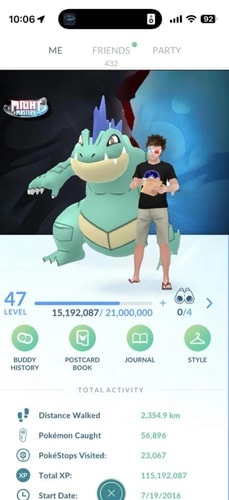
How to Open the Pokémon GO Journal
Step 1. Tap your Trainer portrait in the lower-left corner of Map View.
Step 2. Open your Trainer Profile.
Step 3. Find and tap Journal.
Your recent Pokémon GO activity will then appear in chronological order.
If you are following an old tutorial and cannot find the Journal in exactly the same screen position, check your Trainer Profile first. Pokémon GO's interface can change over time even when the Journal itself remains available.
What Does the Pokémon GO Journal Show?
The exact mix of entries depends on what you have recently been doing. The Journal is not limited to Pokémon catches, although catching is one of its most useful functions.
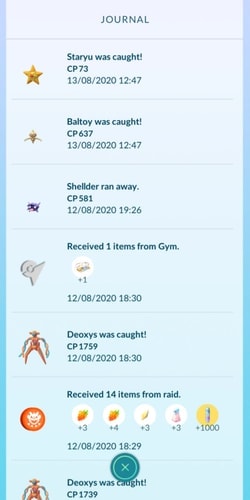
Pokémon Catches and Recent Encounters
Caught Pokémon can appear in the Pokémon GO Journal, making it useful as a basic Pokémon GO catch journal.
For example, if you tapped a Pokémon, threw a ball, and then became distracted, the Journal can help confirm whether the catch succeeded. It is also useful when catching through a supported Bluetooth accessory because you may not have watched every encounter happen on-screen.
However, the Journal should not be treated as a complete collection history. Once an old entry disappears from the recent log, the Journal does not provide an unlimited archive where you can simply scroll farther back.
PokéStop and Gym Activity
Journal entries can also include activity involving PokéStops and Gyms.
When supported Pokémon GO Bluetooth devices interact with PokéStops or Gyms, the Journal can show information about items received and the location where the interaction occurred.
This can help when you want to check what happened during a walking or auto-spinning session without remembering every PokéStop individually.
Battles and Other Recent Activity
Battle-related activity can also appear in the Journal. This makes it useful for confirming some recent gameplay results, but it does not make the Journal a full Pokémon GO battle analytics system.
You should not expect detailed long-term records containing every team, attack, shield, opponent, or battle statistic.
Route activity can also generate Journal records. Completing a Route can record information such as the Route title and badge, providing another example of how the Journal functions as a broad recent-activity feed rather than only a catch history.
Can You See Your Full Pokémon GO Journal History?
No normal option in Pokémon GO provides an unlimited Pokémon GO Journal full history.
The official description of the Journal focuses on recent activity, which is important because entries are not meant to stay there indefinitely.
Community documentation commonly reports that the Journal displays roughly 50 recent entries, although Pokémon GO's official support documentation does not currently define that number as a guaranteed permanent limit.
Your Pokémon GO Journal is limited, and old entries can disappear as new activity is recorded.
How Far Back Does the Pokémon GO Journal Go?
There is no useful answer such as "seven days" or "30 days."
How far back you can see depends heavily on how much activity you generate.
A relatively quiet session might leave entries visible for longer. A busy session involving constant catching, PokéStop spinning, Routes, battles, or accessory activity can fill the recent log much faster.
Can You Recover Old Pokémon GO Journal Entries?
Once an activity entry is no longer available in the visible Journal, there is no normal Journal archive button that restores it.
You also should not assume that requesting your account data will recreate the Journal exactly as it previously appeared. Pokémon GO provides mechanisms for requesting personal account data, but that should not be treated as a guaranteed method for recovering expired Journal entries.
If a particular catch, raid, or event matters to you, it is better to preserve that information before the Journal fills up.
How to Check Catch History When the Pokémon GO Journal Is Too Short
The Journal is only one way to investigate recent Pokémon catches.
For some situations, Pokémon Storage is actually more useful.
Use age0 and age1 in Pokémon Storage
Pokémon GO supports age-based search filters.
Enter:
age0to show Pokémon obtained within the last 24 hours.age1to show Pokémon obtained roughly 24–48 hours ago.
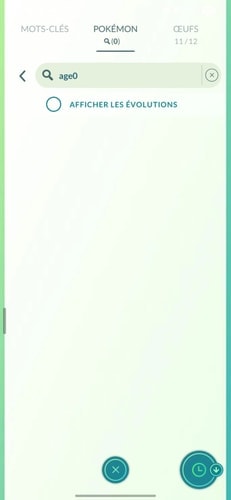
This is especially useful when your Journal has already filled with PokéStop spins or other activity but you simply want to see which Pokémon you caught today.
You can combine age filters with other Pokémon search terms to narrow the results further.
The limitation is that Storage only shows Pokémon you still own. A Pokémon that escaped, was transferred, or was otherwise removed from your collection cannot be reconstructed through age0.
Check the Pokémon's Individual Information
If you still have the Pokémon, its details page can provide information associated with the catch, including when and where it was obtained where available.
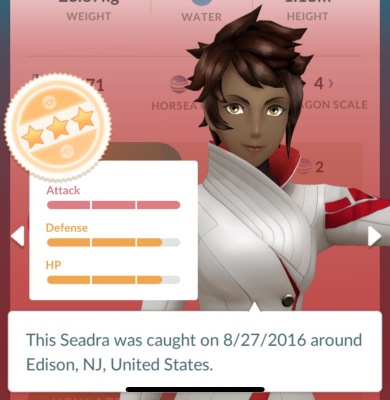
This can be more useful than trying to locate an old Journal entry if your goal is to answer:
"Where did I catch this Pokémon?"
The Journal and Pokémon details serve different purposes. Journal tracks recent actions; the Pokémon page follows the individual Pokémon that remains in your collection.
Save Important Sessions Yourself
For rare catches, major events, or Raid Days, consider keeping a simple record outside the Journal.
Screenshots work well for individual catches, while a spreadsheet or note can be useful if you want to track:
- Raid Bosses and IVs.
- Shiny catches.
- Hundos.
- Event locations.
- Raid counts and results.
Pokémon GO Plus and Plus+ Journal History
The Pokémon GO Journal becomes especially useful when playing with Pokémon GO Plus, Poké Ball Plus, or Pokémon GO Plus+.

These accessories can perform certain actions while you are not actively watching each interaction. The Journal therefore acts as a quick way to review what happened afterward.
Depending on the activity, you can use the Pokémon GO Plus Journal information to review recent Pokémon encounters or items collected from PokéStops and Gyms.
There is one practical drawback: accessory use can generate activity quickly.
If catches and spins are happening repeatedly, the Journal can fill with new entries much faster, causing older information to disappear sooner.
Explorer Gadget vs Pokémon GO Journal
The newer Explorer Gadget should not be confused with the regular Trainer Journal.
Explorer Gadget can automatically attempt Pokémon catches and spin PokéStops while Pokémon GO is not actively being used. When you reopen Pokémon GO, it can display its own activity summary containing information such as Pokémon caught, catch totals, and PokéStops spun.
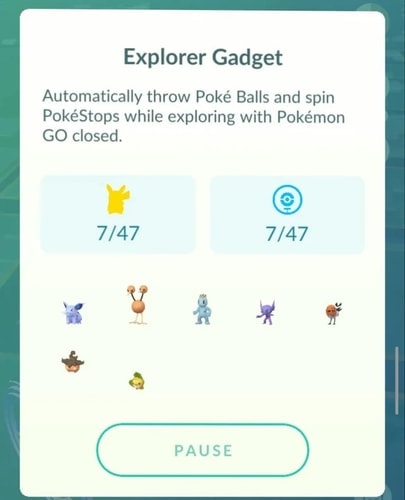
That means there are now two related but different ways to review recent automated activity:
Pokémon GO Journal: a broader recent activity log connected to your Trainer Profile.
Explorer Gadget activity summary: a dedicated summary of Explorer Gadget activity.
If you are checking what happened during an Explorer Gadget session, look at its session summary rather than assuming everything must be reconstructed through the normal Journal.
Can You See Raid History in the Pokémon GO Journal?
There is no separate official feature that should be treated as a permanent Pokémon GO Raid Journal.
Raid-related actions can contribute to your recent activity, and catching a Raid Boss can naturally appear as a Pokémon catch. However, the regular Journal is not designed to provide a complete lifetime raid archive.
You should not expect it to permanently track information such as:
- Every Raid Boss you battled.
- Exact raid dates from months ago.
- Full teams and damage statistics.
- Long-term raid win/loss analytics.
If you want to maintain a real raid journal, recording significant raids yourself is much more reliable.
Pokémon GO Journal vs Battle Log
The Journal may show recent battle-related activity, but it is not a detailed Pokémon GO Battle Log.
For serious PvP analysis, you would normally need to keep a separate battle record or use dedicated battle-tracking tools. Those tools can be structured around opponents, teams, leads, wins, losses, and matchup performance in a way that the Journal is not designed to provide.
Use Journal to answer "What happened recently?", not "What is my complete PvP performance history?"
Can the Pokémon GO Journal Show Location History?
Location can mean two different things here.
If you mean where the Journal menu is located, it is inside your Trainer Profile.
If you mean whether Journal stores your complete movement history, the answer is no. Certain entries can contain location-related information, such as PokéStop or Gym interactions, but the Journal should not be treated as a permanent GPS history or map of everywhere you have played.
Keep Track of Useful Pokémon GO Locations Beyond the Journal
The Journal is good at answering what happened recently, but it is not designed to permanently organize useful hunting locations or movement routes.
Use PoKeep Historical Records for Locations
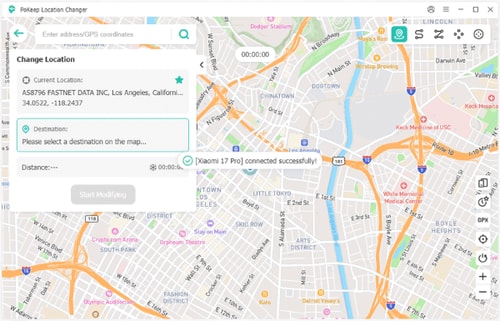
PoKeep Location Changer includes Historical Records, which are designed to save locations you have visited within the tool so you can return to useful spots later. It also provides Favorite Routes for saving frequently used locations and routes.


This does not extend Pokémon GO's Journal or recover lost catches.
Instead, it solves a different problem:
Journal: "What activity happened recently?"
PoKeep Historical Records: "Which locations or routes did I use and want to revisit?"
Save Multi-Stop Routes with PoKeep
PoKeep also supports routes containing multiple waypoints and movement between selected locations.
For someone who repeatedly visits the same clusters of PokéStops, Gyms, or spawn areas, this can provide a more structured location record than trying to infer previous locations from an old Journal entry.
Pokémon GO Journal FAQ
Where is the Journal in Pokémon GO?
Open Map View, tap your Trainer portrait in the lower-left corner, enter your Trainer Profile, and select Journal.
Can I see my full Pokémon GO Journal history?
No. The Journal is intended for recent activity and does not provide an unlimited history archive.
How many entries does the Pokémon GO Journal keep?
Community documentation commonly reports roughly 50 visible entries, but official Pokémon GO support documentation does not currently define that exact number as a guaranteed limit. It is better to treat the Journal simply as a limited recent-activity feed.
Why did my Pokémon GO Journal history disappear?
Older entries can be replaced as new activity is recorded. Catching frequently or using devices that automatically catch and spin PokéStops can make this happen more quickly.
How can I see Pokémon I caught today?
Open Pokémon Storage and search age0. This displays Pokémon obtained within the last 24 hours that are still in your collection.
Does Pokémon GO Plus activity appear in the Journal?
Yes. The Journal can help review recent activity from supported Pokémon GO Bluetooth devices, including Pokémon encounters and PokéStop or Gym interactions.
Does Explorer Gadget use the Pokémon GO Journal?
Explorer Gadget has its own activity summary when you return to the game. It should not be treated as the same thing as the normal Trainer Journal.
Is there a Pokémon GO Raid Journal?
There is no separate permanent Raid Journal that stores your entire raid history. Some raid-related activity may appear as recent Journal entries, but serious raid tracking requires another method.
Final Thoughts on the Pokémon GO Journal
The Pokémon GO Journal is most useful as a quick record of recent activity. It can help confirm catches, review Bluetooth accessory sessions, check PokéStop or Gym interactions, and understand what happened during recent gameplay.
Its biggest weakness is history. The Journal is temporary rather than a permanent Pokémon GO diary, so older activity eventually disappears.
For recent catches, Pokémon Storage filters such as age0 can fill part of that gap. For important raids or collection milestones, screenshots or personal records are more reliable. And when the information you want to preserve is primarily locations and routes, PoKeep's Historical Records and Favorite Routes offer a separate way to organize those places without pretending to replace the Pokémon GO Journal itself.
 Related Articles






 Leave Your Comment