 By
By 

Quick Verdict
The Pokémon GO Web Store is the best place to check before buying PokéCoins, bundles, or event tickets, as it may offer exclusive deals, bonuses, and Reward Road benefits.
Who It’s For
This guide is for Pokémon GO Trainers who want to understand the Web Store, redeem promo codes, claim rewards, fix purchase issues, and learn how it differs from location-changing tools.
Key Takeaways
- Check the Web Store before spending: It may provide better-value bundles, first-purchase discounts, and special promotions compared with the in-game shop.
- Use Reward Road and codes correctly: Eligible purchases can unlock rewards, while promo codes and offer codes have different redemption rules.
- Separate purchases from gameplay location: The Web Store manages payments and rewards, while tools like PoKeep focus on changing gameplay locations and exploring Pokémon GO areas.

The Pokémon GO Web Store gives Trainers another way to purchase PokéCoins, item bundles, event tickets, and special offers outside the in-game shop. However, many players still have questions about how it works, how to redeem codes, and whether it offers better value.
This guide covers everything you need to know about the Pokémon GO Web Store, including purchases, Reward Road, promo codes, common problems, and the difference between Web Store features and Pokémon GO location tools.
What Is the Pokémon GO Web Store?
The Pokémon GO Web Store is an official online marketplace created for Pokémon GO Trainers. Instead of purchasing everything directly inside the Pokémon GO app, players can visit the Web Store through a browser to access available offers.
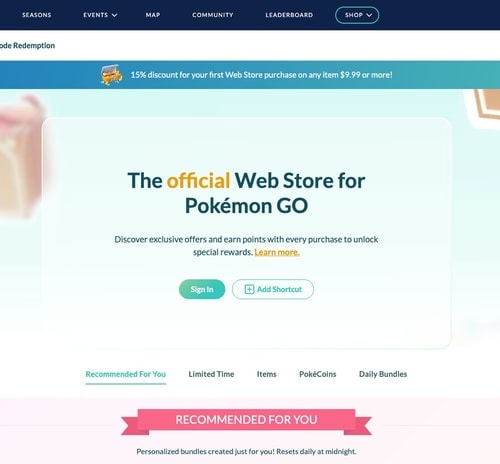
The Web Store commonly includes:
- PokéCoin packages
- Premium item bundles
- Event tickets
- Limited-time offers
- Special promotions
The main difference is that the Web Store is designed as an additional shopping channel. Some offers, bonuses, and reward systems may differ from what appears inside the Pokémon GO app.
Pokémon GO Web Store vs In-Game Shop: What Is the Difference?
Many players wonder whether they should buy items through the app or the Web Store. Both options connect to the same Pokémon GO account, but they serve slightly different purposes.
| Feature | Pokémon GO Web Store | Pokémon GO In-Game Shop |
|---|---|---|
| Buy PokéCoins | ✅ | ✅ |
| Purchase item bundles | ✅ | ✅ |
| Access Web Store promotions | ✅ | ❌ |
| Participate in Reward Road | ✅ | Limited |
| Purchase directly while playing | ❌ | ✅ |
The Web Store is usually worth checking before larger purchases because special promotions and bonuses are often highlighted there.
How to Access the Pokémon GO Web Store
Step 1 Open the official Pokémon GO Web Store
https://store.pokemongo.com/
Visit the official Pokémon GO Web Store website and choose the login option connected to your Pokémon GO account.
Supported account login methods may include:
- Apple
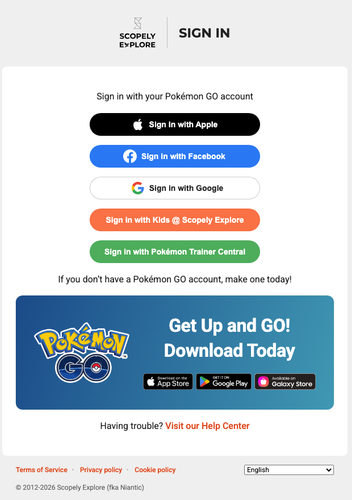
Sign in with the same account you use inside Pokémon GO. Logging into a different account is one of the most common reasons purchases or rewards appear to be missing.
Step 2 Choose your purchase
After signing in, select the available item or bundle you want to buy.
Depending on current offers, you may find:
- PokéCoin bundles
- Raid-related items
- Incubators
- Event tickets
- Special packages
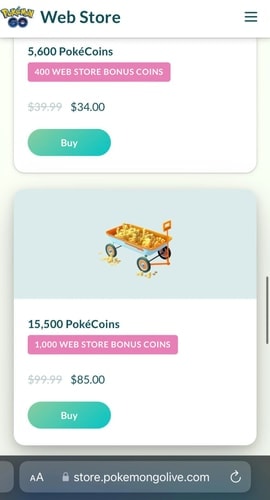
Bundle contents can change during events and seasons, so check what is included before you buy.
Step 3 Complete payment and receive items
After completing payment, purchased items should be delivered to the connected Pokémon GO account.
If your purchase does not appear immediately:
- Confirm you used the correct account
- Restart Pokémon GO
- Check your transaction status
- Contact official support if necessary
How to Save More with Pokémon GO Web Store Offers
Pokémon GO Web Store First Purchase Discount
New Web Store users may receive a first-purchase discount when meeting the offer requirements.
A common promotion provides:
- 15% off the first Web Store purchase
- Applicable to qualifying purchases above a specific price threshold
This discount applies to the Web Store purchase history, so check the exact promotion terms before buying.
Web Store Exclusive Bundles and Bonuses
The Web Store can provide offers that are not always identical to the mobile app shop.
Before spending PokéCoins or real money, compare:
- Bundle contents
- Bonus items
- Event timing
- Limited-time promotions
Pokémon GO Web Store Reward Road Explained
What Is Reward Road?
Pokémon GO Reward Road is a monthly reward program connected with eligible purchases.
Trainers can earn Reward Points from qualifying purchases made through:
- Pokémon GO Web Store
- Eligible in-game purchases
These points can be exchanged for available rewards.
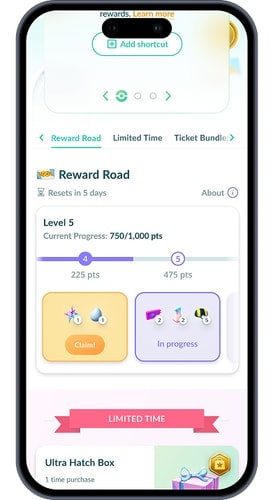
How to Earn Reward Points
Not every purchase qualifies.
Generally:
- Real-money purchases can earn Reward Points
- PokéCoin-only purchases do not qualify
- Some tickets or gift card purchases may have different rules
The exact eligible purchases and rewards can change, so check the current Reward Road information.
How to Claim Pokémon GO Web Store Rewards
If you have earned Reward Points:
Step 1. Log into the Pokémon GO Web Store.
Step 2. Open the Reward Road section.
Step 3. Select available rewards.
Step 4. Claim them with the correct Pokémon GO account.
If rewards do not appear, confirm you are using the same account that made the purchase.
Pokémon GO Web Store Promo Codes and Redemption Guide
What Are Pokémon GO Web Store Codes?
Players may encounter different types of codes:
- Promo codes
- Offer codes
- Gift card codes
They do not all work in the same way.
How to Redeem a Pokémon GO Web Store Promo Code
Step 1. Open the Pokémon GO Web Store.
Step 2. Sign in to your account.
Step 3. Select an eligible purchase.
Step 4. Enter the promo code during checkout.
Step 5. Complete the transaction.
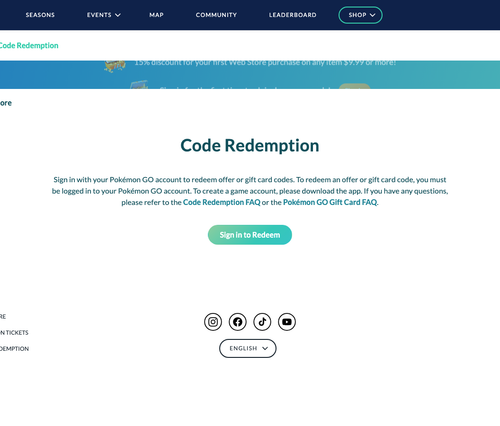
Promo codes usually cannot be redeemed directly inside the Pokémon GO mobile app.
Why Is My Pokémon GO Web Store Code Not Working?
Common reasons include:
- The code has already been used
- The code belongs to another account
- The purchase does not meet requirements
- The code has expired
- The code was entered in the wrong place
If a code fails, check the promotion rules before entering the same code again.
Pokémon GO Web Store Not Working? Common Fixes
Cannot Log Into Pokémon GO Web Store
Try these solutions:
- Confirm you are using the correct login provider
- Check whether your Pokémon GO account uses that login method
- Clear browser cookies
- Try another browser
Pokémon GO Web Store Purchase Failed
Payment problems can happen because of:
- Payment provider restrictions
- Incorrect payment information
- Browser issues
- Account verification problems
Try:
- Switching browsers
- Checking payment details
- Waiting before attempting another transaction
Purchased Items Are Missing
If items do not appear:
Step 1. Confirm the transaction succeeded.
Step 2. Confirm you used the correct Pokémon GO account.
Step 3. Restart the game.
Step 4. Contact Pokémon GO support if the issue continues.
Pokémon GO Web Store vs Location Changers: Understanding the Difference
Many Trainers confuse purchasing features with gameplay location features.
They solve different problems.
| Need | Solution |
|---|---|
| Buy PokéCoins | Pokémon GO Web Store |
| Redeem purchase rewards | Pokémon GO Web Store |
| Claim Reward Road rewards | Pokémon GO Web Store |
| Explore different Pokémon GO areas | Location tools |
| Simulate movement | Location tools |
The Web Store helps you manage purchases. It does not change where your Pokémon GO character can explore.
How PoKeep Helps Pokémon GO Players Explore More Locations
After purchasing items, tickets, or resources through the Pokémon GO Web Store, some Trainers want more flexibility when exploring Pokémon GO.

PoKeep is a GPS location changer designed for iPhone and Android that works without jailbreak or root. It focuses on changing device location rather than modifying Web Store purchases.


For Pokémon GO players, PoKeep provides features such as:
- 360° GPS joystick movement
- Route simulation
- Multiple waypoint movement
- Teleport-style location switching
It also includes practical tools such as cooldown timers, saved locations, GPX route importing, and support for multiple devices.
The key point is that PoKeep and Pokémon GO Web Store serve different purposes:
- Web Store → purchasing and rewards
- PoKeep → location-based gameplay management
Pokémon GO Web Store FAQ
Is Pokémon GO Web Store official?
Yes. It is the official online store for Pokémon GO purchases and rewards.
Is Pokémon GO Web Store cheaper than the app?
It depends on current promotions. The Web Store often provides bonuses or exclusive offers, but prices and bundles can change.
Can I use Pokémon GO gift cards on Web Store?
Some Pokémon GO gift card redemption options are supported through the Web Store. Always check the current redemption instructions.
Does changing location unlock cheaper Pokémon GO Web Store prices?
No. GPS location changes and Web Store payment regions are separate.
Should I check Web Store before Pokémon GO events?
Yes. Event periods often bring special bundles, tickets, or limited-time offers.
Final Thoughts
The Pokémon GO Web Store is more than just another way to buy PokéCoins. It gives Trainers access to additional promotions, Reward Road benefits, special bundles, and purchase options that are worth checking before major spending.
However, purchasing resources and exploring the Pokémon GO world are two different parts of the experience. The Web Store handles transactions, while tools like PoKeep focus on helping players manage their gameplay location and movement.
Understanding how each system works allows Trainers to make smarter purchases and get more flexibility from their Pokémon GO experience.
 Related Articles




 Leave Your Comment