 By
By 

You pick a spot in Shibuya, Pokémon GO loads the new streets, a Pikachu pops up, and before your first throw your trainer is back outside your own front door. Sometimes it takes five seconds. Sometimes it waits ten minutes, right when something good spawns.
On an iPhone, that snap-back almost always comes from the phone, not from the game. The phone keeps checking your position against the Wi-Fi networks and cell towers around you, and after a long jump those still point at home. The moment the reset hits tells you which fix you need.
Find the Cause by When Your Pokémon GO Location Resets
Think back to the moment your trainer slid home, then find the row that matches.
| When it resets | What's going on | Fix |
|---|---|---|
| Seconds after a 20 km+ jump | Nearby Wi-Fi and cell towers win | Long-jump reset routine |
| Again every few minutes | Wi-Fi keeps feeding in your real street | Wi-Fi fixes for repeat resets |
| When the phone moves away or sleeps | The link to the computer dropped | Connection checks |
| On an Android phone | A loose cable or battery saving | Android fixes |
 Note:
Note:
Pulled home in the middle of a session? Don't catch, spin or battle where you landed. Put yourself back on the old spot first. If you did nothing at home, the cooldown still runs from your last catch or spin back there, so you don't owe a new wait. Our teleport cooldown chart lists the waits by distance.
Why Your iPhone Keeps Resetting Your Pokémon GO Location
An iPhone never takes one source's word for where you are. Apple says Location Services works out your position from GPS, Bluetooth, Wi-Fi networks and cell towers. When walls or a roof block the satellites, the phone leans on Wi-Fi and cell towers until GPS comes back.

When you teleport, your location tool changes the position the phone reads. The Wi-Fi side doesn't move with it. Your iPhone tells Apple which networks it can see, and Apple answers with the positions of up to 400 networks nearby. That figure comes from University of Maryland research, written up in a 2024 Krebs on Security report. With that list, the phone can place you on your real street by itself.
| Location source | After a long jump it says | How to quiet it |
|---|---|---|
| Your location tool | The new spot | Nothing to do |
| Wi-Fi networks nearby | Your real street | Wi-Fi off in Settings, or a DNS block |
| Cell towers | Your real area | Airplane Mode, which turns the cell radio off |
On a short hop, the answers land close together and nothing happens. After a jump across the country they're hundreds of kilometers apart, and iOS sometimes sides with Wi-Fi. That's the snap-back. Where it starts varies a lot. Some players get pulled back from as little as 7 to 9 km away, and others can fly 15 km or more before it begins.
PoKeep's Long-Jump Routine for a Location That Keeps Resetting

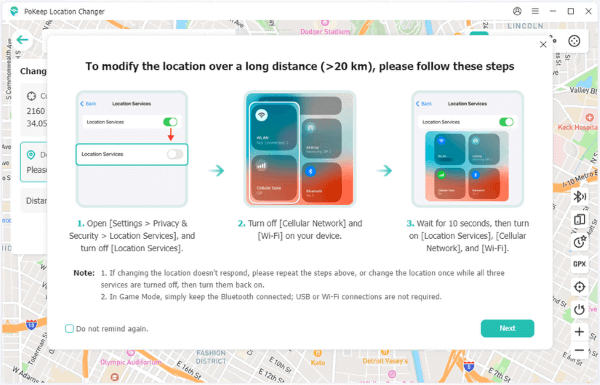
This is where our own app comes in. PoKeep Location Changer already plans for this snap-back. In iPhone Game Mode, whenever the spot you pick is more than 20 km away, it puts a short reset routine on screen before the move. It also remembers the places you use. Save your destination to Favorites before a big trip, and if the phone drags you home later, open the star icon and you're standing on the same coordinates again in a couple of clicks.


Here's the routine in full. Every step happens on the iPhone unless it names PoKeep.
Step 1. Switch off Location Services under Settings > Privacy & Security.
Step 2. Turn off cellular data and Wi-Fi.
Step 3 Move While Everything Is Off
In PoKeep, pick the new spot and click Start Modifying. Leave all three switches off for at least 10 seconds.
Step 4. Turn Wi-Fi, cellular data and Location Services back on, then open Pokémon GO.
Step 5 Go Again if You Still Land at Home
Run the whole routine a second time. It's the same tip we put at the bottom of the on-screen prompt, for any change that doesn't respond.
Once your trainer stays put, hold off on catches and spins until PoKeep's cooldown timer runs out. Give the move a few seconds before you open the game, too. Some players who open Pokémon GO the instant the location changes get Failed to detect location (12). Our Error 12 guide covers that one.
When Your Pokémon GO Location Resets Again After a Few Minutes
If a long jump holds for a while and then slips, the phone has picked your real street back up from Wi-Fi. The routine cleared it once, but the networks around you keep feeding it in. There are two ways to cut that off.
The free way is to play on cellular data with Wi-Fi switched off in Settings > Wi-Fi. Skip the Control Center tile for this. As Apple explains in its support article on Wi-Fi in Control Center, that button only disconnects you from the network, and Wi-Fi stays available to Location Services.

Cell towers can still give you away, though. One player who switched Wi-Fi off, with no blocker running, still got pulled home about ten minutes into a walk. The other way keeps you on Wi-Fi. Airplane Mode turns the cell radio off, you switch Wi-Fi back on, and NextDNS stops the phone from looking up where nearby networks are. That setup is next.
Use NextDNS to Keep Your Pokémon GO Location From Resetting
NextDNS is a DNS filter with a free plan and an iPhone app. It doesn't move you anywhere. It only stops your iPhone from reaching gs-loc.apple.com, the Apple address the phone uses to look up where Wi-Fi networks are, so the networks around you can't give your real street away. You don't need it to use PoKeep. We'd only add it if your iPhone keeps slipping on Wi-Fi after long jumps.
What NextDNS Breaks While It Blocks Location Resets
The list players pass around blocks far more than that one address. It includes apple.com itself, and blocking a name in NextDNS blocks everything under it, so most of Apple goes quiet while the filter is on.
| What stops working | Why |
|---|---|
| App Store downloads and updates | Apple's store addresses are blocked |
| iCloud sync and backups | icloud.com is blocked |
| Notifications | They come through Apple's servers |
| The PokéCoin shop | A player reported it in August 2026 |
| Some non-Apple apps and sites | Akamai's shared network is blocked |
That player also saw wild spawns stop while it was on. Pokémon GO updates come through the App Store too, so treat NextDNS as a game-time switch. Turn it on when you start playing, turn it off when you're done, and run app updates while it's off.
Set Up NextDNS for PoKeep When Your Location Keeps Resetting
Step 1. Install NextDNS from the App Store and update Pokémon GO before you block anything.
Step 2 Create a Configuration and Keep It
Open my.nextdns.io in any browser and start a configuration. Sign up for a free account so it's saved, because a configuration made without one stops filtering after seven days. Note the six-character ID on the Setup tab.
Step 3 Fill In the Denylist
Open the Denylist tab and add the ten entries below. That's the whole list players pass around.
| Entries | What they cover |
|---|---|
| gs-loc.apple.com | The Wi-Fi location lookup |
| apple.com, icloud.com, mzstatic.com, aaplimg.com, apple-dns.net | Apple's services, downloads and iCloud |
| akadns.net, akamai.net, edgekey.net | Akamai's delivery network, which plenty of non-Apple apps use too |
| iphone-service.com | On the shared list, though we couldn't trace it to Apple |
We haven't seen solid reports on whether gs-loc.apple.com alone is enough. If you'd like to keep the App Store working, try that one entry on a short session first and add the rest only if your trainer still slips.
Step 4 Point the iPhone at NextDNS
Then you need to log in this account in the NextNDS app, and choose the porifle you made.. Switch NextDNS on. Then, in the iPhone's Settings app, choose General > VPN & Device Management > DNS > NextDNS.

Step 5 Choose Your Network, Then Jump
On Wi-Fi, turn on Airplane Mode and switch Wi-Fi back on. Apple says Airplane Mode leaves Bluetooth running, so PoKeep's Game Mode stays connected. If you once switched Bluetooth off while in Airplane Mode, the iPhone remembers and turns it off again, so check the Bluetooth icon. On cellular data, switch Wi-Fi off in Settings instead. Keep VPN apps off either way, since a VPN can send your lookups around NextDNS. Then run PoKeep's long-jump routine once and open the game.
When Your Pokémon GO Location Still Resets With NextDNS On
Match what you're seeing to a row.
| What you see | What to try |
|---|---|
| Websites stop loading | Turn off Use Ultra-Low Latency Network in the NextDNS app. Some NextDNS users have seen every lookup stall with it on. |
| Resets return after weeks of working | You may have used up the free plan. After 300,000 queries in a month, NextDNS keeps working but stops blocking until the next month. Pro costs $1.99 a month. |
| Long jumps fail only on home Wi-Fi | Rename the network, switch to the guest network or reset network settings. One iOS 26 player got about a week out of each fix. |
NextDNS doesn't settle every phone, either. One player on iOS 26.5 still got pulled back with it running, though that setup used a USB cable and Developer Mode rather than Bluetooth.
Still slipping after all of that? Send the details to our support team: your iOS version, how far you jumped, Wi-Fi or cellular, and whether NextDNS was on. Those four answers tell us where to start looking.
Keep PoKeep Connected So Your Pokémon GO Location Doesn't Reset
PoKeep holds your spot only while it can still reach the phone. In iPhone Game Mode that link is Bluetooth alone, with no cable or Wi-Fi involved, so leave Bluetooth on and keep the phone near the computer. When the link breaks, switch Bluetooth off on the phone and on the computer, wait about 10 seconds, then pair again with Connect Now. A computer without Bluetooth can use a USB adapter that supports BLE, which usually says Bluetooth 5.x on the box.
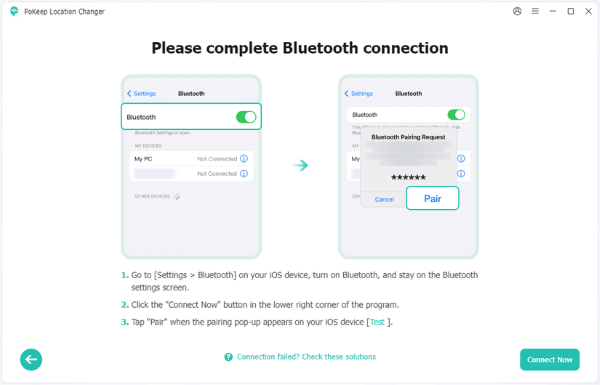
On a USB connection, keep the cable in. On a Wi-Fi connection, stay on the same network as the computer and change Auto-Lock to Never in Display & Brightness so the phone doesn't sleep. Close other apps that read or change your location in the background, too.
If PoKeep shows the new spot but Pokémon GO still has the old one, the game is holding a cached location. Swipe it closed and open it again. A red GPS signal not found (11) bar is a different problem, covered in our Error 11 guide.
Pokémon GO Location Keeps Resetting on Android
On Android, a reset usually means the phone lost its link to PoKeep. A loose cable is the simplest case: unplugging an Android phone usually brings your real location back, so keep the cable seated for the whole session if you connect over USB.
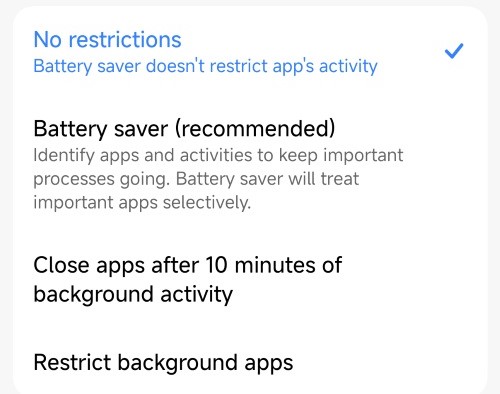
Then check your setup against the Android steps in our user guide. In Game Mode, uninstall the official game app first. Universal Mode runs through a small PoKeep helper set as the mock location app, so set its battery use to No restrictions, lock it so memory cleaners skip it, and never force-stop it while you're spoofing.
If the phone keeps dropping off, our product FAQ covers the other connection problems, like a phone that doesn't show up in PoKeep at all.
Pokémon GO Location Keeps Resetting FAQ
Why does my Pokémon GO location keep resetting to my real location?
Your phone is checking the spot you set against the Wi-Fi networks and cell towers around you. After a long jump they disagree, and an iPhone sometimes trusts the Wi-Fi. A dropped Bluetooth, USB or Wi-Fi link to PoKeep sends you home the same way.
How far can I teleport before my Pokémon GO location resets?
On an iPhone, we treat anything over 20 km as a long jump, and PoKeep walks you through the reset routine for it. Players report slips from as little as 7 to 9 km on some phones, so run the routine whenever a shorter jump won't stick.
Does NextDNS fix a Pokémon GO location that keeps resetting?
It often helps on Wi-Fi, because it stops your iPhone from looking up where nearby networks are. It isn't guaranteed, it blocks the App Store, iCloud and notifications while it's on, and the free plan stops blocking after 300,000 queries a month.
Do I need NextDNS to use PoKeep?
No. PoKeep works without it. Short hops need nothing extra, and long jumps start with the on-screen routine. NextDNS is an optional extra for iPhones that still slip on Wi-Fi after that.
Does turning off Wi-Fi in Control Center stop my location from resetting?
No. Apple says the Control Center button only disconnects you from the network, and Wi-Fi stays available to Location Services. Turn Wi-Fi off in Settings instead.
Can a Pokémon GO location reset lead to a ban?
The reset on its own is just another location change. The risky part is catching, spinning or battling at home and then jumping far away before the cooldown ends. The game's Terms of Service list faking your location as cheating, so no setup makes it risk-free.
Why does my Pokémon GO location keep resetting on Android?
Usually the link to PoKeep broke. Unplugging the cable tends to bring your real location back, and battery saving can close the PoKeep helper in Universal Mode. Keep the cable in and set the helper's battery use to No restrictions.
 Related Articles

 Leave Your Comment